Compute Virtualization
Overview
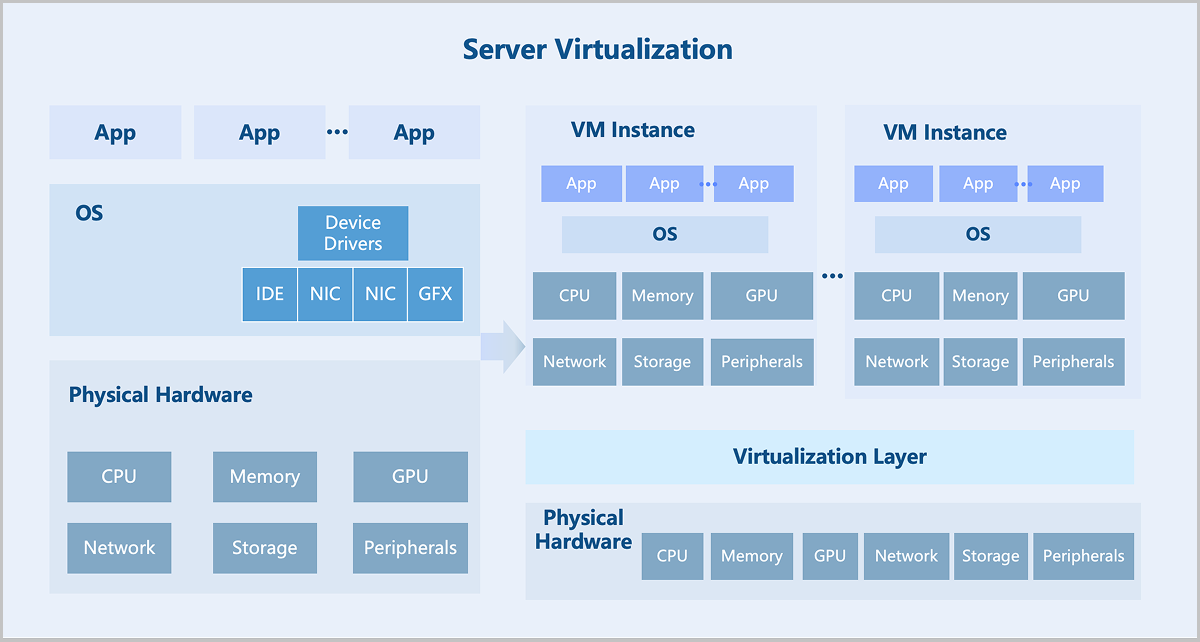
Compute virtualization abstracts physical server resources into logical resources through virtualization technology, enabling a single physical server to function as multiple isolated virtual machines. It pools hardware resources such as CPU, memory, disk, and I/O devices into a virtual resource pool for unified dynamic management. Consequently, it improves resource utilization, reduces system management costs, and increases IT agility to adapt to business changes.
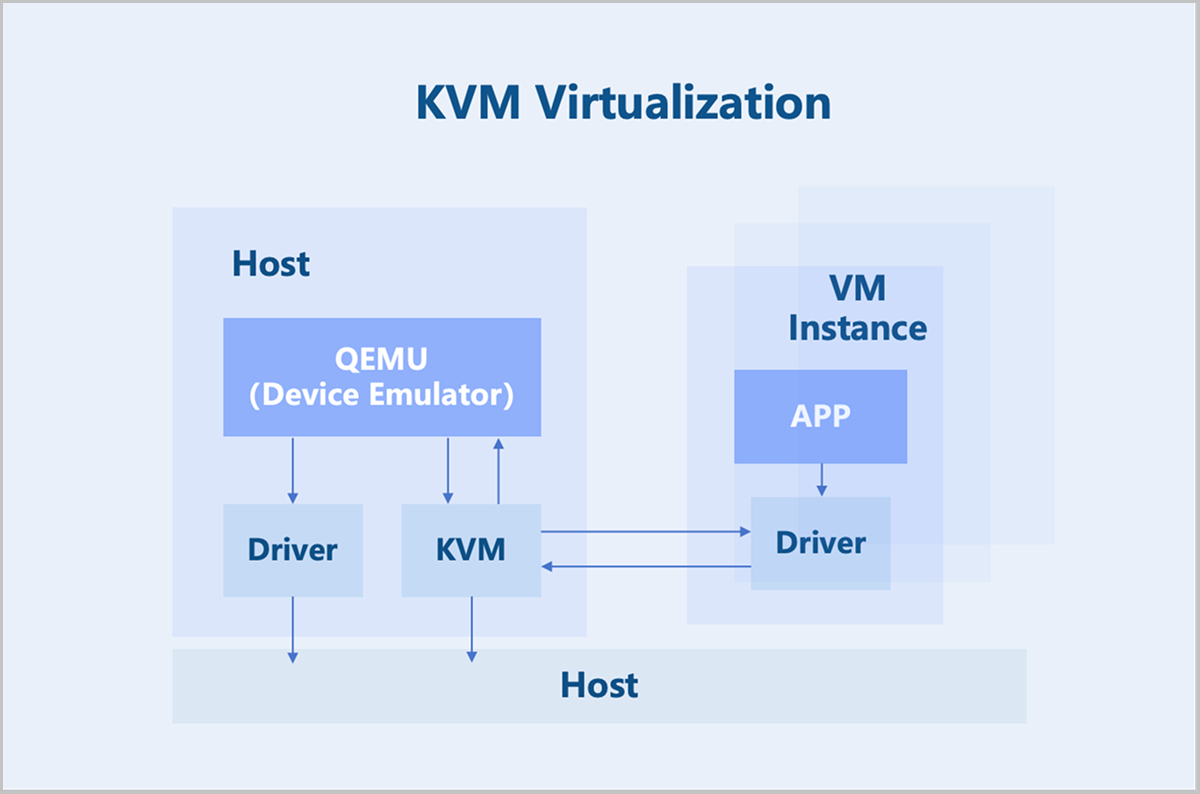
ZStack Cube Ultimate adopts a KVM-based hardware virtualization technology. As a Linux kernel module, KVM turns the Linux kernel into a hypervisor. KVM operates as a process within the Linux system and is scheduled by the standard Linux scheduler. As a result, KVM can leverage existing Linux kernel functionalities, such as memory management and CPU scheduling. However, KVM itself only provides CPU and memory virtualization. I/O device virtualization requires QEMU for full functionality. QEMU is a user-mode device emulator that provides virtual device models for VM Instances. It is responsible for creating, calling, and managing various virtual devices.
Technical Features
CPU Virtualization
In the x86 architecture, CPUs generally have four privilege levels (RING0 to RING3) for operating systems and applications to access hardware. Linux uses only two of these levels: RING0 (kernel mode) and RING3 (user mode).
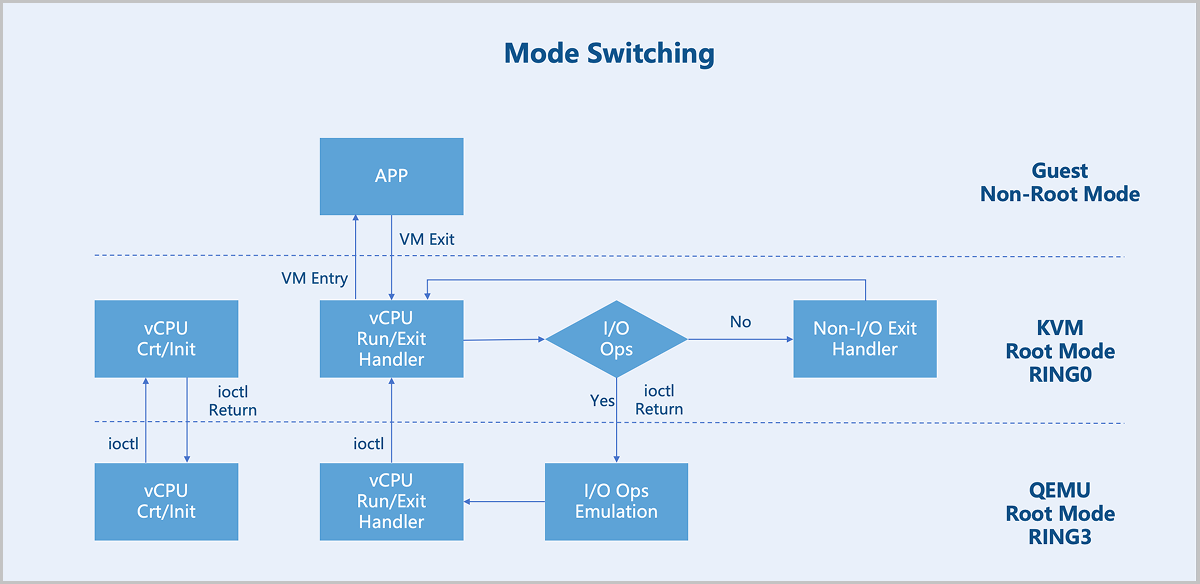
VMX Root Mode and VMX Non-Root Mode: For hardware-assisted virtualization, CPUs introduce two operation modes to enable VM Instances to run without modifying the operating system: VMX root mode and VMX non-root mode. The host runs in root mode, with its kernel in RING0 and user-mode programs in RING3. The VM instance runs in non-root mode, with its kernel in RING0 and user-mode programs in RING3.
VM Exit and VM Entry: A switch from non-root mode to root mode occurs when a VM instance in non-root mode encounters external interrupts, page faults, or actively executes the VMCALL instruction to invoke VMM services. This entire process is called VM Exit. Conversely, when the VMM explicitly executes either VMLAUNCH or VMRESUME instruction to switch to non-root Mode, the hardware automatically loads the VM instance context and executes VM instructions. This transition is called VM Entry.
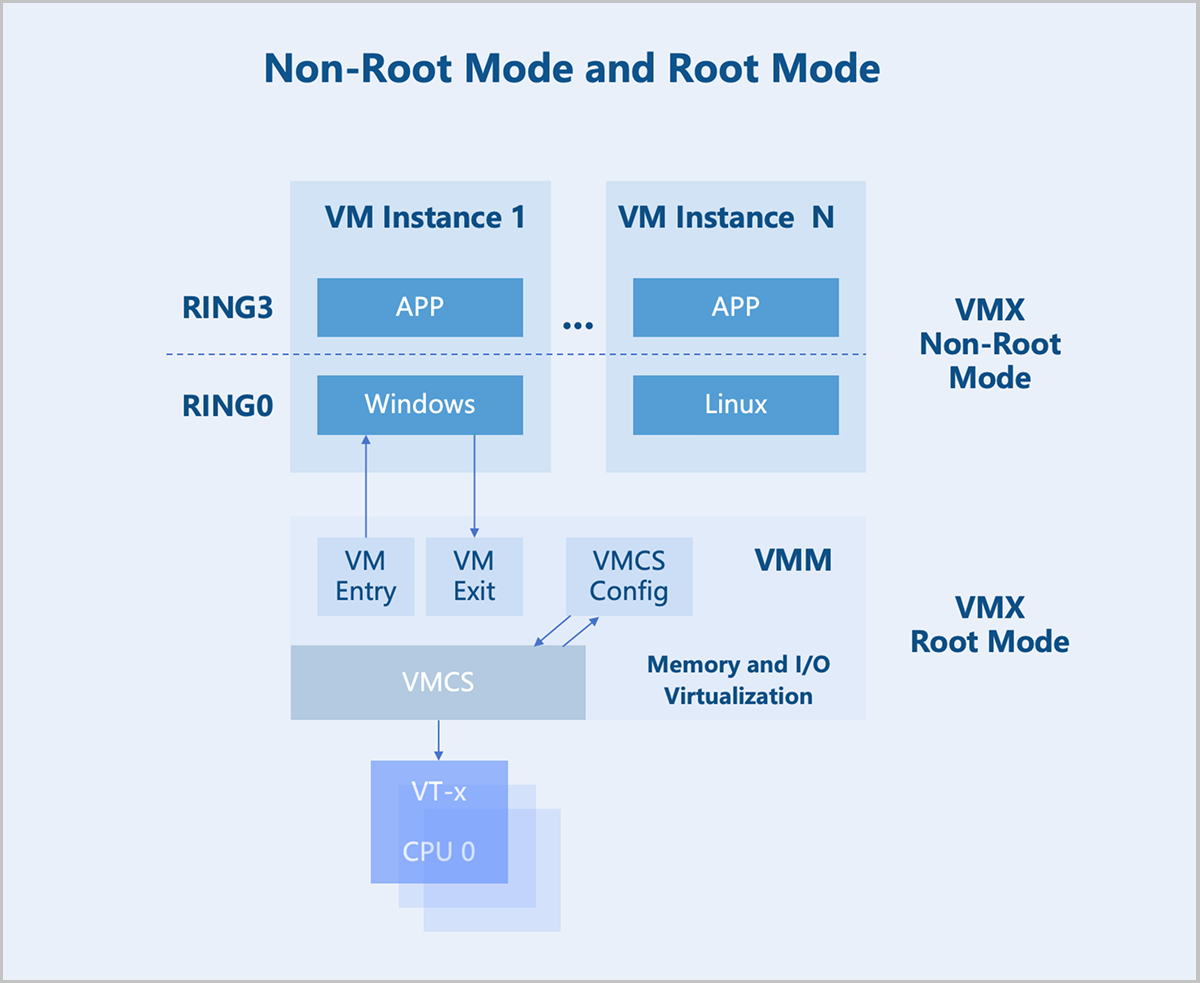
After a VM instance triggers a VM Exit from non-root mode to root mode, KVM takes further action based on the exit reason. If the exit is due to an I/O operation, KVM delegates the processing to QEMU. For non-I/O exits, KVM handles them directly. After processing, KVM initiates a VM Entry to switch back to non-root mode for VM instance execution.
Memory Virtualization
The Virtual Machine Monitor (VMM) manages and allocates physical memory for each VM Instance. The guest OS sees a virtualized Guest Physical Address (GPA) space. The OS memory management module maps Guest Virtual Addresses (GVAs) to GPAs. The target address in instructions is also a GPA. In a non-virtualized environment, such an address would be the actual physical address. However, in a virtualized scenario, this address cannot be used directly. Instead, the VMM must first translate the GPA into a Host Physical Address (HPA), which is then executed by the physical processor.
- Maintaining the mapping relationship between GPAs and HPAs.
- Translating GPAs into HPAs whenever a VM instance accesses a GPA based on the established mapping.
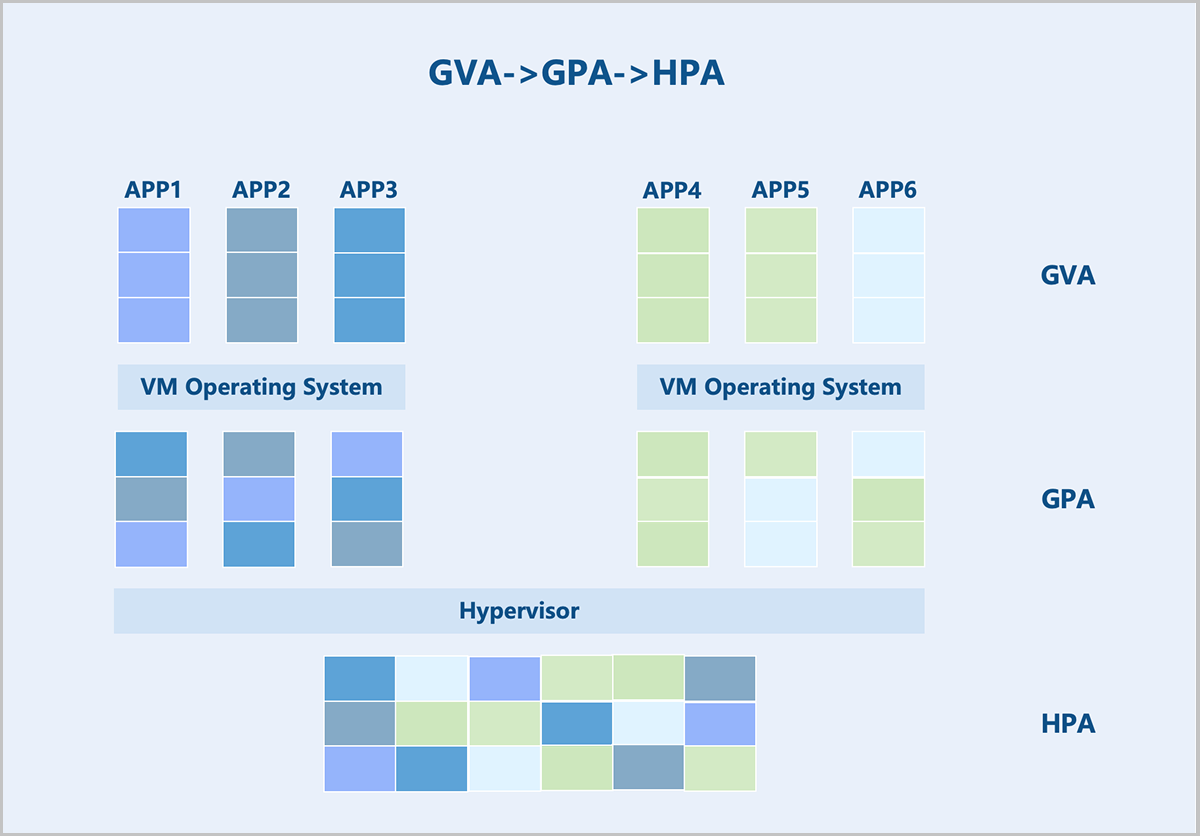
Hardware-assisted memory virtualization uses Extended Page Tables (EPT) technology to translate GVAs into HPAs at the hardware level.
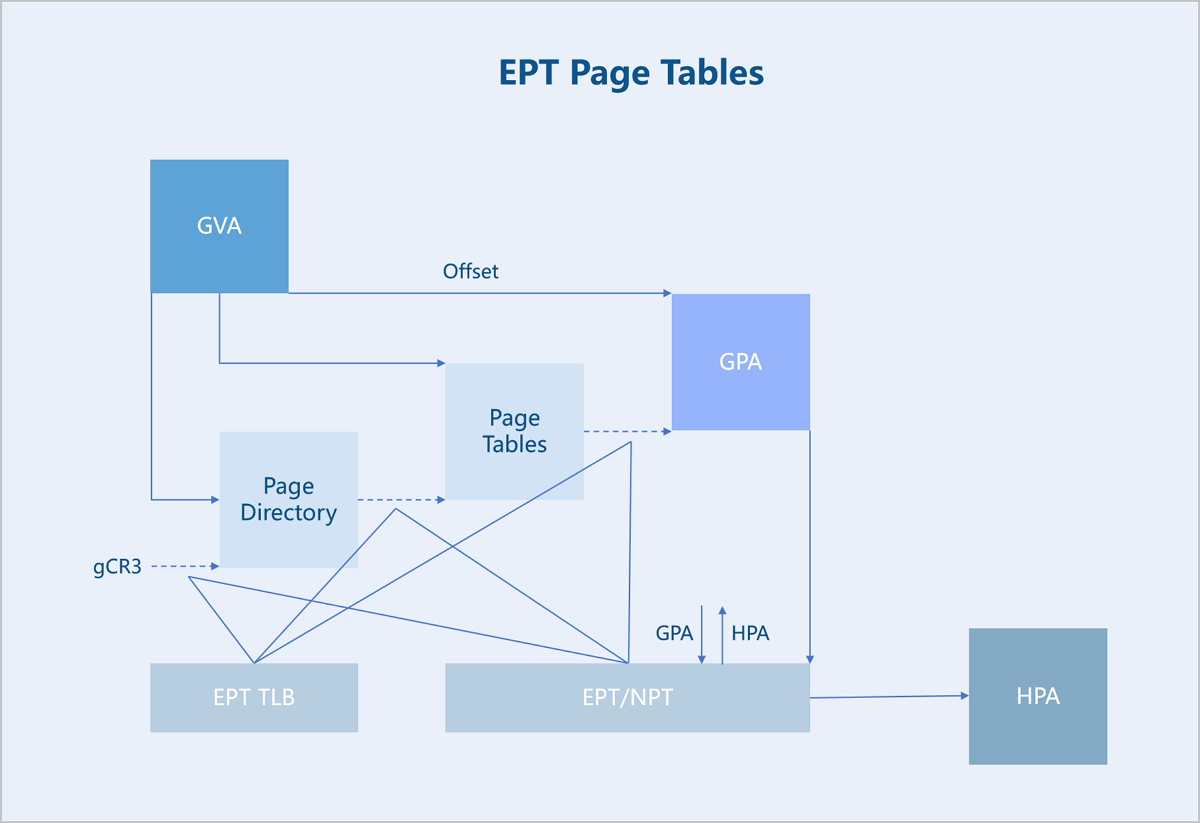
Memory Isolation: On the host's operating system, VM instance processes require a virtual Memory Management Unit (vMMU) and EPT for address translation. Although the VM instance process exists as a regular process on the host, it maintains two sets of page tables: the EPT and the host’s standard page tables. When allocating memory to a VM instance, the hypervisor first allocates memory from the host in the form of a regular process. It then assigns this memory to the VM instance through the EPT. This approach ensures: unified allocation of HPAs, memory isolation between different VM instances, and a mapping relationship between the EPT and the host's page tables. From the VM's perspective, the contiguous memory may actually map to multiple non-contiguous address ranges on the host. The hypervisor dynamically allocates this memory on demand. This design achieves effective isolation between different types of processes, enables resource management, and maintains system flexibility and efficiency.
Complete Memory Release: During VM instance memory allocation, the initial allocation does not involve actual physical memory. When a VM instance genuinely uses the memory, control is transferred to the host's hypervisor for actual allocation. From the hypervisor's perspective, allocating memory to a VM instance means allocating memory space for the VM instance's processes. This space corresponds to Host Virtual Addresses (HVA). The host's memory management subsystem maps thees HVAs to specific HPAs. This subsystem uniformly manages all physical memory on the host. During allocation, the subsystem marks the memory to ensure different processes receive different HPAs. When HPA resources are insufficient, the subsystem may reclaim some memory previously allocated to VM instances and mark the corresponding pages as invalid in the EPT. If a VM instance later accesses the reclaimed memory, the subsystem reallocates a new HPA space. This mechanism prevents physical memory from being repeatedly allocated to different VM instances, maintaining memory isolation and security.
Device Virtualization
There are three main approaches to device virtualization: device emulation, paravirtualized devices, and device passthrough.
Device Emulation
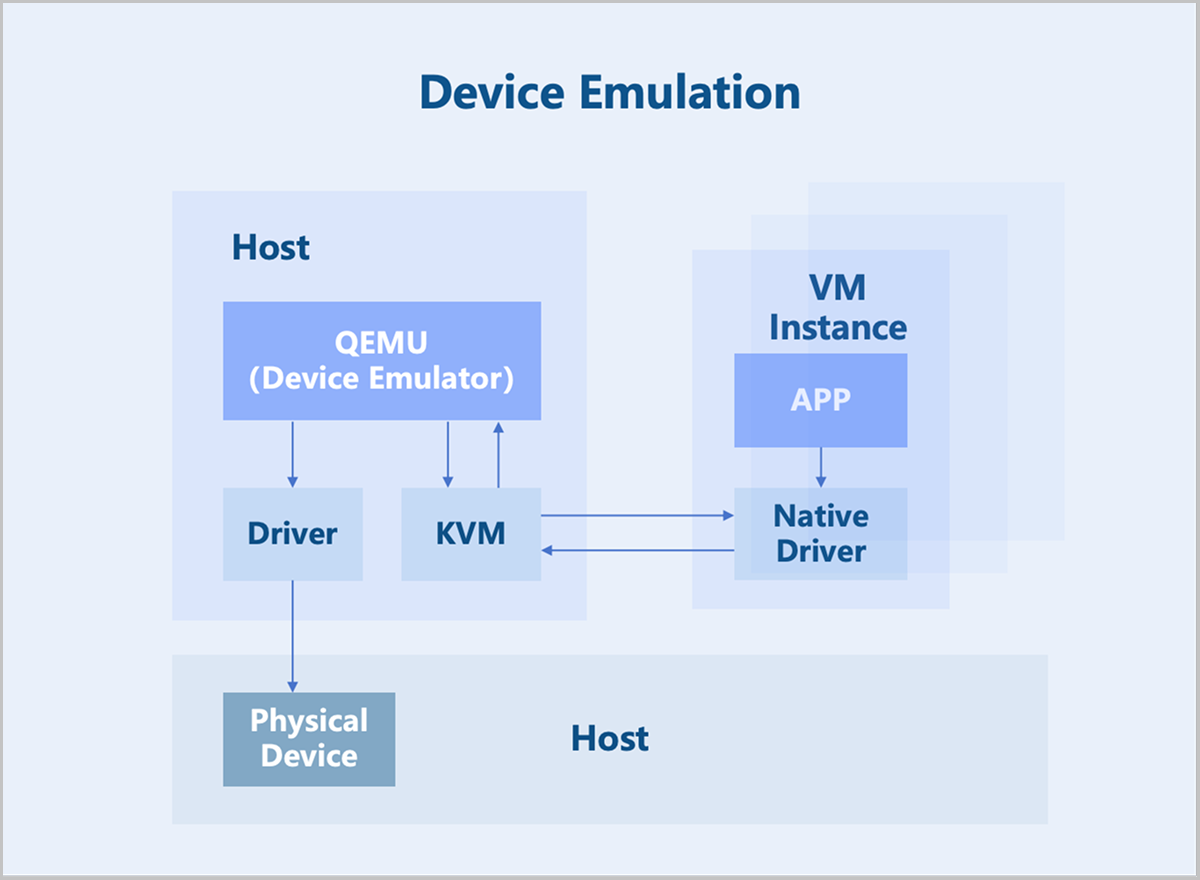
Device emulation uses the device models provided by QEMU to fully emulate interfaces identical to those of physical devices. Consequently, the VM operating system can use these devices with its native drivers. However, device emulation can only replicate devices with basic functionalities and does not support complex features or models. While fully emulated devices offer good compatibility, they suffer from lower performance since they are purely software-based emulation.
Paravirtualized Devices
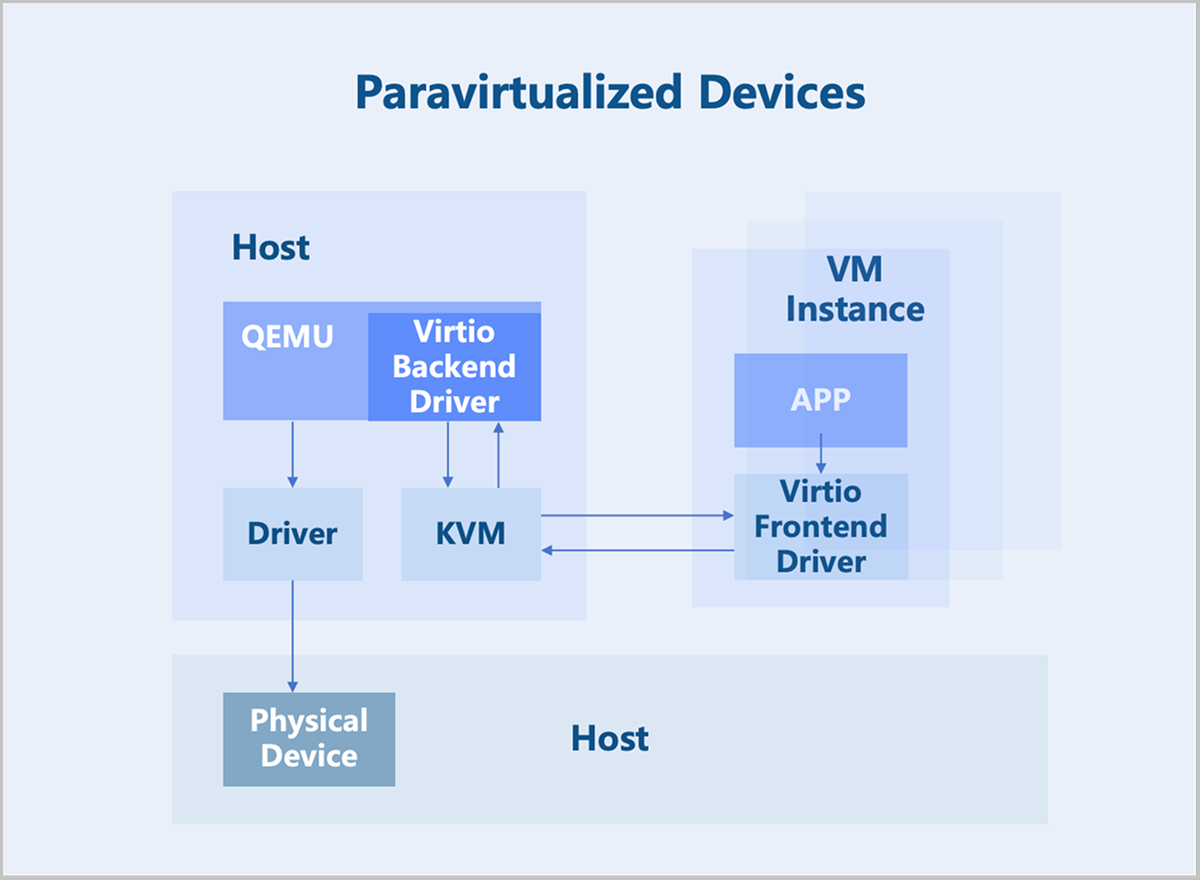
Paravirtualized devices implement frontend and backend drivers. Utilizing a frontend driver in the VM instance, requests are directly sent to a backend driver on the host through a transaction-based communication mechanism, significantly reducing context switching overhead and improving performance over full device emulation. However, since the Virtio backend driver is still implemented in QEMU, the I/O processing path involves multiple switches between user space and kernel space. To further enhance performance, the functionality of the Virtio backend driver can be moved into the kernel space. This implementation is known as the Vhost-kernel backend. With this change, data transmission requires only a single switch from user space to kernel space, thereby improving performance.
As technology evolves, moving data processing to user space achieves a greater flexibility. Consequently, modifications to the original Vhost architecture led to the Vhost-user backend, which works with relevant user-space libraries from DPDK and SPDK to further boost performance.
Device Passthrough
Device passthrough uses the hardware-assisted device virtualization technology to directly map a physical PCI/PCIe device to a VM instance's address space. The VM instance can use the native device driver to directly operate the devices, achieving performance nearly identical to that of physical devices. Once a physical device is passed through, it is dedicated to that VM instance and cannot be shared with other VMs.
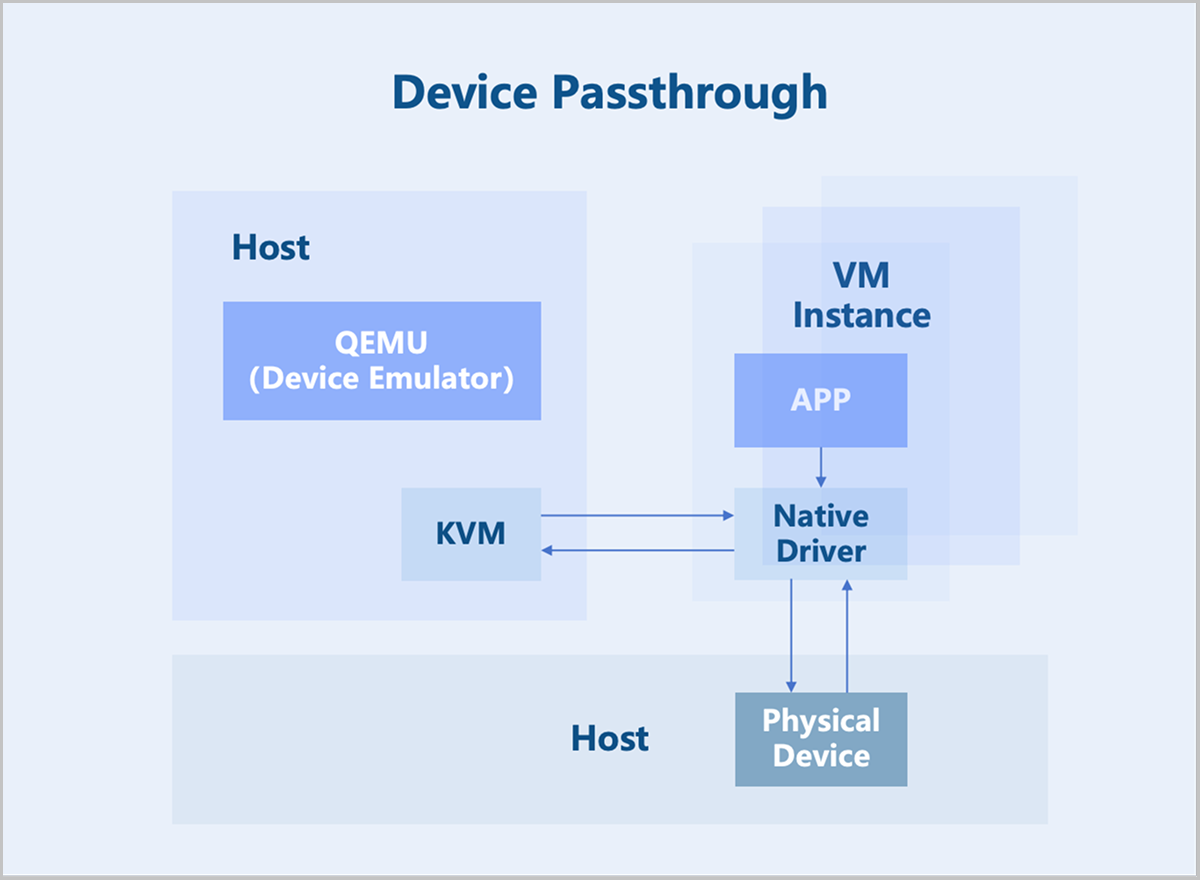
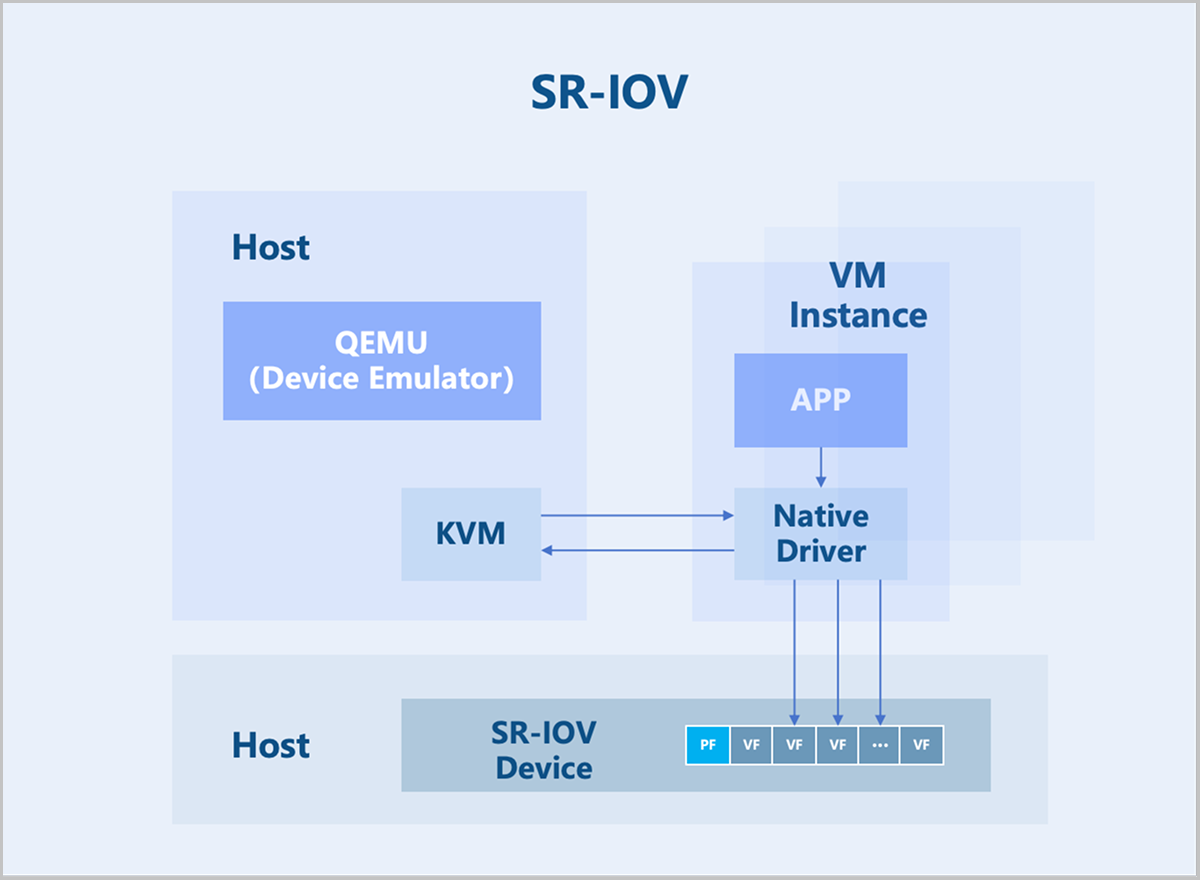
SR-IOV is an extension to the PCIe specification defined by the PCI-SIG. Its purpose is to provide a standardized specification for granting VM instances independent memory spaces, interrupts, and DMA data streams. SR-IOV enables a single physical PCIe device (Physical Function, PF) to be virtualized into multiple virtual PCIe device devices (Virtual Function, VF). These VFs can then be passed through directly to VM instances using device passthrough technology. This allows a single physical PCIe device to support multiple VM instances.