
Virtual Resources Management
VM Instances Management
VM Scheduling Policy
A VM scheduling policy is a resource orchestration policy based on which VM instances are assigned hosts to achieve the high performance and high availability of businesses. You can add VM instances to a VM scheduling group and associate a scheduling policy to this group to implement VM scheduling.
Fundamentals
- If you associate a VM scheduling group with a VM Exclusive from Each Other or VM Affinitive to Each Other scheduling policy, you do not need to specify a host scheduling group, as the VM instance will be assigned to hosts based on the policy and execution mechanism.
- If you associate a VM scheduling group with a VMs Affinitive to Hosts or VMs Exclusive from Hosts scheduling policy, you need to specify the corresponding host scheduling groups and the VM instance will be assigned to hosts based on the policy and execution mechanism
In the following section, you will learn how the four scheduling policies work through four scenario illustrations.
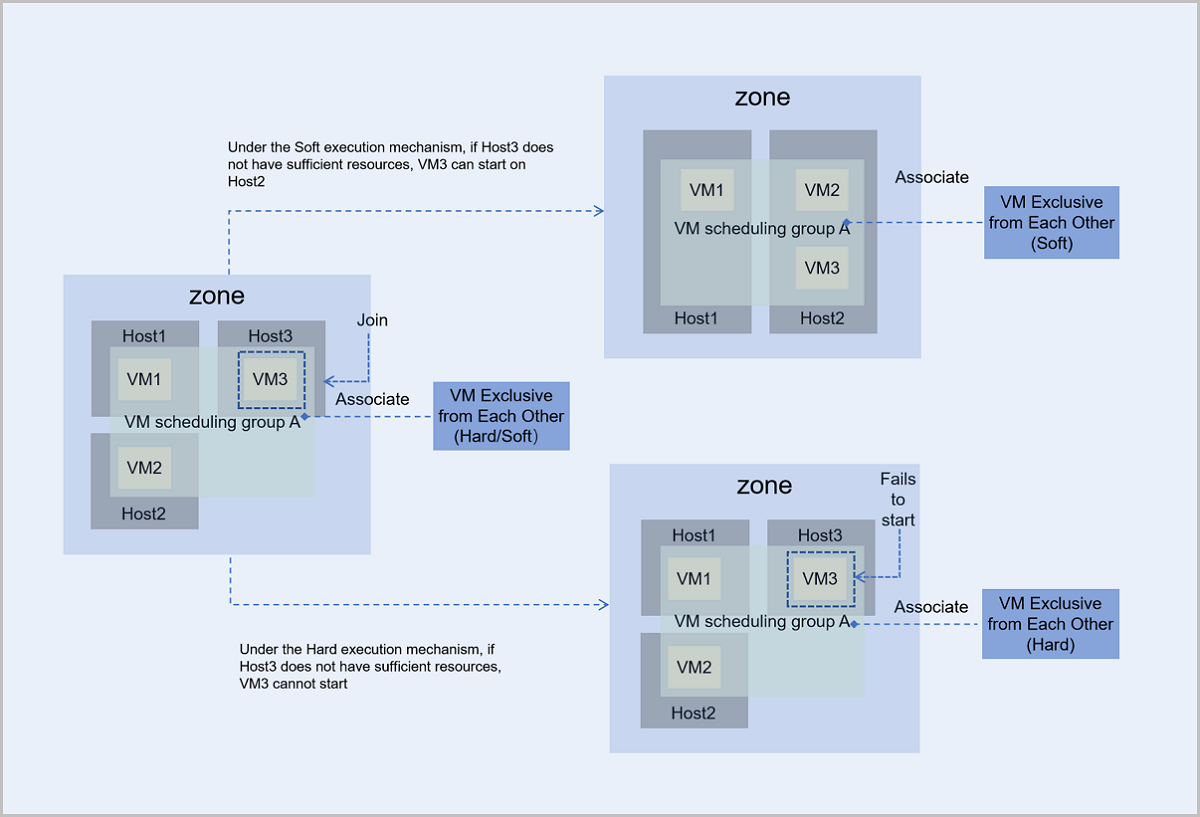
- Under the Hard execution mechanism, VM3 follows the policy of VM Exclusive from Each Other:
- If Host3 has sufficient resources, VM3 can start and run normally on Host3.
- If Host3 does not have sufficient resources, then VM3 cannot start.
- Under the Soft execution mechanism, VM3 follows the policy of VM Exclusive from Each Other and first chooses to start on Host3:
- If Host3 has sufficient resources, VM3 can start and run normally on Host3.
- If Host3 does not have sufficient resources, VM3 tries to start on other host that has available resources. In this scenario, VM3 starts and runs on Host2.
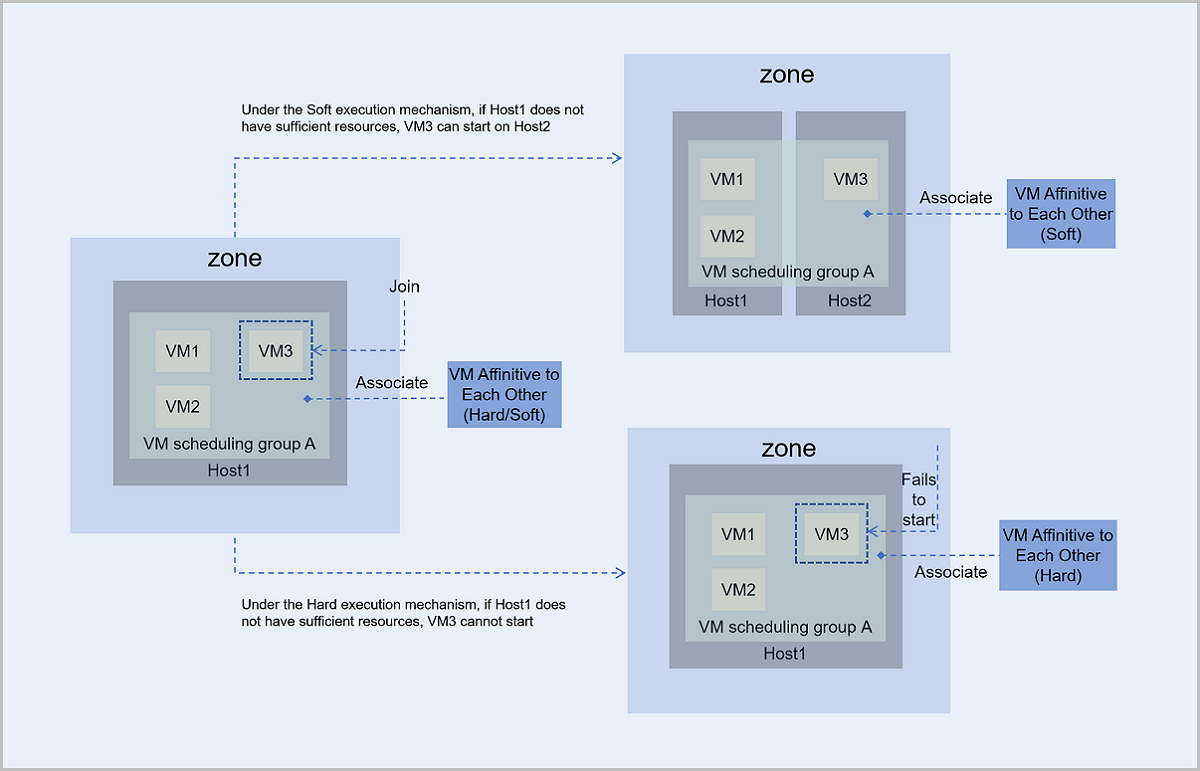
- Under the Hard execution mechanism, VM3 follows the policy of VM Affinitive to Each Other:
- If Host1 has sufficient resources, VM3 can start and run normally on Host1.
- If Host1 does not have sufficient resources, VM3 cannot start.
- Under the Soft execution mechanism, VM3 follows the policy of VM Affinitive to Each Other and first chooses to start on Host1:
- If Host1 has sufficient resources, VM3 can start and run normally on Host1.
- If Host3 does not have sufficient resources, VM3 tries to start on other host that has available resources. In this scenario, VM3 starts and runs on Host2.
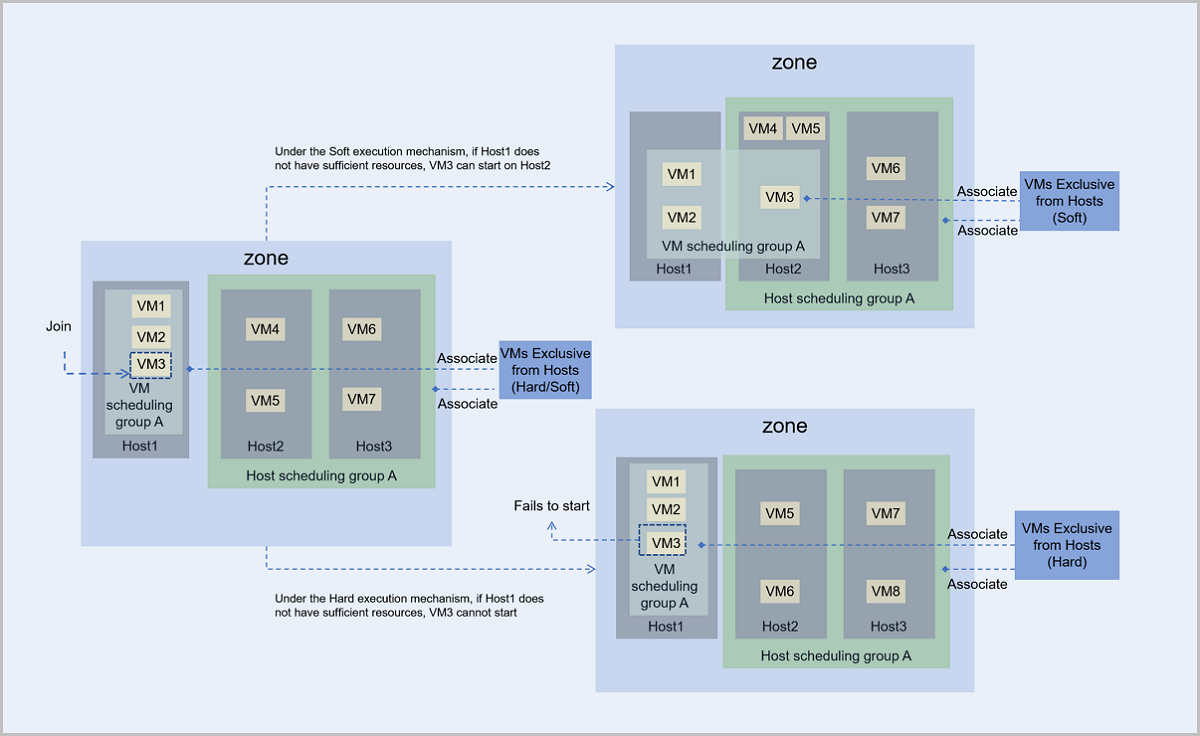
- Under the Hard execution mechanism, VM3 and hosts in the host scheduling group A follow the policy of VMs Exclusive from Hosts:
- If Host1 has sufficient resources, VM3 can start and run normally on Host1.
- If Host1 does not have sufficient resources, VM3 cannot start.
- Under the Soft execution mechanism, VM3 and hosts in the host scheduling group A follow the policy of VMs Exclusive from Hosts and VM3 first chooses to start on Host1:
- If Host1 has sufficient resources, VM3 can start and run normally on Host1.
- If Host1 does not have sufficient resources, VM3 tries to start on other host that has available resources. In this scenario, VM3 starts and runs on Host2.
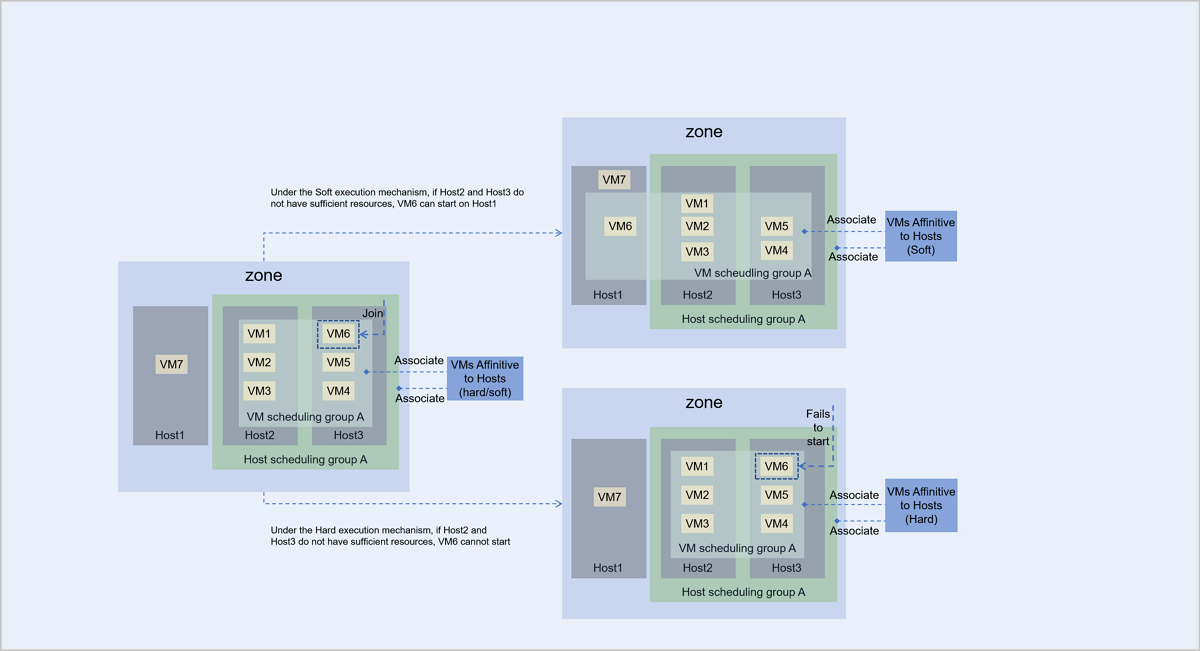
- Under the Hard execution mechanism, VM6 and hosts in the host scheduling group A follow the policy of VMs Affinitive to Hosts:
- If Host2 or Host3 have sufficient resources, VM6 can start and run normally on Host2 or Host3.
- If Host2 and Host3 do not have sufficient resources, VM6 cannot start.
- Under the Soft execution mechanism, VM6 and hosts in the host scheduling group A follow the policy of VMs Affinitive to Hosts and VM6 first chooses to start on Host2 or Host3:
- If Host2 or Host3 have sufficient resources, VM6 can start and run normally on Host2 or Host3.
- If both Host2 and Host3 do not have sufficient resources, VM6 tries to start on other host that has available resources. In this scenario, VM6 starts and runs on Host1.
VM Instance Clone
ZStack Cube Ultimate provides three VM instance clone methods to meet different service needs: linked clone, full clone, and instant full clone.
Linked Clone
Linked clone VM instances boot rapidly and consume minimal storage. However, linked clone VM instances share the disk chain of the source VM instance due to a dependency relationship between them. The ZStack Cube Ultimate's linked clone implementation is not limited by the length of the source VM's snapshot chain and supports all types of primary storage.
When you create a new VM using a linked clone, the process does not copy all data from the source VM. Instead, it creates a new disk file based on the source VM's snapshot chain and associates it as the new VM instance. The new VM instance shares the source VM's snapshot chain, which remains read-only. This approach eliminates the need for physical data copying during VM creation, enabling rapid startup.
The new disk file, created based on the source VM's snapshot chain, employs a redirect-on-write (ROW) mechanism. This means the disk file occupies very little storage upon creation. Subsequent write attempts by the VM instance are directed to this new disk file to leave the source snapshot chain data unmodified, ensuring the relative independence of the cloned VM from its source.
To completely decouple the cloned VM from the source VM's snapshot chain, you can use the flatten operation provided by ZStack Cube Ultimate. When performing batch linked clones, multiple VM instances share the same read-only snapshot chain, significantly reducing overall storage requirements.
The VM instance linked clone technology offers an efficient approach to manage VM instances, especially when creating multiple similar VM instances (such as for test clusters or VDI scenarios in desktop clouds). Linked clone significantly reduces storage costs and improve the efficiency of VM instance creation and management through shared snapshot chains.
Full Clone
Full cloning is another method for cloning VMs. Unlike linked clones, full clones do not share data with the source VM. Instead, full clones create a new VM instance by first converting the source VM into an image file. The source VM image is a complete file containing all necessary files and configurations for the VM and is stored in the image storage. This image file is then pushed to the primary storage to serve as an image cache for the cloned VM instance, thereby creating a new VM instance. Full clone VMs are not restricted by the primary storage. The cloned VMs can be configured to start on a primary storage different from that of the source VM.
Full clone VM instances are completely isolated from and independent of the source VM. This independence ensures that the new VM's performance is in no way affected. Full clones typically require more storage. However, ZStack Cube Ultimate optimizes storage during batch full cloning operations. The image cache for new VMs is stored only once on the primary storage. This avoids excessive consumption of primary storage resources and also accelerates the startup of batch-cloned VM instances.
Instant Full Clone
Instant full cloning combines the advantages of both linked cloning and full cloning. It enables rapid booting of cloned VMs like linked clones while maintaining data independence like full clones, without sharing snapshot chains with the source VM.
When you perform instant full cloning, the process initially uses linked cloning technology to create a new VM that depends on the source VM, ensuring fast VM provisioning. Subsequently, a background task initiates a snapshot merge operation that completely separates the cloned VM's data from the source VM. As a result, VMs created through fast full cloning benefit from rapid boot times and ultimately achieve complete data independence, with no performance impact after the cloning process completes.
VM Instance Hot Migration
VM hot migration refers to migrating a running VM instance from one host to another without user perceptibility and service interruption. This technology is widely applied in cloud computing and data center management to achieve resource optimization, load balancing, maintenance upgrades, and disaster recovery. ZStack Cube Ultimate supports two types of VM hot migration: between hosts with the same storage and between hosts with different storage.
To understand how VM hot migration works, focus on the transmission mechanisms of the VM's core resources: CPU, memory, disk, and network.
Hot Migration Between Hosts with the Same Storage
Two hosts use the same storage, and the VM instance is hot migrated from one host to the other.
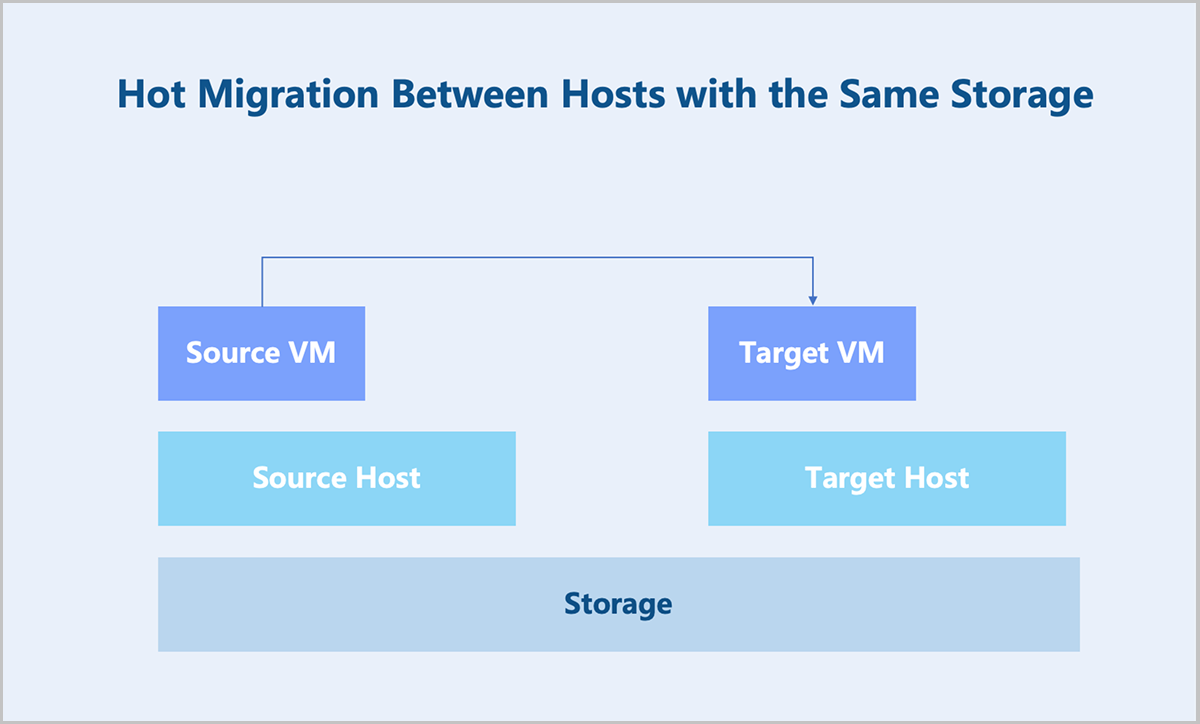
How are the core resources of the source VM instance synchronized to the target VM instance during hot migration?
First is the network. The network requests of a VM instance are commonly stateless, so it is only necessary to synchronize the network configuration of the source VM to the target VM. Next is the disk. Both the source and target VMs reside on shared storage, and the source and target hosts have an identical view of this shared storage. Consequently, there is no need to migrate the disk.
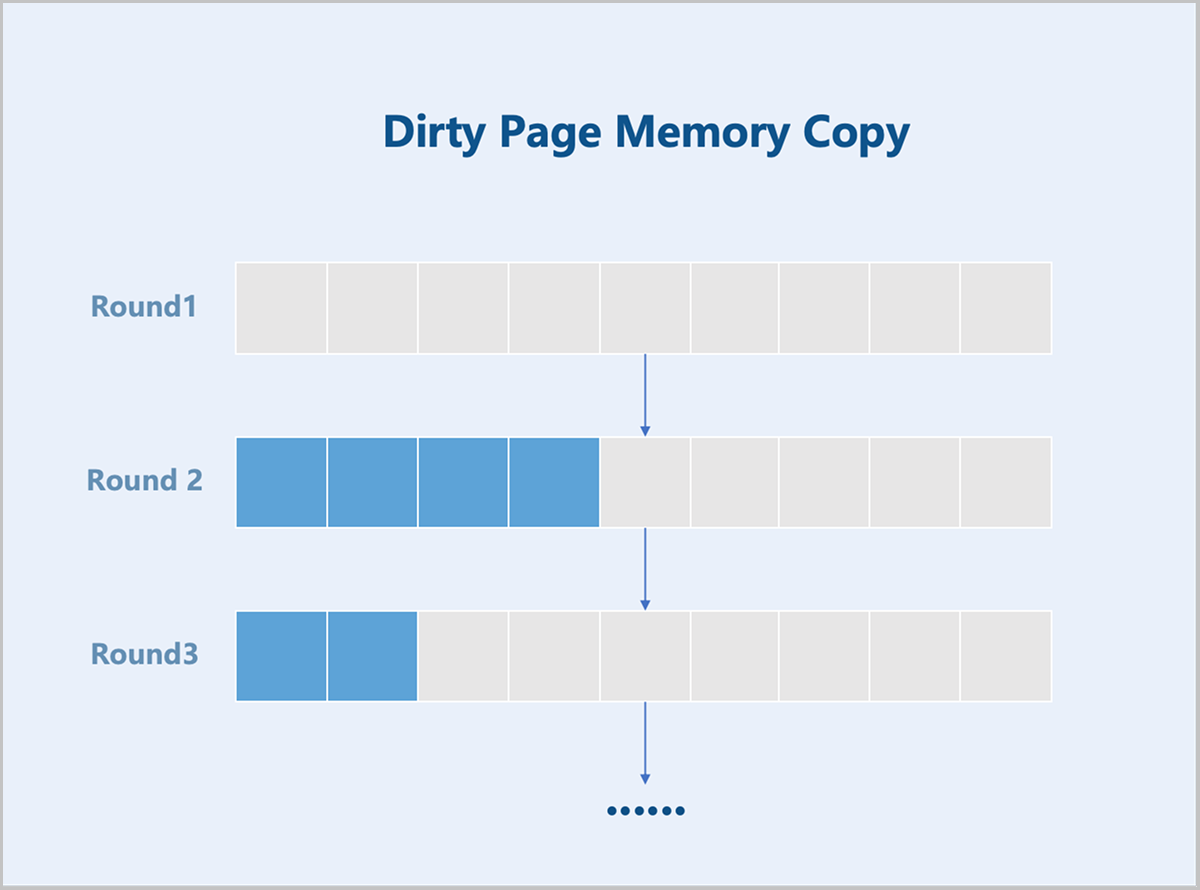
The critical component of hot migration involves transferring the CPU and memory. Throughout the migration, the source VM instance continues running, while the target VM instance is not yet started. During migration, the CPU persistently generates new data, which is written to memory. Memory pages modified by the CPU during this period are designated as dirty pages. The hot migration process initiates by copying the entire memory content from the source to the target VM instance. Subsequent iteration cycles transfer only the dirty pages that accumulated during the preceding copy operation, rather than retransmitting the complete memory image. This iterative process continues recursively. Migration progresses until the volume of dirty pages on the source host diminishes below a predefined minimal threshold—typically resulting in transfer times measured in milliseconds. At this point, the process enters the stop-and-copy phase. During the stop-and-copy phase: The source VM instance is suspended, ceasing further dirty page generation. The migration mechanism transfers the final set of dirty pages. CPU execution state and peripheral device states are migrated. The target VM instance is activated. Upon completion, the target VM instance assumes full operational control of the source workload. The minimal duration of the stop-and-copy phase ensures user-unaware migration with continuous service availability.
Hot Migration Between Hosts with Different Storage
Two hosts use different storage, and the VM instance is hot migrated from one host to the other.
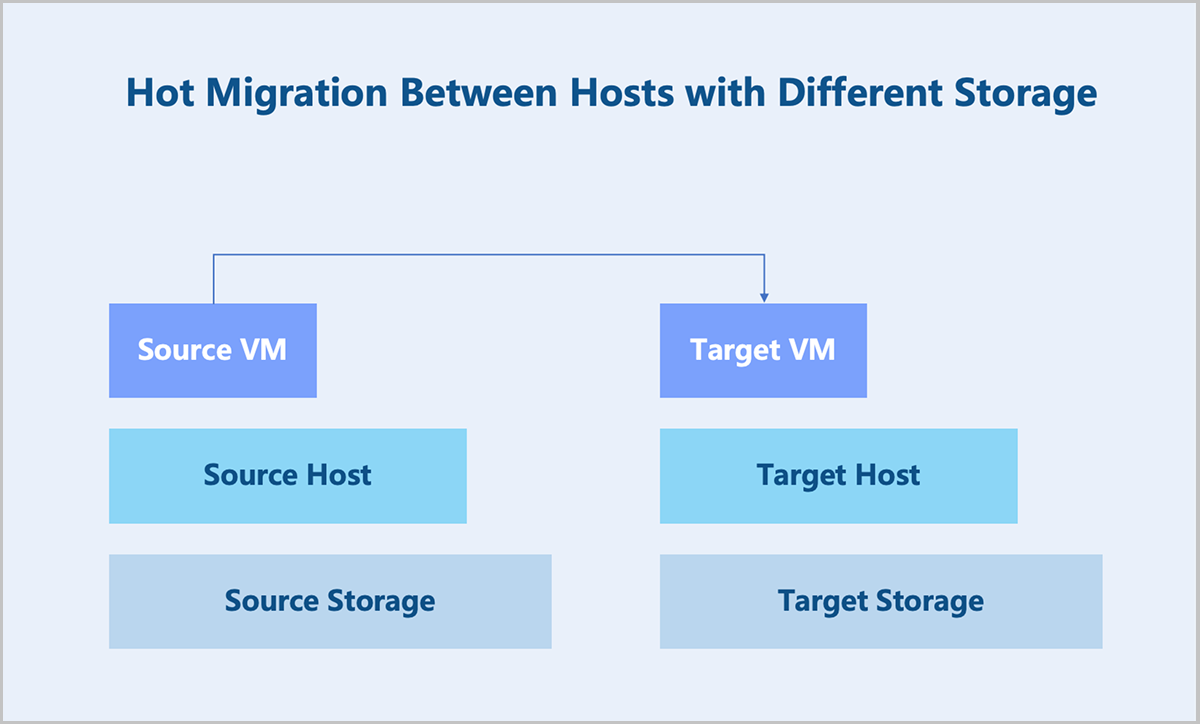
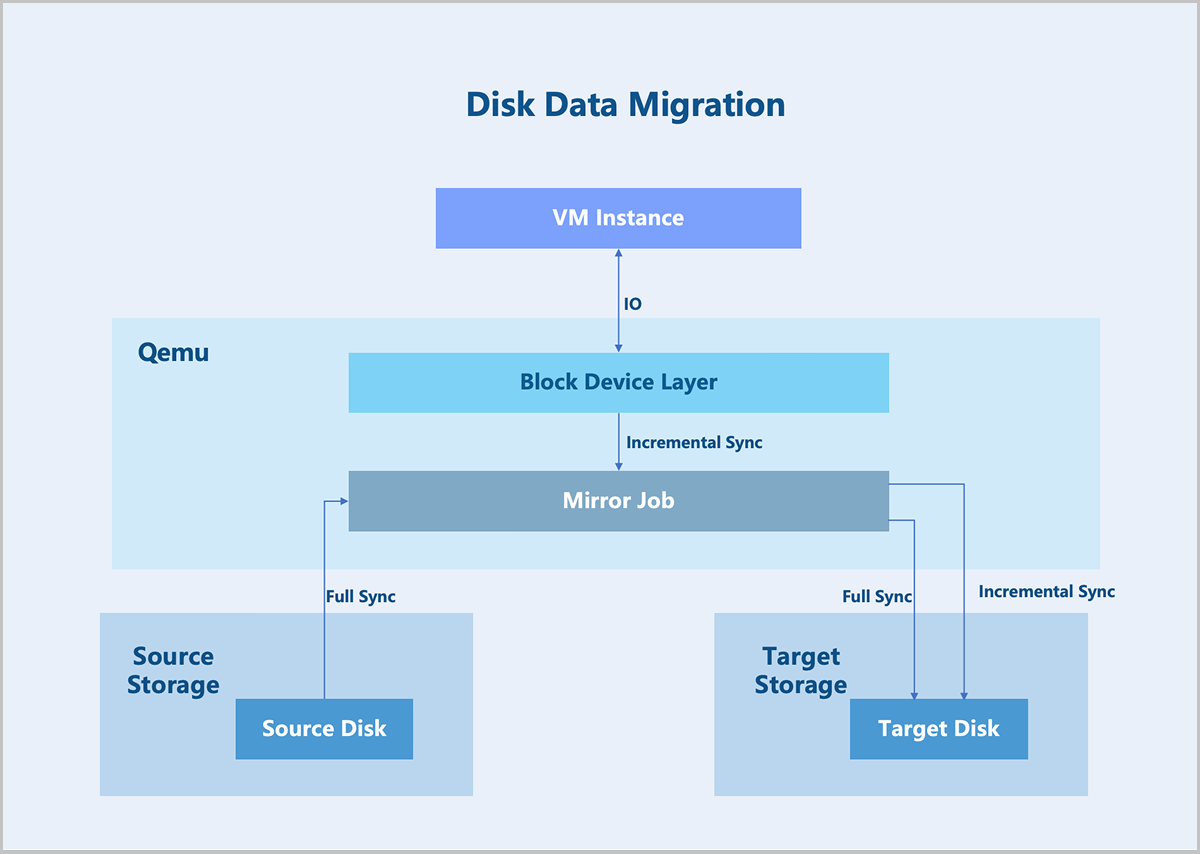
During a hot migration, because the source and target hosts use different storage, disk migration is required. Data managed by the disk falls into two categories: data that has been written to disk and data not yet written to disk. Data not yet written to disk (data in memory) is referred to as dirty data. Disk migration first creates an identical target disk on the destination storage, then establishes a mirroring relationship between the target disk and the source disk. QEMU receives the specified source and target disk devices and creates a mirror job, which runs continuously in the background until all data replication is complete.
Full Sync: After the mirror job initiates, a full data synchronization is first performed. QEMU sequentially iterates through all data blocks of the source disk, reading and writing data block-by-block to the target disk. During this period, if the VM instance generates new write operations, QEMU temporarily stashes these writes and synchronizes the incremental data to the target disk immediately after the initial synchronization is completed.
Incremental Sync: Throughout the full data synchronization process, the VM might still write to the source disk. To ensure data consistency between the source and target disks, QEMU intercepts write operations to the source disk and copies the incremental data blocks to the target disk.
Write operation interception: QEMU's block layer is responsible for intercepting disk I/O requests and logging write operations. These writes are stashed, and metadata such as the operation timestamp and block offset are recorded to ensure accurate incremental copying. QEMU synchronizes new write operations to the target disk via Incremental Sync, maintaining consistency between the target disk and source disk.
Mirror completion and switchover: Upon completion of mirror job, QEMU performs a final data synchronization to copy any remaining unsynchronized data blocks to the target disk. Then, you can choose to switch the VM's I/O from the source disk to the target disk. At this point, the data from the source disk is fully synchronized to the target disk. The entire VM hot migration finishes after the subsequent completion of the memory and CPU hot migration.
Baremetal Management
- Management Network: Manages hardware resources on ZStack Cube Ultimate.
- Flat Network: Serves as the service network for baremetal instances to provide application services.
- IPMI Network: Used by the management node to perform remote operations on baremetal chassis and baremetal instances, such as powering on/off, rebooting, and retrieving hardware information.
- Deployment Network: Used by the PXE server to assign IP addresses via the DHCP service and to transfer images via the TFTP service.
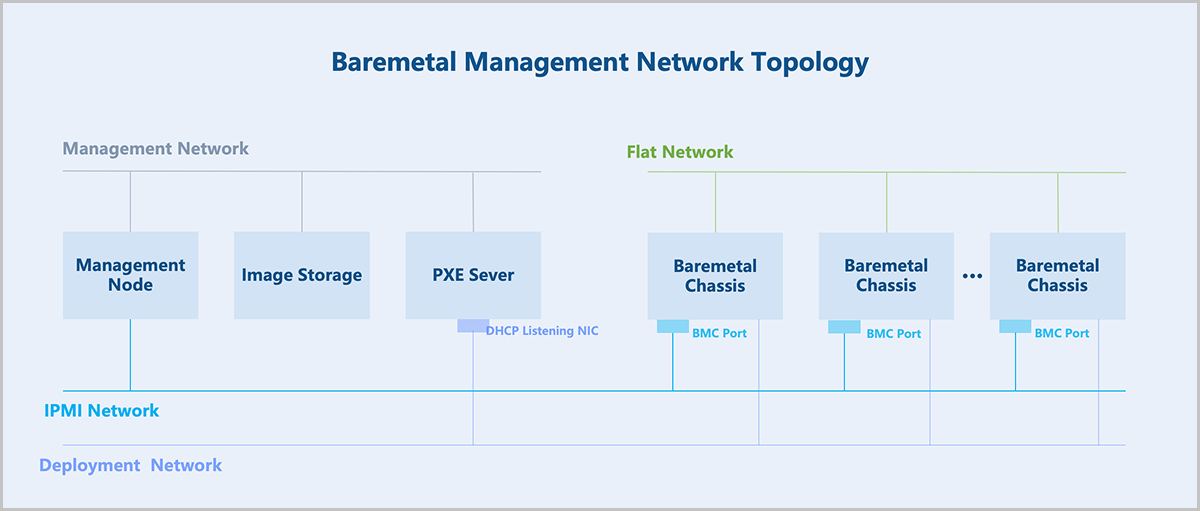
The core of the baremetal management: hardware information retrieval and unattended deployment of baremetal chassis.
- The management node directs the baremetal chassis to perform a PXE boot via the PXE server.
- The PXE server encapsulates DHCP, TFTP, and image storage services. After the baremetal chassis boots via PXE, it obtains an IP address through DHCP, downloads pxelinux.0 and boot files from the TFTP server, loads the kernel into memory for execution, and boots into a LiveCD system.
- In the LiveCD system, a detection script runs and reports the hardware information of the baremetal chassis back to the management node.
- Based on the returned hardware information, a preconfigured template is applied to the baremetal chassis. This template includes partition information, NIC bonding, IP address, and more.
- Select an OS ISO for installation to deploy the baremetal instance.
- The baremetal chassis is rebooted for a PXE boot. The PXE server pre-downloads the target OS ISO, and the baremetal chassis performs an unattended deployment according to the preconfigured template. After deployment, the chassis automatically configures the NIC and other settings based on the preconfigured template, completing the baremetal instance configuration.
- For better O&M of baremetal instances, the PXE server supports deploying a baremetal monitoring service. This service enables real-time monitoring of internal data within the baremetal instances, including metrics for CPU, memory, disk capacity, disk I/O, NICs, and more.
Elastic Baremetal Management
Elastic baremetal management provides dedicated physical servers for applications, ensuring high performance and stability for core applications. Combining with the elastic resources advantages of ZStack Cube Ultimate, this management model achieves flexible provisioning and on-demand usage. Elastic baremetal management integrates the respective benefits of hosts and VM instances. Applications can benefit from not only the robust and stable computing power of hosts but also various resources within ZStack Cube Ultimate, such as primary storage and L3 networks. This approach avoids virtualization overhead while bridging the boundary between cloud and physical resources to improve the availability of cloud resources. Elastic baremetal is particularly suitable for deploying traditional non-virtualized applications.
Elastic Baremetal Framework
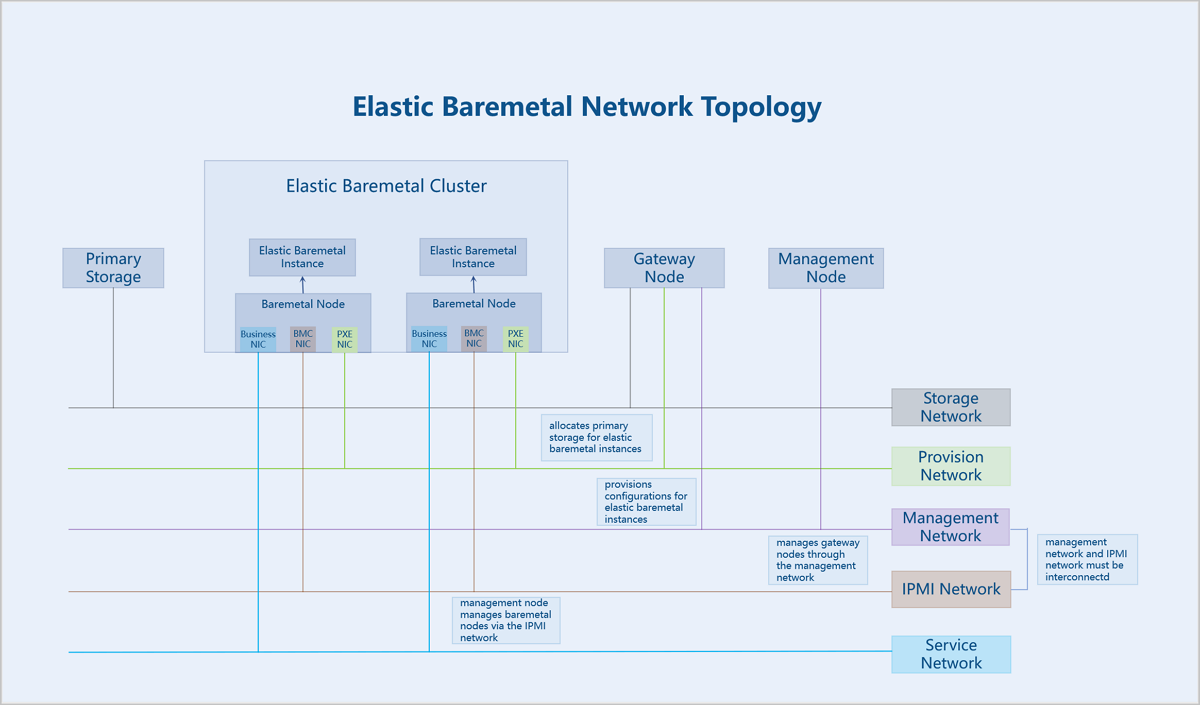
- Storage Network: The network used for communication with primary storage.
- Provision Network: A dedicated network used for PXE boot and downloading images when creating elastic baremetal instances.
- Management Network: ZStack Cube Ultimate management nodes use this network to manage and control the server nodes. This network must have connectivity with the IPMI network.
- IPMI Network: The IPMI network for servers.
- Management Node: ZStack Cube Ultimate management node.
- Gateway Node: A traffic forwarding node for both ZStack Cube Ultimate and elastic baremetal instances. A gateway node provides services such as iPXE and DHCP, and delivers configurations to elastic baremetal instances. The gateway node takes over the primary storage and allocates primary storage resources to elastic baremetal instances. A single gateway node can only be associated with one elastic baremetal cluster.
- Elastic Baremetal Cluster: Provides cluster management for baremetal nodes.
- Elastic Baremetal Instance: A cloud instance with performance comparable to physical servers, combining the elastic resources advantages of ZStack Cube Ultimate for flexible application and on-demand usage.
- Elastic Baremetal Offering: The specification defines the CPU, memory, CPU architecture, and CPU model involved in an elastic baremetal instance.
- Baremetal Node: A baremetal node is used to create elastic baremetal instances. It is uniquely identified via the BMC interface and IPMI configuration.
- Primary Storage: A storage server used for storing disk files of VM instances (including root volumes, data volumes, root volume snapshots, data volume snapshots, image caches).
Retrieve Hardware Information
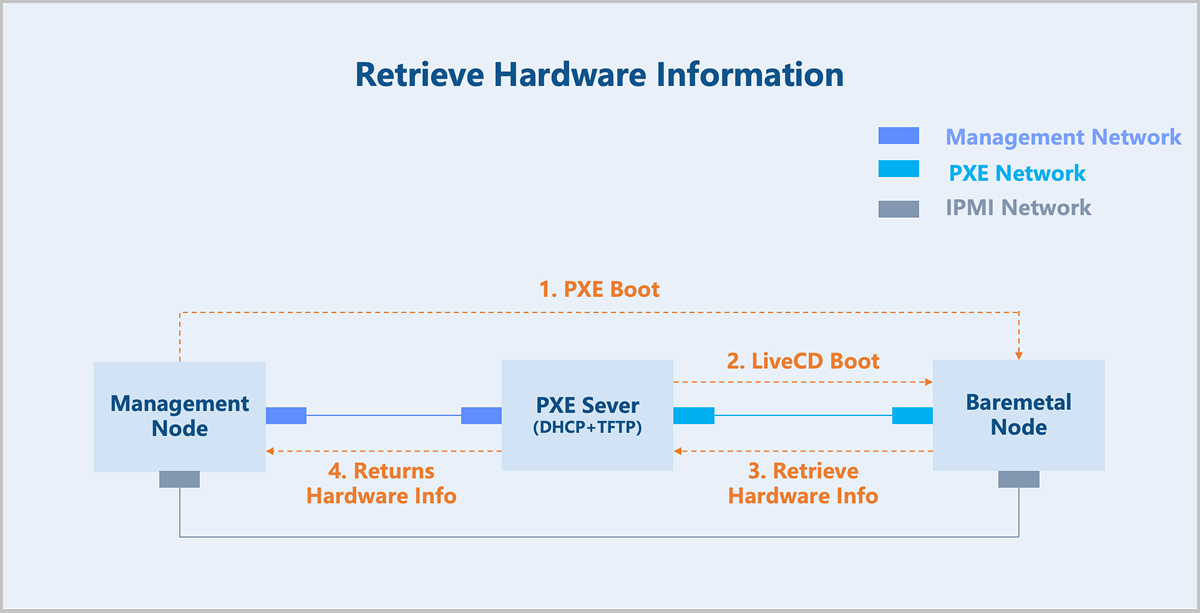
To retrieve the hardware information of a baremetal node, the management node uses IPMI to instruct the baremetal node to boot from the network. During the boot process, the baremetal node loads a LiveCD system located on the gateway node via PXE. It then uses pre-configured scripts within that system to collect its own hardware information and returns that data to the management node.
Volume Boot and Console
Volume Boot of Baremetal Nodes
Baremetal nodes support using either local disks or volumes as the boot source. When booting from a local disk, a baremetal node supports either taking over an existing local system or deploying a local system using a platform image. When booting from a volume, the storage resources are primarily provided by SharedBlock primary storage or Ceph primary storage. This approach combines the elasticity of platform resources with the stable I/O and high throughput advantages of local disks.
- When an image is selected during the creation of an elastic baremetal instance, the image is distribtued to the primary storage as an image cache.
- A volume corresponding to the elastic baremetal instance is created based on the image cache.
- On the gateway node, the volume is mapped as an iSCSI Target and exposed to the baremetal node via the provision network, serving as the root or data volume for the elastic baremetal instance.
- The baremetal node boots via PXE and loads the root and data volumes exposed by the gateway node, thereby achieving volume boot.
Elastic Baremetal Instances Console
To launch the console and enbale real-time monitoring of an elastic baremetal instance on ZStack Cube Ultimate, you must install the corresponding baremetal agent service on the elastic baremetal instance OS. The Nginx proxy service on the baremetal gateway node forwards requests from the management node to the baremetal agent service and then relays the feedback from the baremetal agent service back to the management node. This implements the console functionality for elastic baremetal instances.