
ZStack Cloud 5.0.0
Highlights
- A New Primary Storage Type: Vhost: Uses vhost-user mode to connect with high-performance SSD distributed storage.
- Supports Isolated VLAN in L2VlanNetwork: Supports isolated VLAN function of PVLAN on the Cloud to isolate resources within the same VLAN network.
- Optimizations on Monitoring & Alarm: Supports new endpoint types: WeCom and Lark; supports message templates for WeCom, Lark, and HTTP application endpoints.
Overview
- VM console enhancements.
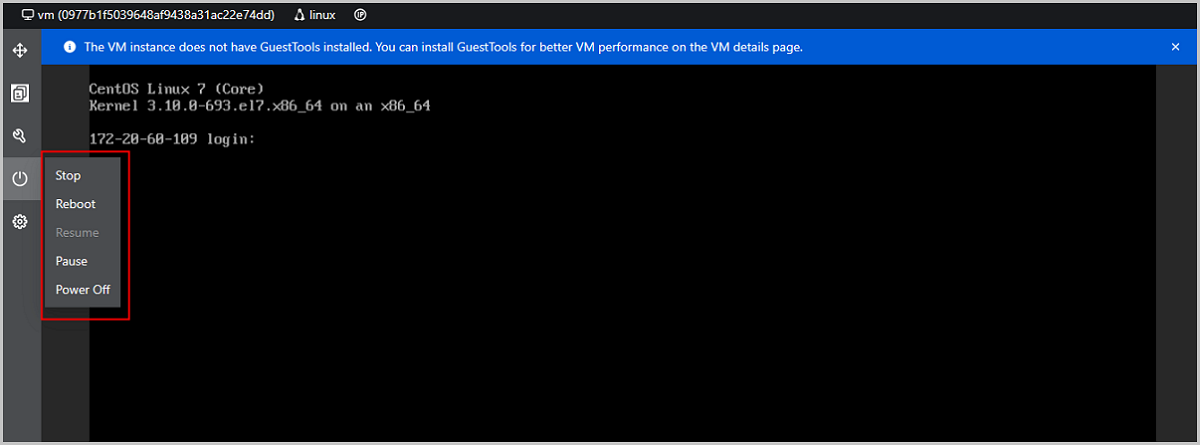
- Supports power managements in VM consoles.
- Allows you to reboot a VM instance without interrupting the console connection.
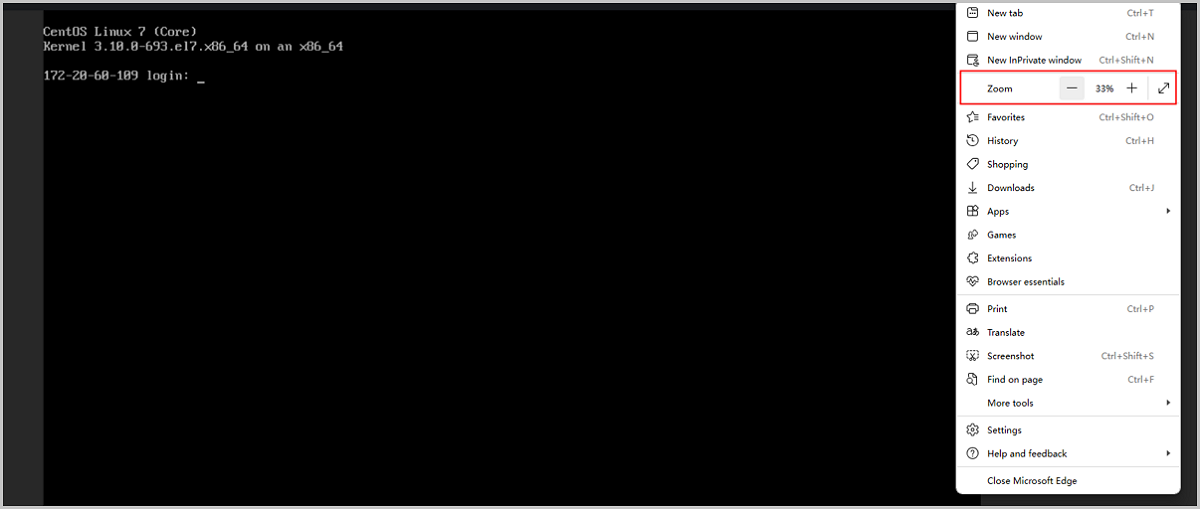
- VM console page automatically adapts to the browser resolution.
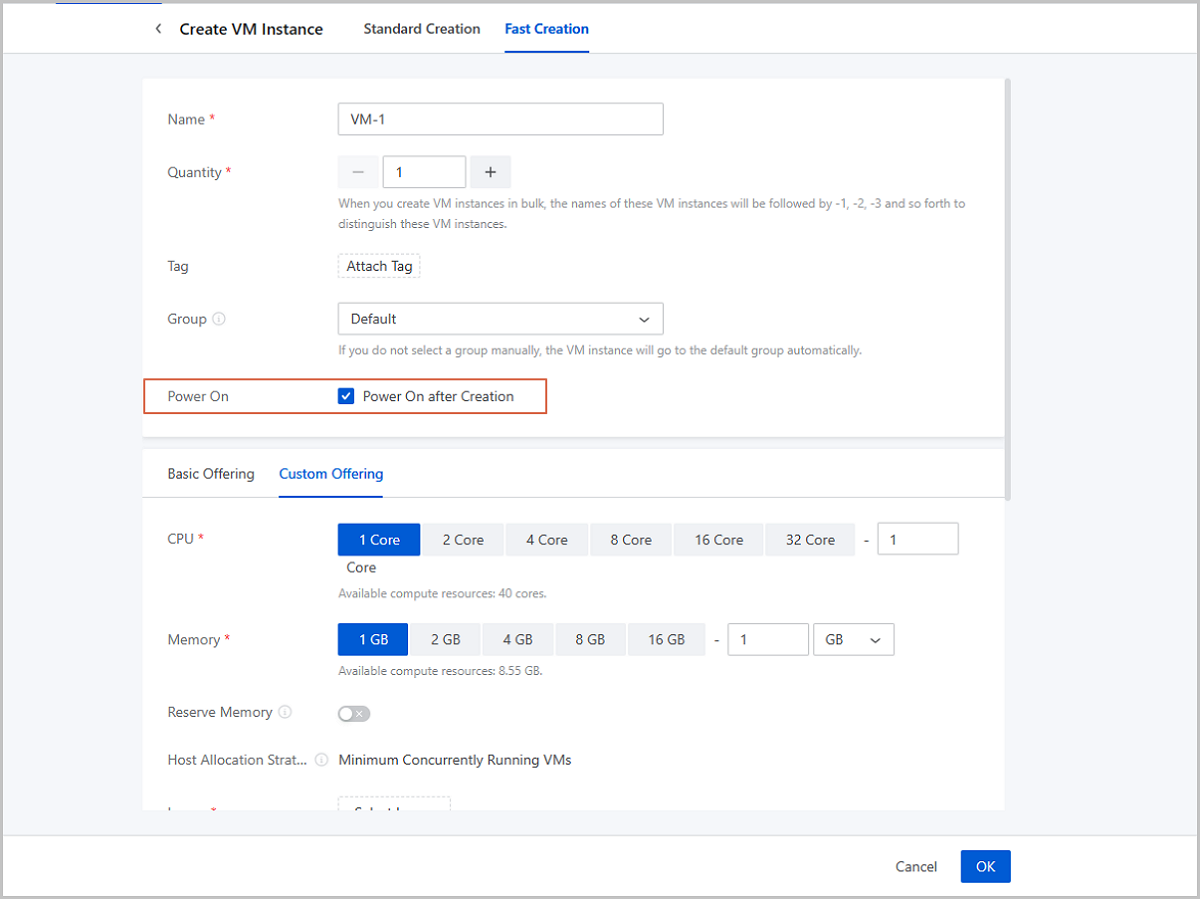
- Allows you to choose whether make a VM instance powered on automatically after it is created.
- Improvements on image uploading.
- Improves image uploading speed to ImageStore.
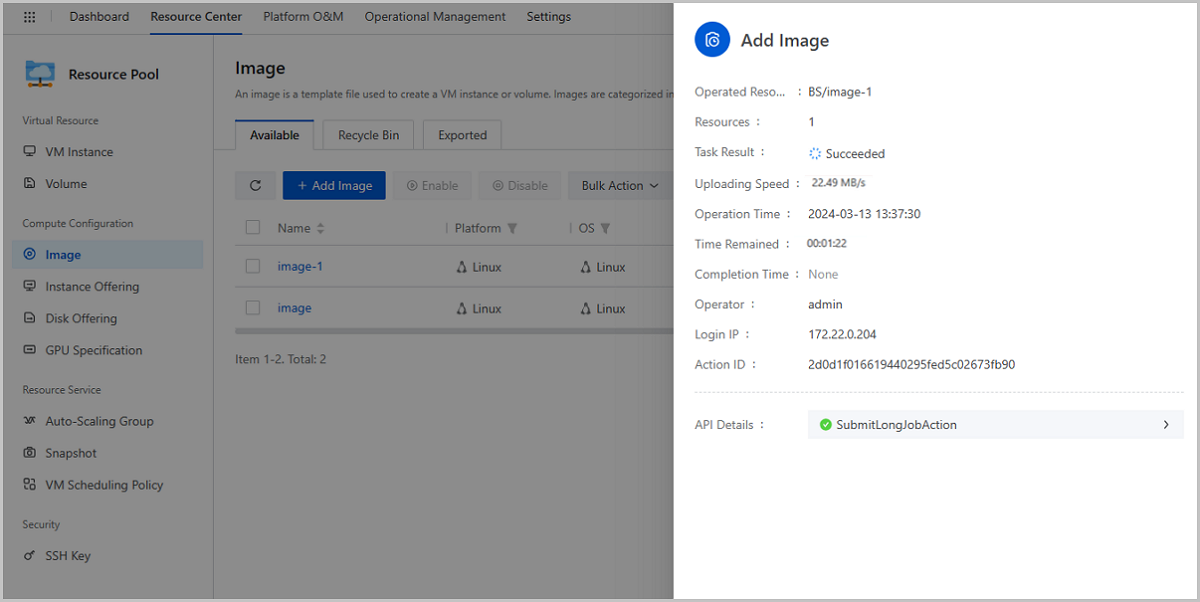
- Displays image uploading speeds and remaining time in real-time.
- Calculates image MD5 after the uploading, which can be used to verify the image integrity.
- Supports isolated VLAN in L2VlanNetwork.
- Supports receiving/sending LLDP information.
- A new primary storage type: Vhost.
- Optimizations on monitoring & alarm.
- Supports new endpoint types: WeCom and Lark.
- Supports message templates for WeCom, Lark, and HTTP application endpoints.
- Adds new fields in message template, providing more alarm details.
- New resource data displayed on the host list: CPU Utilization Average and Memory Utilization.
- Restores related data volume by default when you restoring a VM instance backup.
- Displays related backup jobs on VM details pages.
- Releases a new x86 ISO on Official Website: H84R ISO.
VM Instance
VM Console Enhancements
ZStack Cloud 5.0.0 makes following enhancements on VM consoles.
Supports Power Management in VM Consoles
Starting from ZStack Cloud 5.0.0, VM power managements are supported on VM console pages, which effectively improves the VM O&M efficiency. Supported operations now include stopping, rebooting, resuming, pausing, and powering off VM instances.
Starting VM instances is not supported in VM consoles. You need to exercise this operation on the VM main list or on the VM details page.
Allows You to Reboot VM Instance without Interrupting the Console Connection
In previous versions, rebooting VM instance interrupts the connection to the VM console. After the rebooting, you have to manually relaunch a console page to continue your operations in the console.
Starting from ZStack Cloud 5.0.0, an existing VM console connection will automatically recover after a VM rebooting. This allows you to continue your operations in the VM console without launching a new console page and enhances your usage experience.

VM Console Page Automatically Adapts to the Browser Resolution
Starting from ZStack Cloud 5.0.0, VM console pages can adapts to the browser resolution automatically, ensuring a clear and complete console screen regardless of the browser resolution value.
Allows You to Choose Whether power on a VM Instance Automatically after it is Created
ZStack Cloud 5.0.0 adds a parameter Power On on VM creation pages. With this parameter, you can define whether power on a VM instance automatically after it is created.
Volume and Image
Improvements on Image Uploading
ZStack Cloud 5.0.0 improves the image uploading process from three aspects.
Improves Image Uploading Speed to ImageStore
ZStack Cloud 5.0.0 enhances the image uploading speed to backup storage of ImageStore type. With a gigabit network, the speed of uploading images through local files increases by 210% on average; the speed of uploading images through URLs increases by 25% on average. However, URL path, URL download methods, and other factors may also affect the image uploading speed.
Displays image uploading speed and estimated remaining time in real-time.
Starting from ZStack Cloud 5.0.0, after adding an image through a local file, you can view the image uploading speed and remaining time in the task detail to better grasp the uploading progress.
Currently, this improvement applies to image uploaded through local files only.
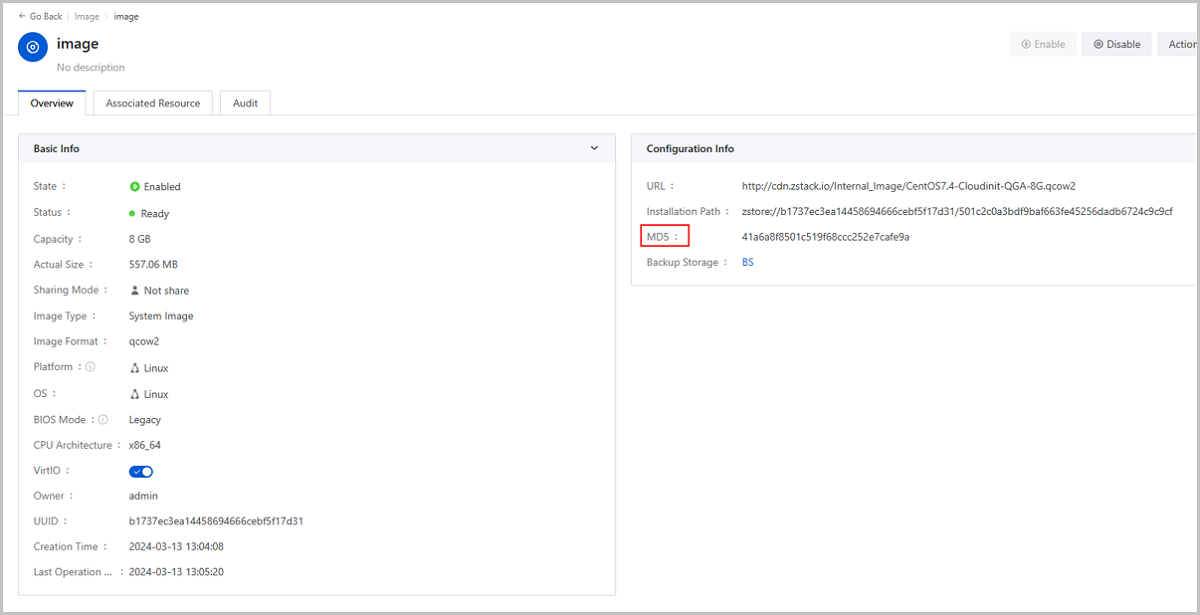
Calculates image MD5 after the uploading, which can be used to verify the image integrity.
Starting from ZStack Cloud 5.0.0, the system automatically calculates the MD5 value of a uploaded image and displays it on the image details page. You can verify the image integrity by checking the MD5.
 Note:
Note:
- The system does not calculate MD5 for images uploaded to Ceph backup storage.
- A VMDK image will be converted into a QCOW2-formatted or ROW-formatted image, which causes an inevitable MD5 change. Therefore, if you upload a VMDK file, do not rely on this MD5 to verify the image integrity.
Cloud Network
Supports Isolated VLAN in L2VlanNetwork
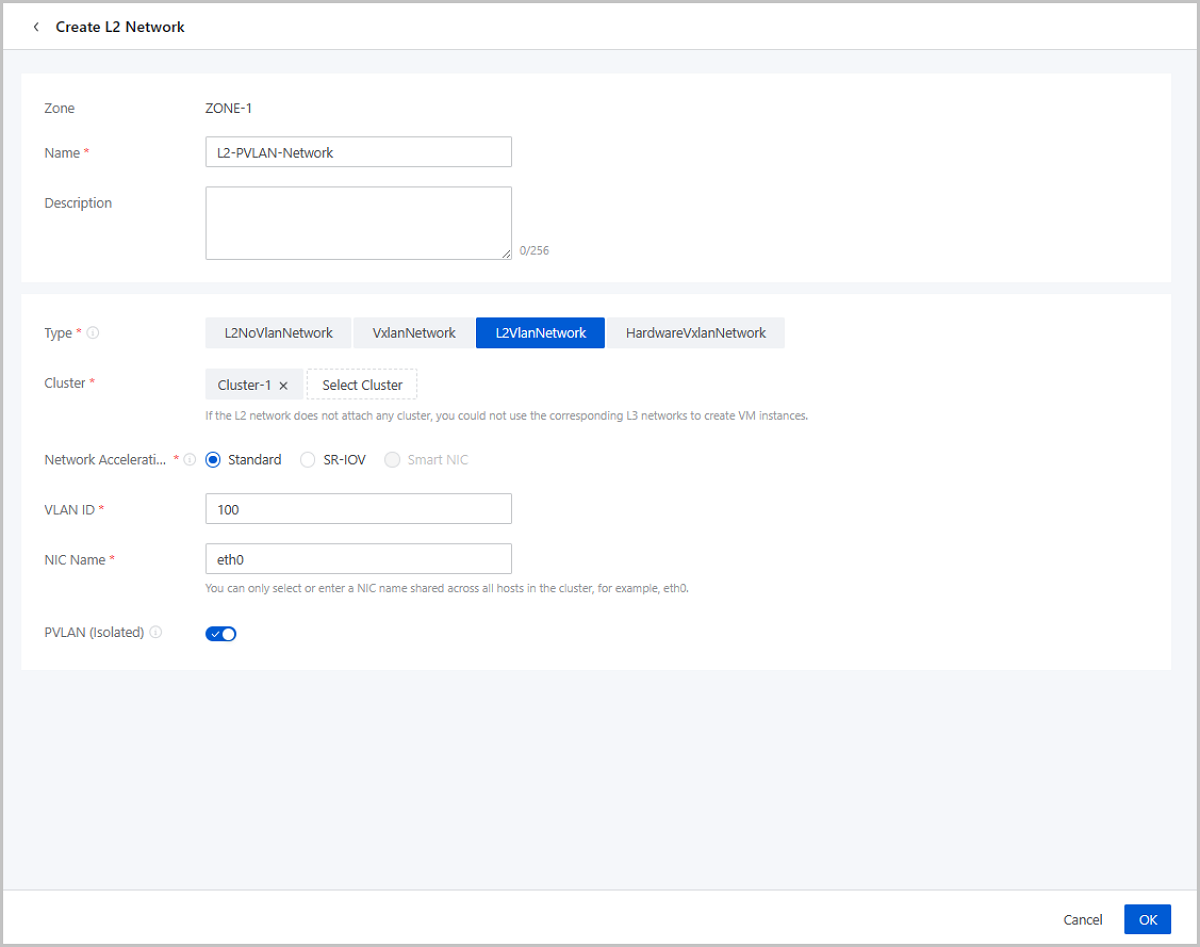
Starting from ZStack Cloud 5.0.0, you can enable PVLAN (Isolated) when creating an L2VlanNwetwork. Once enabled, the Cloud implements the PVLAN’s isolated VLAN function, effectively restricting communication between resources within the same VLAN network. This means that VM instances in the L3 network created from this L2 network cannot communicate with each other.
PVLAN (Isolated) helps users achieve layer 2 security controls, reduce the number of subnets required, and improve IP address utilization. This function is usually used in conjunction with physical switches to meet advanced VLAN networking requirements.
Supports Receiving/Sending LLDP Information
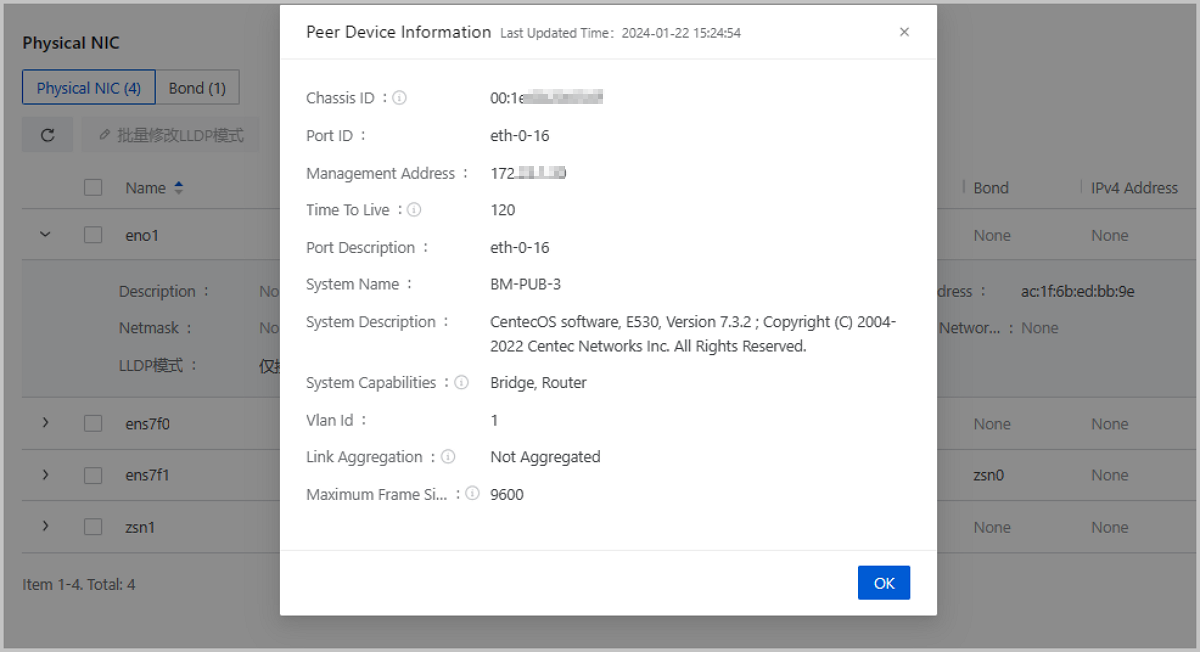
Starting from ZStack Cloud 5.0.0, physical NICs support receiving/sending LLDP information, which can identify neighboring devices in the same network, such as uplink switch port information, for easy network fault location and troubleshooting.
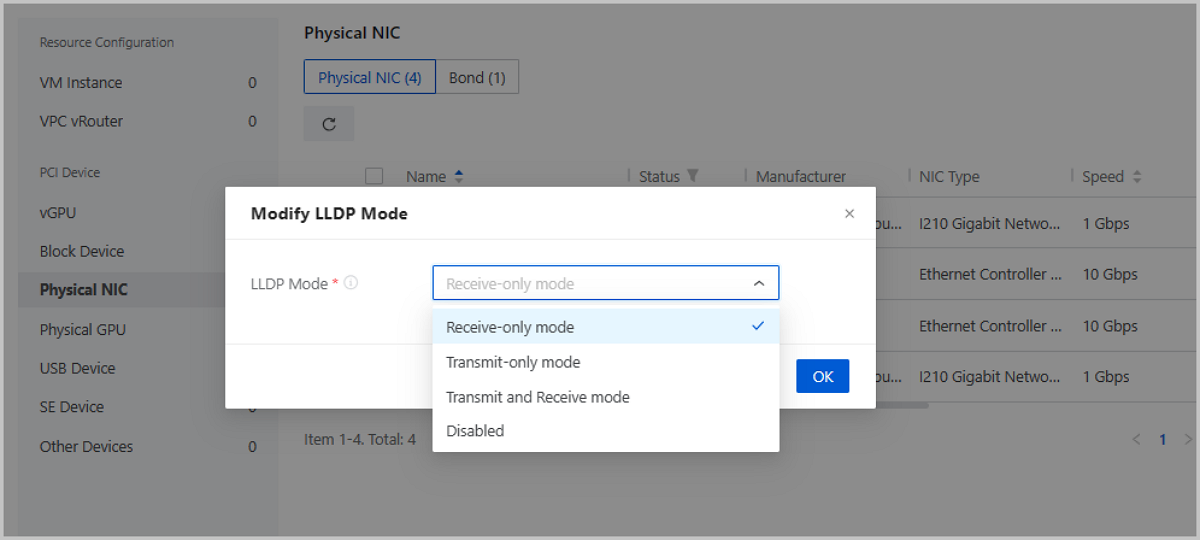
ZStack Cloud provides 4 LLDP modes, including receive-only mode, transmit-only mode, transmit and receive mode, and disabled. You can flexibly choose the appropriate mode based on their specific business needs.
Cloud Storage
A New Primary Storage Type: Vhost
Starting from ZStack Cloud 5.0.0, a new type of primary storage called Vhost is added, which supports the basic lifecycle management of VM instance and volume based on Vhost primary storage. The Vhost primary storage uses vhost-user mode to interface with high-performance SSD distributed storage systems. Using Vhost storage to deliver volume services helps to minimize virtualization overhead, lower latency, and increase throughput. You can enjoy a more efficient, reliable volume service with lower latency.
Platform O&M
Optimizations on Monitoring & Alarm
ZStack Cloud 5.0.0 makes following optimizations on monitoring & alarm.
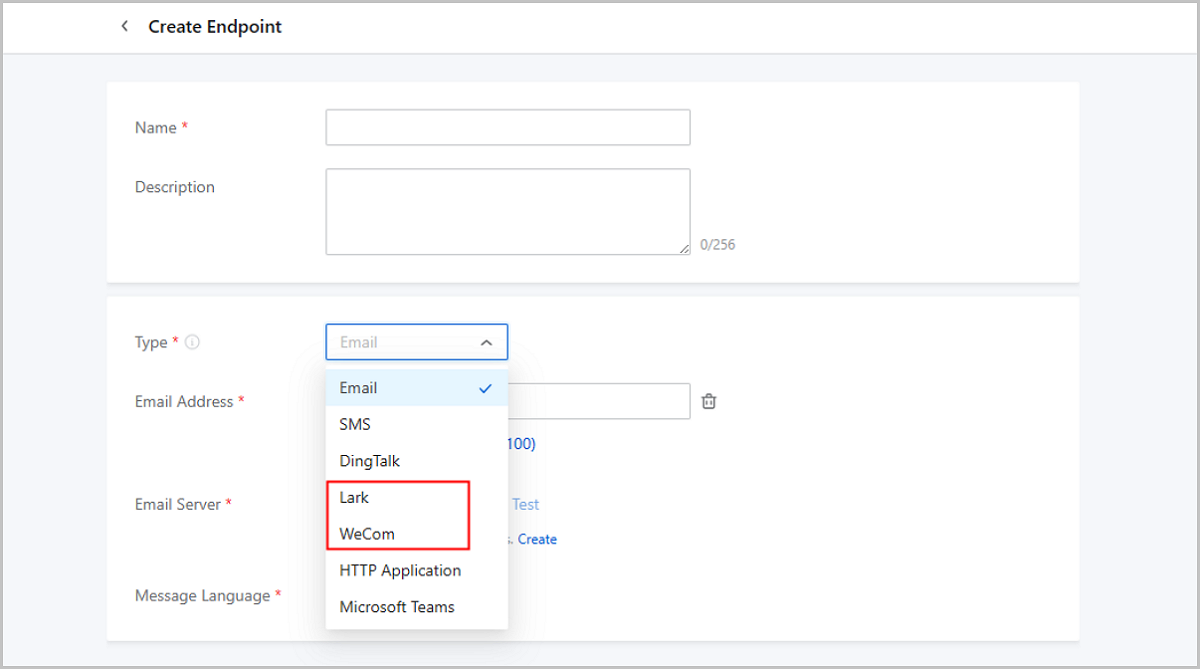
Supports new endpoint types: WeCom and Lark
ZStack Cloud 5.0.0 supports new endpoint types: WeCom and Lark. After creating a group robot on the WeCom or Lark platform, you can add the robot webhook to ZStack Cloud to make Cloud alarms sent to specified WeCom or Lark groups.
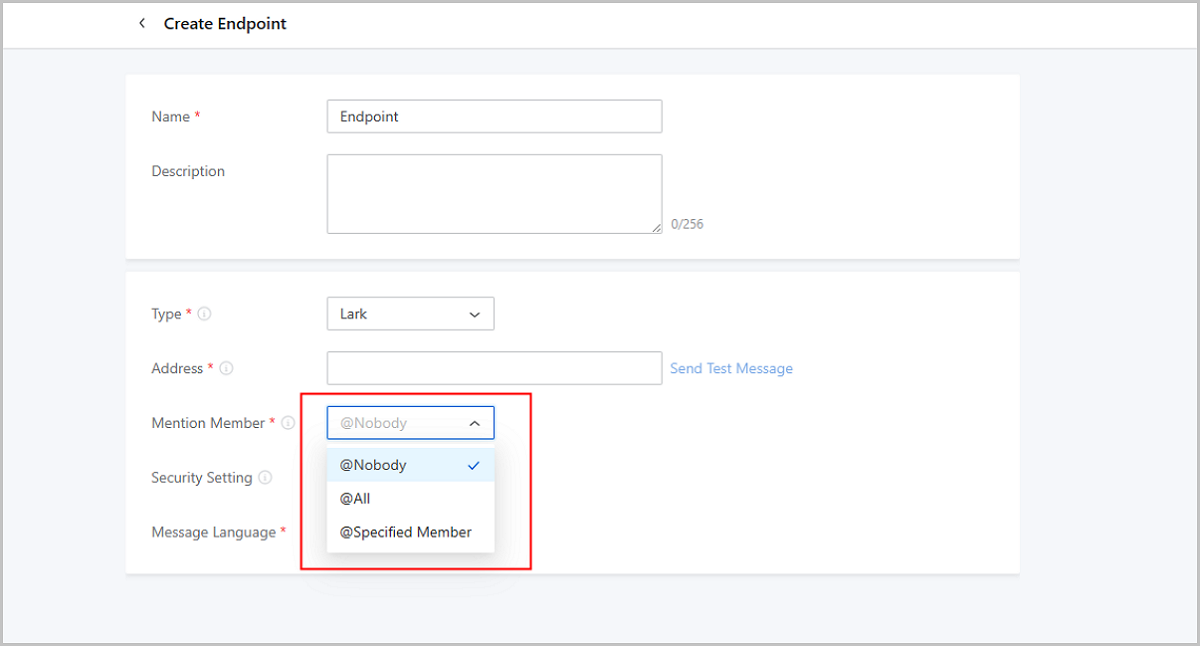
A WeCom or Lark robot can @ group members when sending alarm messages to attract their attention in time. You can enable/disable this @ function for WeCom or Lark endpoints on ZStack Cloud and manage the @ member lists flexibly.
Same as other endpoints, a WeCome or Lark endpoint can be used by resource alarms, event alarms, extended alarms, resource groups, and one-click alarm.
Supports message templates for WeCom, Lark, and HTTP application endpoints.
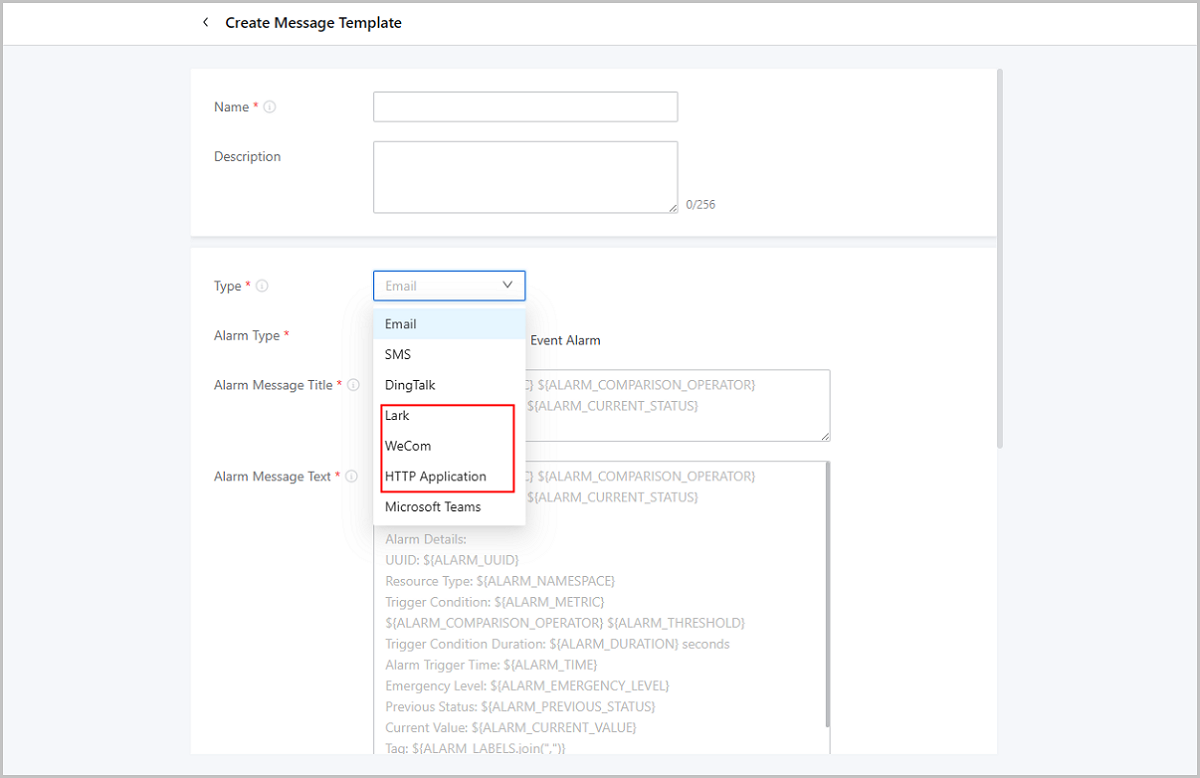
Starting from ZStack Cloud 5.0.0, you can customize WeCom, Lark, and HTTP application message templates to unify the format of alarm messages sent to corresponding endpoints.
ZStack Cloud offers template samples respectively for WeCom, Lark, and HTTP application. You can refer to these samples and configure needed fields in your custom templates.
ZStack Cloud also provides system default templates. In scenarios where you do not create custom message templates, alarm messages are sent according to system default templates.
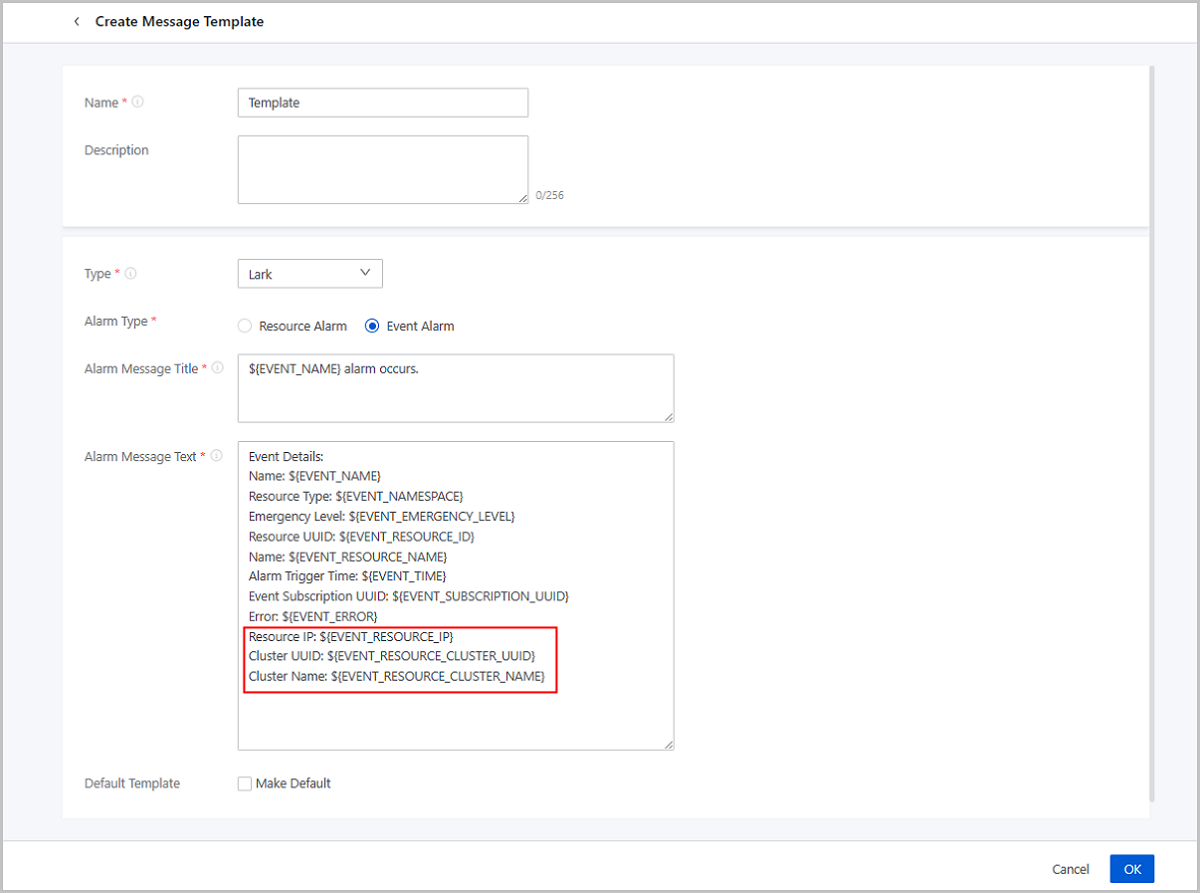
Adds New Fields in Message Templates, Providing More alarm Details
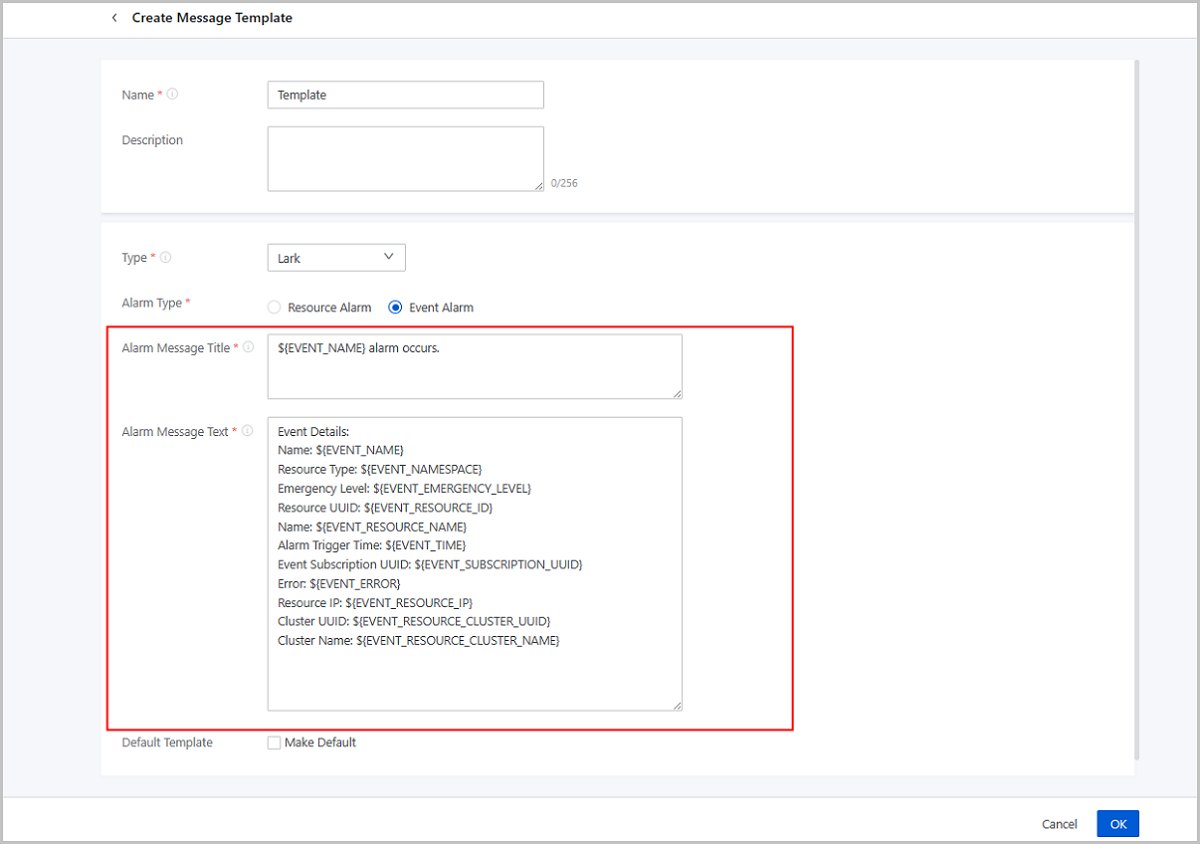
Starting from ZStack Cloud 5.0.0, you can add three new fields, Resource IP, Cluster UUID, and Cluster Name, in Email, DingTalk, Lark, WeCom, HTTP application and Microsoft Teams message templates to get more detailed alarm information on the 3rd-party platform.
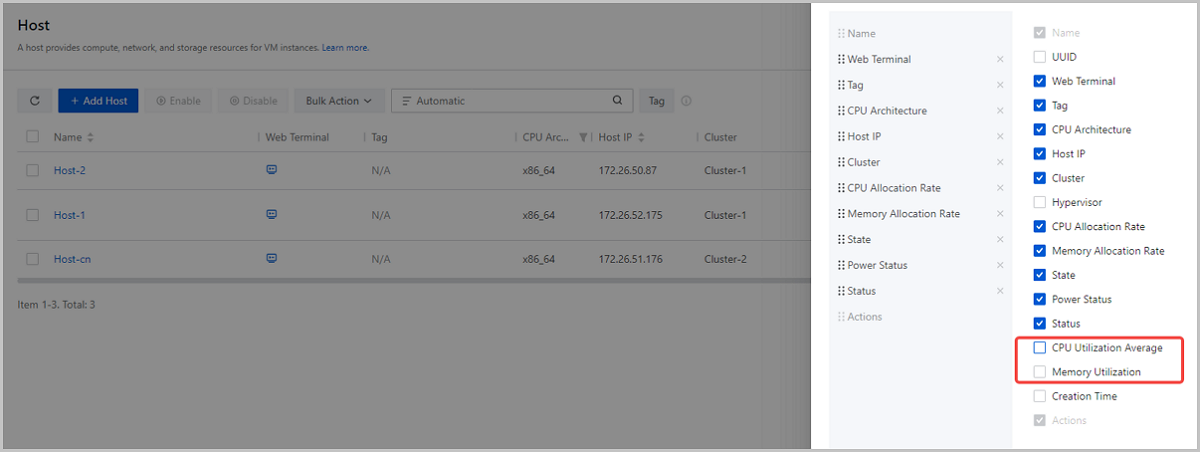
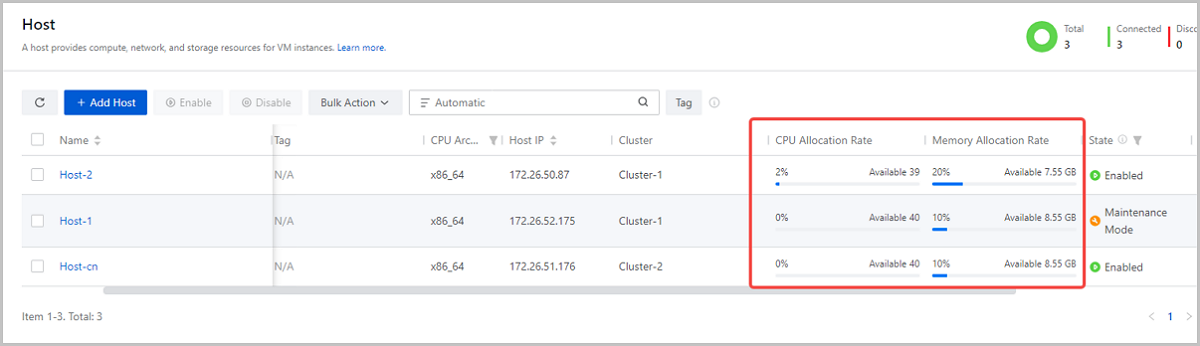
New Resource Data Displayed on the Host Main List: CPU Utilization Average and Memory Utilization
Starting from ZStack Cloud 5.0.0, host main list can display two new resource utilization data: CPU Utilization Average and Memory Utilization.
These two data does not displayed on the host main list by default but you can add them by customizing the list, so as to get more intuitive and complete host information.
Backup Management
Restores Related Volume Data by Default When You Restoring a VM Backup
Starting from ZStack Cloud 5.0.0, when you restore a VM instance backup, the volume data attached to the VM instance is simultaneously recovered by default. You can modify this default setting as needed.
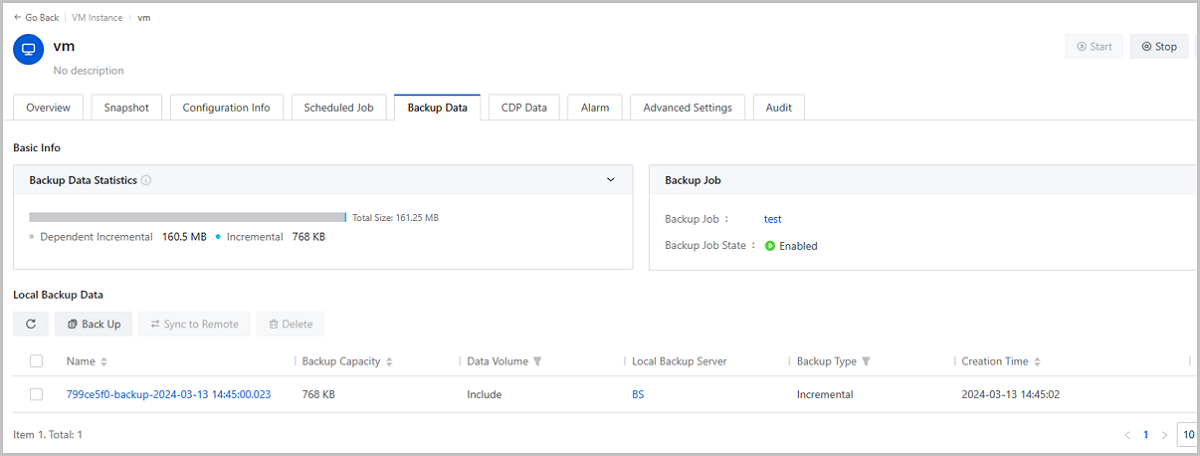
Displays Related Backup Jobs on VM Details Pages
Starting from ZStack Cloud 5.0.0, you can view associated backup jobs information from the Backup Data tab on VM details pages. To VM instances without a backup job associated, you can create a backup job directly from this tab page.
Installation and Upgrade
Officially Releases H84R ISO
ZStack Cloud 5.0.0 officially releases a new ISO, H84R ISO, on the official website, and stops providing H76C and H79C ISO, which means that from 5.0.0, only H84R ISO is available on the ZStack Cloud official website. If you have deployed your Cloud based on an H76C or H79C ISO and need an upgrade or expansion, contact our official technical support.
H84R ISO provides all ZStack Cloud features and is recommended for new Cloud installation. It is based on the ZStack self-developed system Helix, Kernel of 4.18.0-425.19.2.3.g75f4bb8fb9a0 version, QEMU of 6.2 version, and Libvirt of 8.0 version.