
Zone
What is Zone?
A zone is a logical group of resources such as clusters, L2 networks, and primary storage. Zone is the largest resource scope defined in the Cloud.
Basics
- In a data center, a zone corresponds to an equipment room.
- A zone defines a visible boundary. Sub-resources within the same zone are visible mutually and can form a certain relationship. However, sub-resources within different zones are invisible mutually and cannot form mutual relationships.
Characteristics
- Zone isolation:
Isolates physical sub-resources such as primary storage and hosts in different zones, ensuring stability and fault tolerance to the maximum extent.
Reduces network delay and allows for faster access.
- Resource management:
You can set a platform administrator for each zone. A platform administrator can manage one or more zones.
The resources of each project can belong to only one zone.
- Global view:
After you plan a zone, you can view all the resources in the zone on a dedicated dashboard. You can view the resource usage by KVM or vCenter.
Considerations
- Hosts in the same physical layer 2 broadcast domain must be in the same zone. These hosts can be grouped as one or more clusters.
- A physical layer 2 broadcast domain cannot span multiple zones. Instead, it must be mapped as an L2 network in a single zone.
- A primary storage cannot span multiple zones. Instead, it must be mapped as a primary storage in a single zone.
- A data center can have multiple zones.
- A zone can have one or more image storage attached.
- Resources in a zone, such as a primary storage, can only access the image storage attached to the zone.
- An image storage can be deleted from a zone. After the image storage is deleted, resources in the zone will not see the image storage any more.
- If an image storage is no longer accessible to resources of a zone due to network typology changes in a data center, you can detach the image storage from this zone.
- To better manage the relationship between image storage and zone, the UI specifies that an image storage can only be attached to one zone at a time. That is, an image storage that has been attached to a zone cannot be reattached to the other zone. When you add an image storage in the UI, the image storage will be automatically attached to the current zone. When you delete a zone, you will directly delete the image storage attached to the zone.
Create a Zone
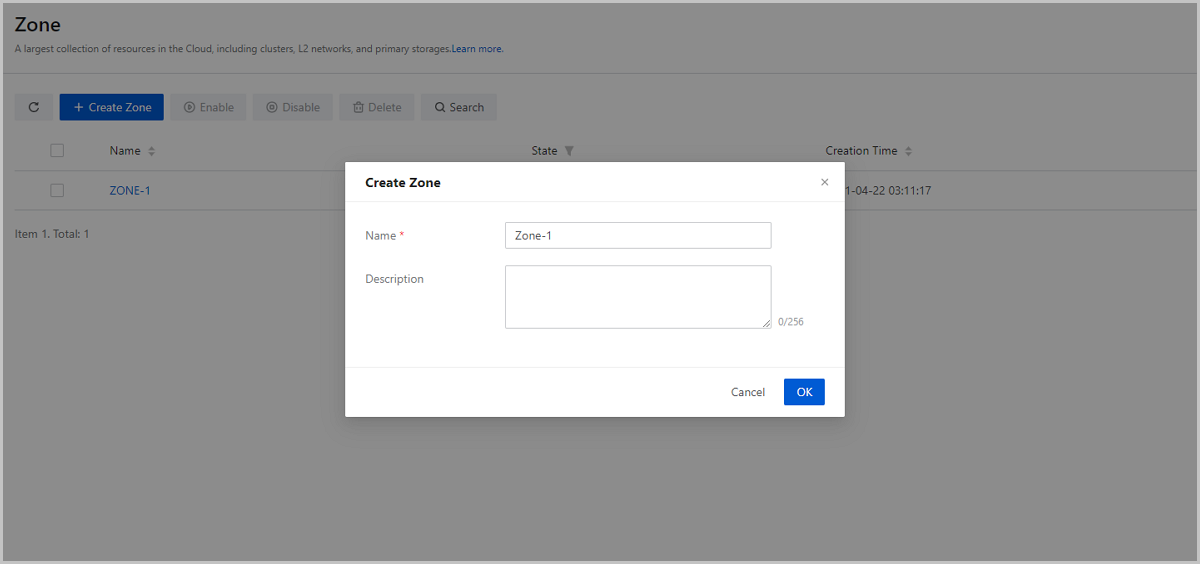
On the main menu of ZStack Cube Ultimate, choose . On the Zone page, click Create Zone. Then, the Create Zone page is displayed.
- Name: Enter a name for the zone.
- Description: Optional. Enter a description for the zone.
Manage a Zone
On the main menu of ZStack Cube Ultimate, choose . Then, the Zone page is displayed.
The following table lists the actions that you can perform on a zone.
| Action | Description |
|---|---|
| Create Zone | Create a zone. |
| Edit Zone | Edit the name and description of the zone. |
| Enable Zone | Enable a disabled zone. |
| Disable Zone | Disable a enabled zone. Note: Note:
|
| Set as Default Zone | Set a zone as the default zone.Note:
|
| Delete Zone | Delete a zone.Note: Deleting a zone also deletes the clusters,
hosts, networks, primary storage, and managed vCenters, and all
sub-resources (such as VPC vRouter) of each resource in the
zone. Please exercise caution. |