SAN Storage
What is SAN Storage?
Storage Area Network (SAN) storage can be categorized into iSCSI storage and FC
storage:
- iSCSI storage is an SAN storage that uses the iSCSI protocol for data transmission. You can add an iSCSI SAN block as a Shared Block primary storage or pass through the block to a VM instance.
- FC storage is an SAN storage that uses the FC technology for data transmission. You can add an FC SAN block as a Shared Block primary storage or pass through the block to a VM instance. ZStack Cube Ultimate supports FC for SAN storage connection with multi-path I/O.
Scenarios
- Passes through an iSCSI or FC disk to a VM instance.
- Adds an iSCSI or FC disk as a shared block and takes the shared block as a Shared Block primary storage.
Considerations
iSCSI storage:
- You can add a disk that is not attached to a VM instance as a Shared Block primary storage.
- A logical unit number (LUN) that is added as a primary storage cannot be used for other purposes.
- You can attach a disk that is not added as a primary storage to a VM instance.
- You can attach a disk to multiple VM instances or attach multiple disks to one VM instance.
FC storage:
- If a block device is not attached to a VM instance and the cluster where the block device resides is in normal state, you can add the block device as a Shared Block primary storage.
- A logical unit number (LUN) that is added as a primary storage cannot be used for other purposes.
- You can attach a block device that is not added as a primary storage to a VM instance.
- You can attach a block device to multiple VM instances or attach multiple block devices to one VM instance.
Add an iSCSI Storage
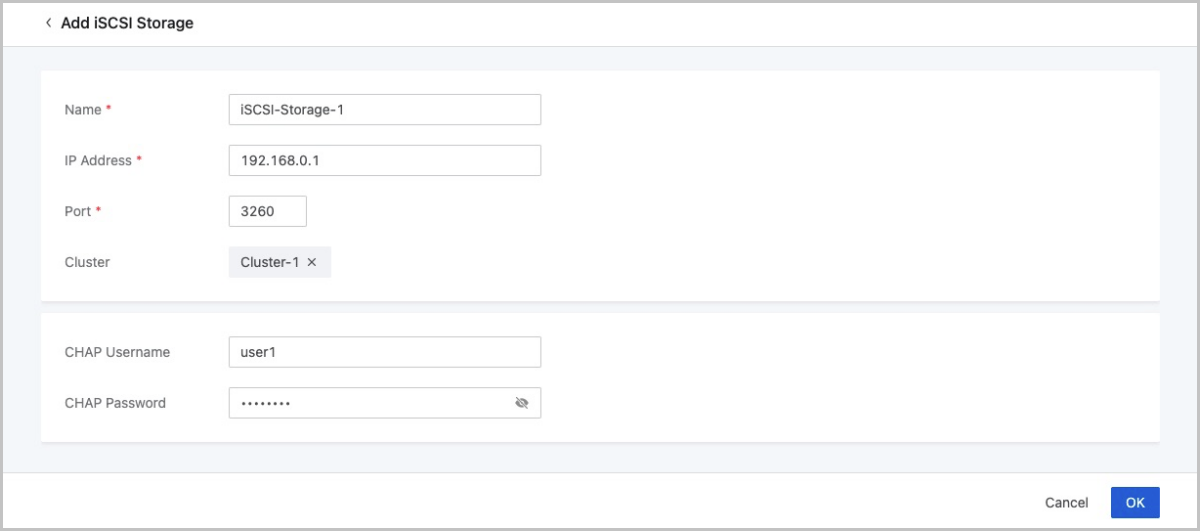
On the main menu of ZStack Cube Ultimate, choose . On the iSCSI Storage page, click Add iSCSI Storage. Then, the Add iSCSI Storage page is displayed.
On the displayed page, set the following parameters:
- Name: Enter the name of the iSCSI storage.
The name must be 1 to 128 characters in length and can contain Chinese characters, letters, digits, spaces, hyphens (-), underscores (_), periods (.), parenthesis (), colons (:), and plus signs (+) and cannot begin or end with spaces.
- IP Address: Set the IP address of the iSCSI storage.
- Port: Set the port of the iSCSI storage. Default port: 3260.
- Cluster: Optional. Select a cluster. You can also attach a cluster after you add the iSCSI storage.
- CHAP Username: Optional. Enter the CHAP username if the iSCSI storage has CHAP authentication configured.
- CHAP Password: Optional. Enter the CHAP password if the iSCSI storage has CHAP authentication configured.