vRouter Offering
What is vRouter Offering?
A vRouter offering defines the number of vCPU cores, memory size, image, management network, and public network configuration settings of VPC vRouters. You can use a vRouter offering to create VPC vRouters that can provide network services for public networks and VPC networks. You can use a vRouter offering to create multiple VPC vRouters. These VPC vRouters share the same public network and management network defined in the vRouter offering. The public network and management network defined in the vRouter offering cannot be detached from the VPC vRouters.
Create a vRouter Offering
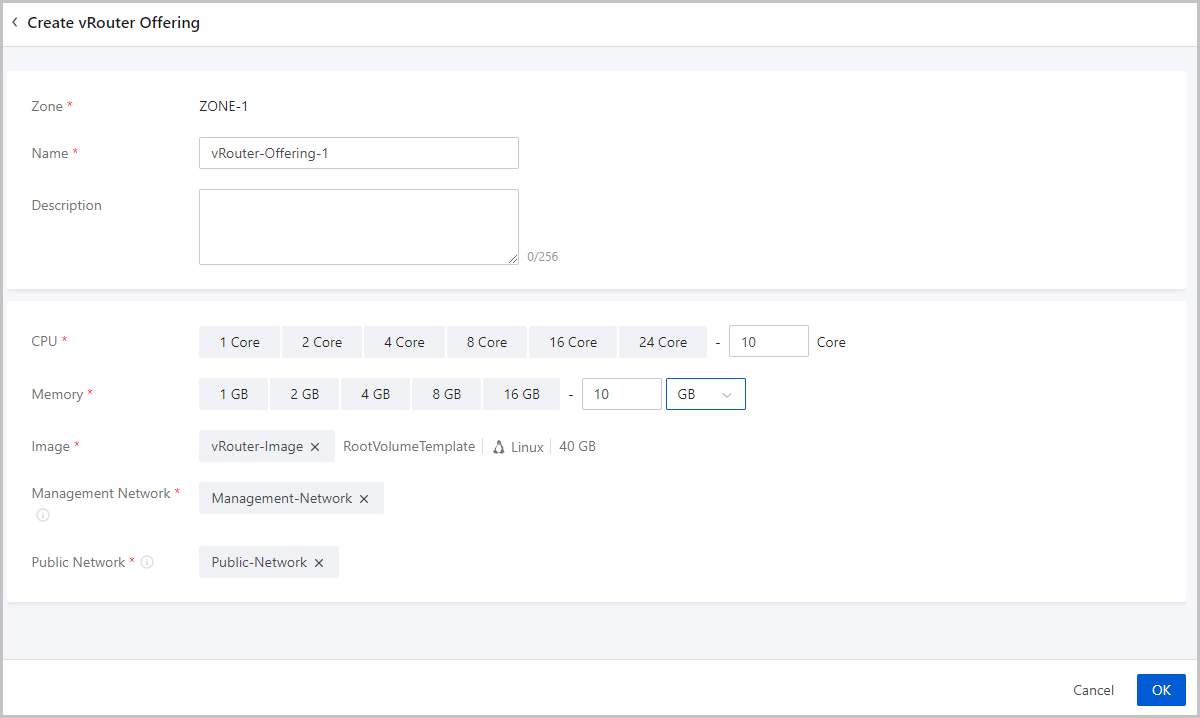
On the main menu of ZStack Cube Ultimate, choose . On the vRouter Offering page, click Create vRouter Offering. Then, the Create vRouter Offering page is displayed.
- Zone: By default, the current zone is displayed.
- Name: Enter a name for the vRouter offering.
- Description: Optional. Enter a description for the vRouter offering.
- CPU: Set the number of CPU cores for a
vRouter.
 Note: Currently, a vRouter can have up to 240 CPU cores. In an
actual production environment, we recommend that you set more than 8 CPU
cores for a vRouter.
Note: Currently, a vRouter can have up to 240 CPU cores. In an
actual production environment, we recommend that you set more than 8 CPU
cores for a vRouter. - Memory: Set the memory size for a vRouter. Unit: MB, GB, and TB. In an actual production environment, we recommend that the memory size greater than 8 GB.
- Image: Select a vRouter image you added
before.Note: If
the L3 public network in the vRouter offering has a network range of the
IPv6 type, when you create a VPC vRouter, you must use the vRouter image of
version 3.10.0 or later.
- Management Network: Select an L3 management network you
created before.
- A management network is used by the management node to deploy and configure resources such as hosts and VPC vRouters.
- If a system network is used to manage physical resources, select the system network as the management network.
- If you use a public network to manage physical resources, select the public network as the management network.
- Public Network: Select a public network you created
before.
- vRouters created from this vRouter offering can provide VPC network services.