
SDN Instance
What is SDN Instance?
SDN instance: A dedicated VM instance designed to provide SDN network capabilities.
Considerations
- Before you create an SDN instance, you need to prepare the management network and SDN image required for an SDN instance.
- An SDN instance is created from an SDN instance offering with a management network. The management network defined in the instance offering cannot be detached.
Create an SDN Instance
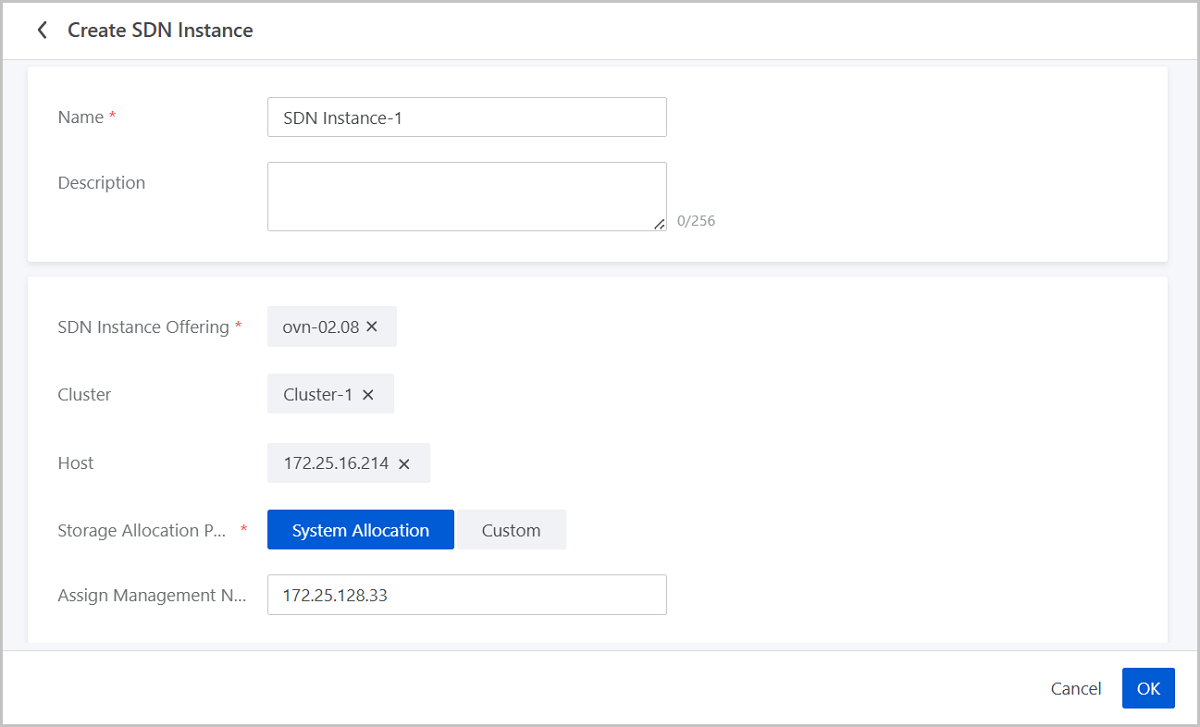
On the main menu of ZStack Cube Ultimate, choose . On the SDN Instance page, click Create SDN Instance. Then, the Create SDN Instance page is displayed.
On the displayed page, set the following parameters:
- Name: Enter a name for the SDN instance.
- Description: Optional. Enter a description for the SDN instance.
- SDN Instance Offering: Select an SDN instance offering.
- Cluster: Optional. Specify a cluster for the host on the which the SDN instance is to be started.
- Host: Optional. Specify a host on which the SDN instance is to be started.
- Storage Allocation Policy: The following two policies are
supported:
- System Allocation: The system allocates a primary storage according to the preconfigured policy.
- Custom: Select a primary storage as needed.
- Assign Management Network IP: Optional. Assign a management network IP to the SDN instance.
Manage an SDN Instance
On the main menu of ZStack Cube Ultimate, choose . Then, the SDN Instance page appears.
The following table lists the actions that you can perform on an SDN instance.
| Action | Description |
|---|---|
| Create SDN Instance | Create an SDN instance. |
| Edit Name and Description | Edit the name and description of an SDN instance. |
| Launch Console | Access an SDN instance through terminals. |
| Start SDN Instance | Start a stopped SDN instance. |
| Stop SDN Instance | Stop a running SDN instance. Note: Stopping an SDN
instance does not affect the existing VM network on the
associated hosts. When stopped, you cannot create new VM
instances using the associated OVS network. Note: Stopping an SDN
instance does not affect the existing VM network on the
associated hosts. When stopped, you cannot create new VM
instances using the associated OVS network. |
| Reboot SDN Instance | Reboot an SDN instance.Note: During the reboot
process, you cannot create new VM instances using the associated
OVS network or add new NICs to existing VM
instances. |
| Change Host | Migrate an SDN instance to another host.
|
| Change Host and Primary Storage | Migrate an SDN instance to another host and
primary storage.
|
| Delete SDN Instance | Delete an SDN instance.Note: Deleting the SDN
instance will cause the associated SDN controller to lose
connection. Proceed with caution. |