
VPN
What is VPN?
 Note: The CIDRs from the local vRouter to Alibaba Cloud
which use the IPsec VPN to realize an intercommunication cannot overlap with each
other.
Note: The CIDRs from the local vRouter to Alibaba Cloud
which use the IPsec VPN to realize an intercommunication cannot overlap with each
other.Scenario
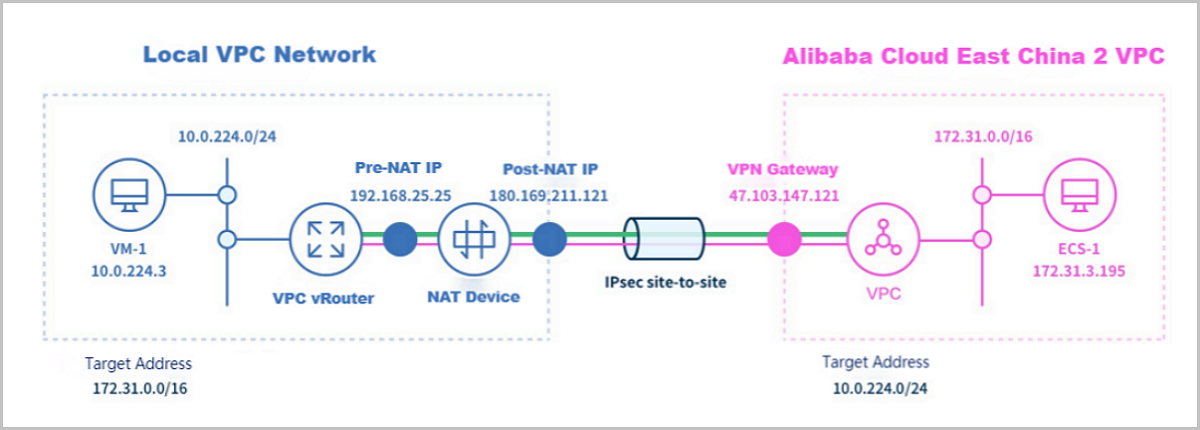
Main Procedures
- In ZStack Cube Ultimate Hybrid Cloud Management, add a region, zone, VPC, and vSwitch associated with the VPC in order.
- Purchase a VPN gateway on Alibaba Cloud Console.
- Create a Private Cloud VM instance on the VPC netwrok.
- Create an ECS instance.
- Follow Quick Start Wizard to establish a VPN connection.
- Select the purchased VPN gateway. The system can figure out the region, zone, VPC, and vSwitch corresponding to the VPN gateway.
- Finish the connection configuration: Select the VPC vRouter automatically created when you create the local VM instance. Select the public network and VPC network the VPC vRouter attached to and enter the pre-shared key. Advanced parameters are automatically configured. We recommend that you do not change these default values.
- After the connection configuration, ZStack Cube Ultimate automatically finish the following
actions:
- Selects an available VIP on the public network corresponding to the VPC vRouter.
- Uses this VIP to create a VPN customer gateway.
- Establishes a VPN connection on Alibaba Cloud.
- Configures routes for the Alibaba Cloud VPC virtual router. The destination CIDR is the CIDR of the VPC network the local VPC vRouter attached to. The next hop is VPN Gateway.
- Establishes an IPsec connection on ZStack Cube UltimatePrivate Cloud.
- Check whether the local VM instance and the ECS instance can
pingeach other. If so, the IPsec VPN is created successfully.
Manage a VPN Gateway
On the main menu of ZStack Cube Ultimate Hybrid Cloud Management, choose . Then, the VPN Gateway page is displayed.
| Action | Description |
|---|---|
| Edit VPN Gateway | Edit the name and description of a VPN gateway. |
| Delete VPN Gateway | Delete a VPN gateway.Note: By default, only the
local record of the VPN gateway is deleted. You cannot delete
the VPN gateway on Alibaba Cloud. |
Create a VPN Customer Gateway
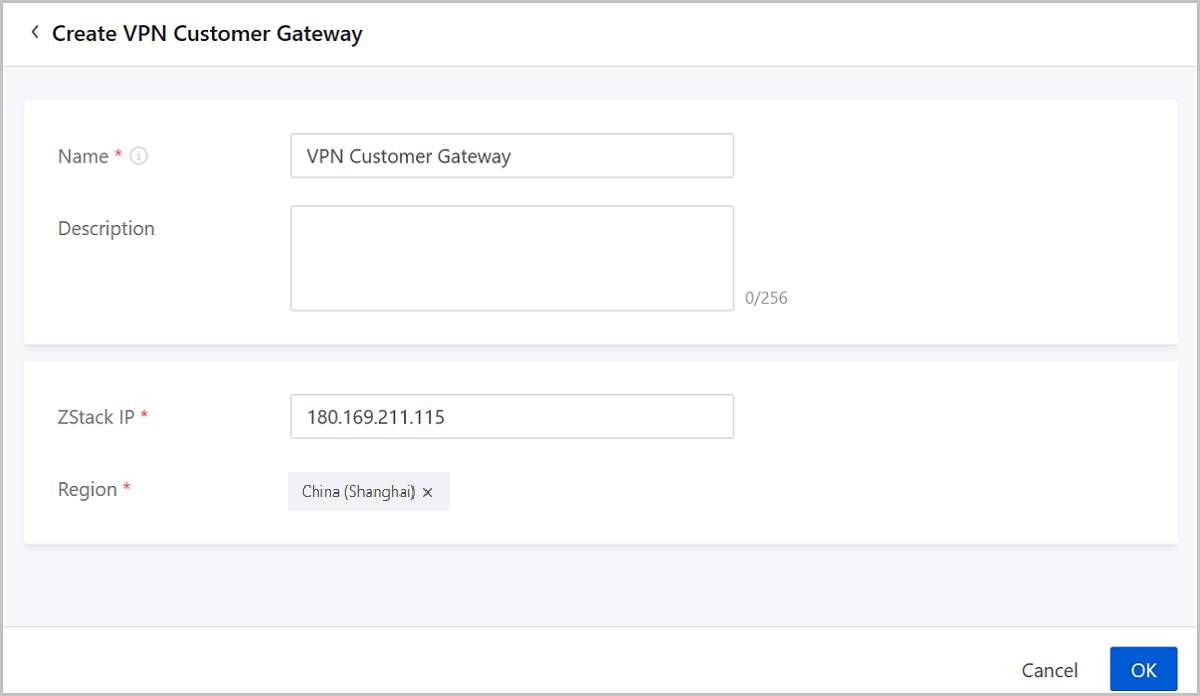
On the main menu of ZStack Cube Ultimate Hybrid Cloud Management, choose . On the VPN Customer Gateway page, click Create VPN Customer Gateway. Then, the Create VPN Customer Gateway page is displayed.
- Name: Enter a name for the VPN customer gateway.
- Description: Optional. Enter a description for the VPN customer gateway.
- ZStack IP: Enter a VIP on the public network corresponding to local VPV vRouter. You need to create the VIP on ZStack Cube UltimatePrivate Cloud in advance.
- Region: Select the region the VPN gateway resides on.
Manage a VPN Customer Gateway
On the main menu of ZStack Cube Ultimate Hybrid Cloud Management, choose . Then, the VPN Customer Gateway page is displayed.
| Action | Description |
|---|---|
| Edit VPN Customer Gateway | Edit the name and description of a VPN customer gateway. |
| Create VPN Customer Gateway | Create a VPN customer gateway. |
| Delete VPN Customer Gateway | Delete a VPN customer gateway.Note: By default,
only the local record of the VPN customer gateway is deleted. If
you want to delete the VPN customer gateway on Alibaba Cloud,
select the checkbox of Delete Resources on Alibaba
Cloud. |
Establish a VPN Connection
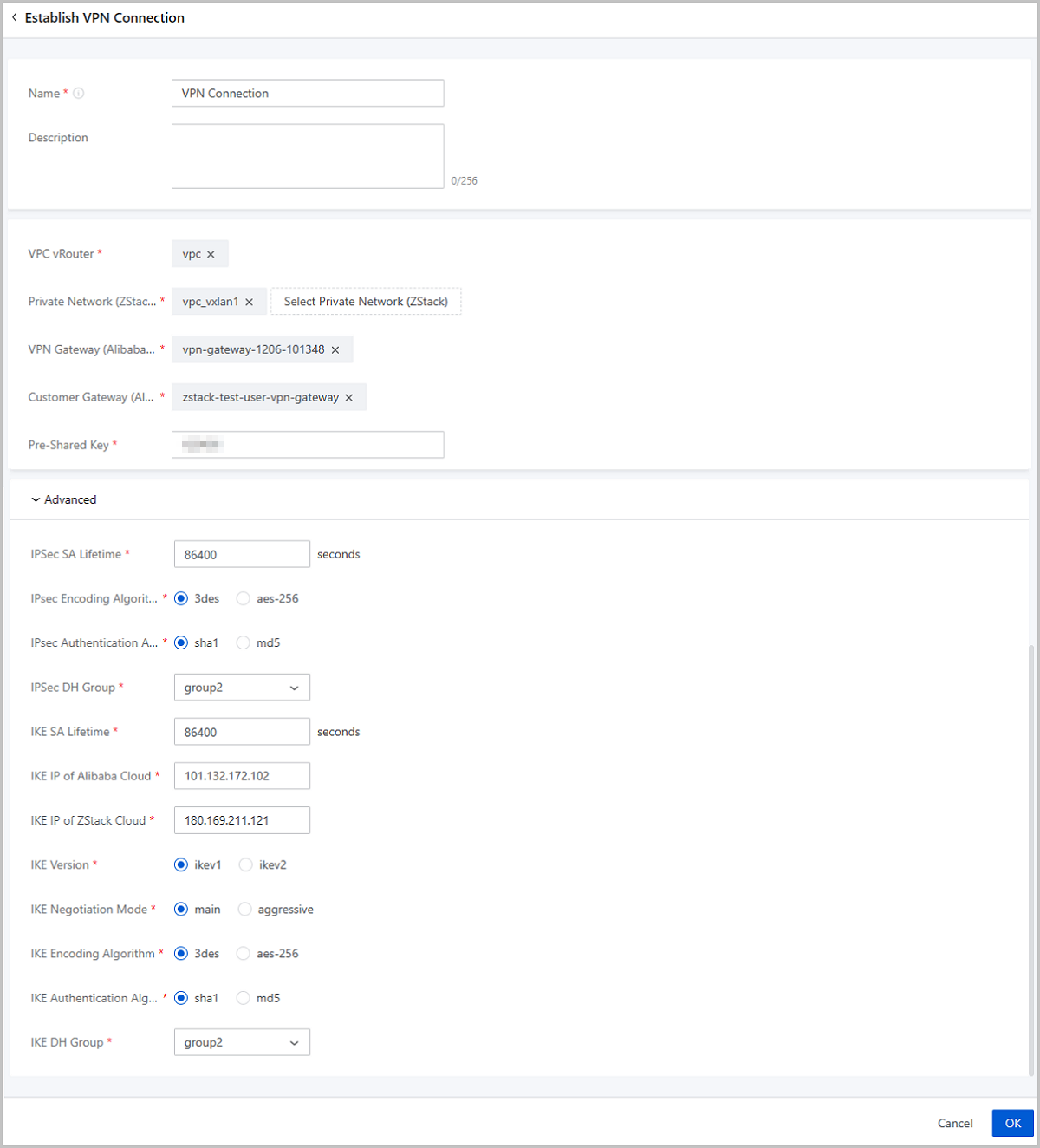
On the main menu of ZStack Cube Ultimate Hybrid Cloud Management, choose . On the VPN Connection page, click Establish VPN Connection. Then, the Establish VPN Connection is displayed.
- Name: Enter a name for the VPN connection.
- Description: Optional. Enter a description for the VPN connection.
- VPC vRouter: Select a VPC vRouter for the VPN connection.
You can select multiple L3 network attached to the VPC vRouter to establish the
VPN connection.Note: If you select multiple L3 networks to
establish the VPN connection. An IPsec tunnel attached with multiple sub
nets is created on local and multiple VPN connections are created on Alibaba
Cloud.
- Private Network (ZStack): Select L3 networks attached to the VPC vRouter. You can select multiple L3 networks.
- VPN Gateway (Alibaba Cloud): Select a purchased Alibaba Cloud VPN gateway.
- Customer Gateway (Alibaba Cloud): Select an Alibaba Cloud Customer Gateway.
- Pre-Shared Key: We recommend that you set a strong key.
- Advanced: We recommend that you do not change default
values of advanced parameters for they ensure the intercommunication between the
local VPC network and Alibaba Cloud VPC.
- IPSec SA Lifetime: 86400 (Default). Unit: second.
- IPsec Encoding Algorithm: 3des (Default).
- IPsec Authentication Algorithm: sha1 (Default).
- IPsec DH Group: group2 (Default).
- IKE SA Lifetime: 86400 (Default). Unit: second.
- IKE IP of Alibaba Cloud: The Alibaba Cloud VPN gateway IP is automatically entered here.
- IKE IP of ZStack: The Alibaba Cloud customer gateway IP is automatically entered here.
- IKE Version: ikev1 (Default).
- IKE Negotiation Mode: main (Default).
- IKE Encoding Algorithm: 3des (Default).
- IKE Authentication Algorithm: sha1 (Default).
- IKE DH Group: group2 (Default).
Manage a VPN Connection
On the main menu of ZStack Cube Ultimate Hybrid Cloud Management, choose . Then, the VPN Connection page is displayed.
| Action | Description |
|---|---|
| Edit VPN Connection | Edit the name and description of a VPN connection. |
| Establish VPN Connection | Establish a VPN connection. |
| Delete a VPN Connection | Delete a VPN ConnectionNote:
|