Data Protection
Snapshot Management
- The snapshot mechanism for centralized storage: Local storage, NFS, Shared Mount Point, and SharedBlock use QCOW2 external snapshot, which is a type of ROW snapshot mechanism.
- The snapshot mechanism for distributed storage: Ceph enterprise edition, Vhost, and CBD use ROW snapshots. Self-Developed Distributed Storage uses COW snapshots.
Centralized Storage Snapshot Mechanism
This section introduces QCOW2 external snapshots.
- Snapshot Chain and Snapshot Tree
Typically, a single disk corresponds to one snapshot chain. ZStack Cloud supports creating a snapshot tree for a disk, where each branch of the tree represents a distinct snapshot chain.
图 1. Snapshot Tree 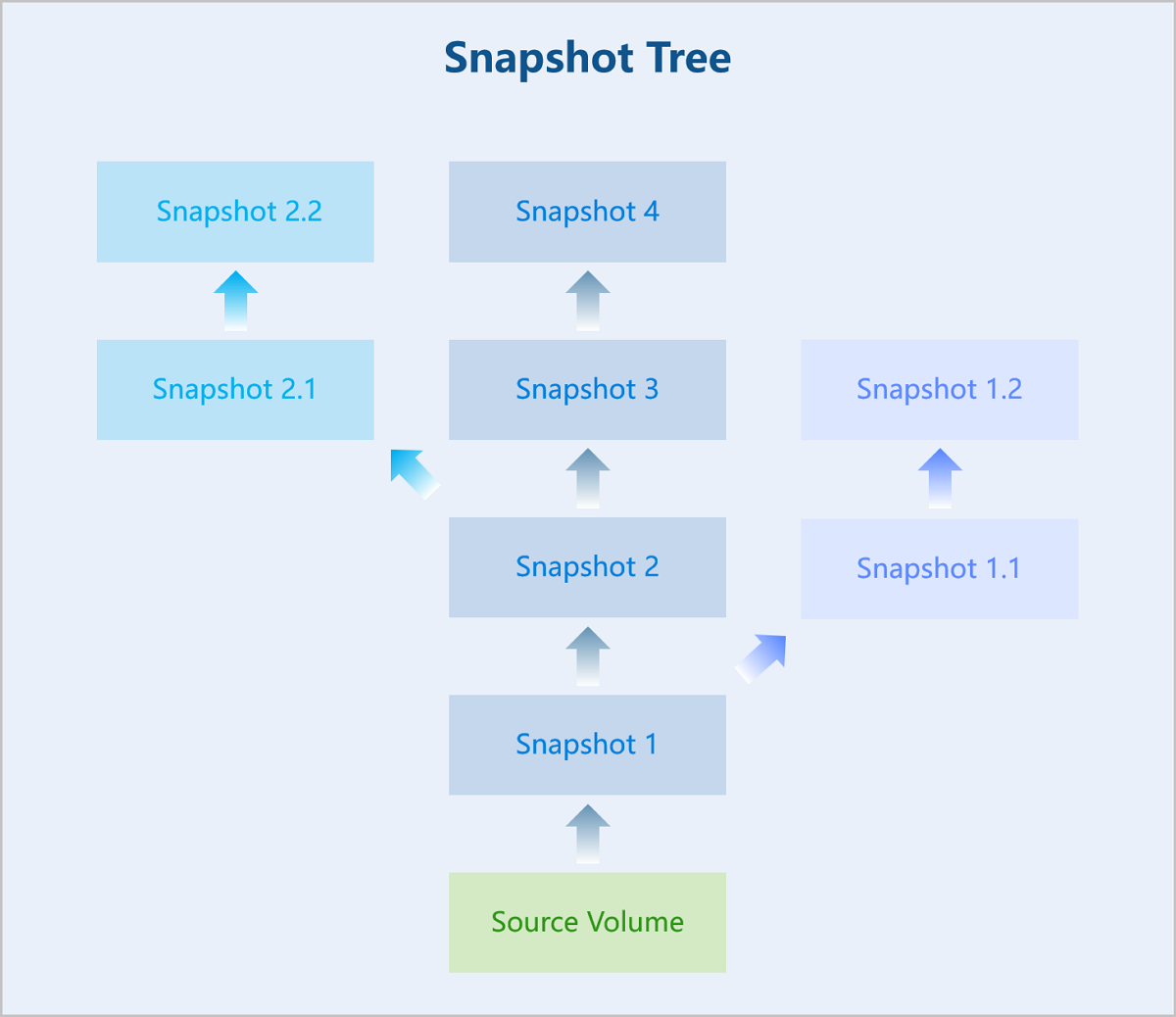
A snapshot tree includes the following information:- Snapshot Chain: A relational chain composed of a set of snapshots for a disk. Each branch of the snapshot tree is a snapshot chain.
- Snapshot Node: An individual node in a snapshot chain, representing a single snapshot of the disk.
- Snapshot Size: The storage space consumed by a snapshot. You can view the total size of all snapshots in the snapshot tree and the size of an individual snapshot node.
 Note:
Note:
- For non-Ceph storage, the system allows a maximum of 128 nodes per snapshot chain by default. You can modify Maximum Incremental Volume Snapshot in the global settings to set the maximum length of the snapshot chain. For Ceph storage, the maximum number of snapshots per disk is 32, including both manual and automatic snapshots.
- When a snapshot chain reaches its maximum length:
- If you continue to create automatic snapshots, the system automatically deletes the earliest automatic snapshot.
- If you continue to create manual snapshots, you must manually delete unneeded snapshots.
- In production environments, we recommend that you keep the number of snapshots for a single disk below 5. Excessive snapshots can affect the I/O performance of VM instances or volumes, data security, and primary storage capacity. For long-term backup, use the backup service.
- Create Snapshots
When an external snapshot is created, a new empty QCOW2 file is generated. This new file has its backing file pointed to the original QCOW2 file. The original QCOW2 file is set to read-only, effectively turning it into a snapshot itself. Subsequent data writes are directed only to the new QCOW2 file. The creation of an external snapshot involves creating a new blank qcow2 file.
- Create a single snapshot chain based on a backing file.
图 2. Create Snapshot - Single Chain 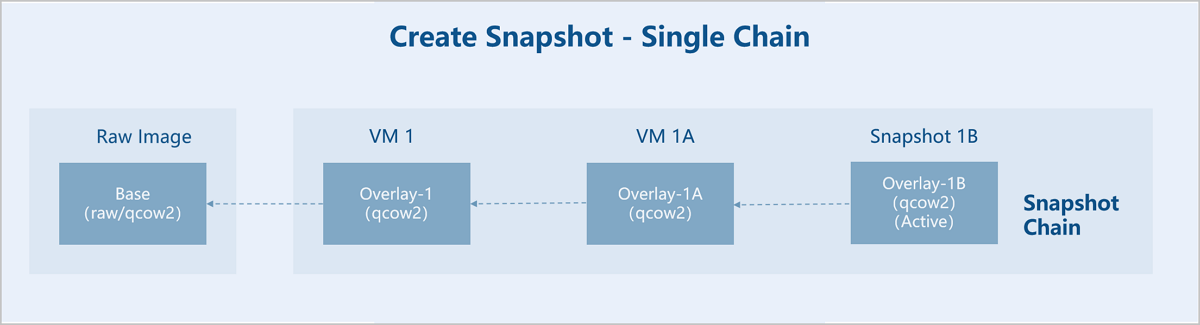
Assume there is an original base image (Base). A VM instance 1 is created using this base image as a template. Then, snapshot 1A and 1B are created sequentially for VM instance 1.- Base Image: A pre-made disk image file containing a complete operating system and bootloader, serving as the Base (read-only).
- VM Instance 1: A new empty file, Overlay-1, is created. Its backing file points to Base. Base remains read-only, thus becoming a snapshot. Subsequent data is written only to Overlay-1.
- Snapshot 1A: A new empty file, Overlay-1A, is created. Its backing file points to Overlay-1. Overlay-1 is set to read-only, thus becoming a snapshot. Subsequent data is written only to Overlay-1A.
- Snapshot 1B: A new empty file, Overlay-1B, is created. Its backing file points to Overlay-1A. Overlay-1A is set to read-only, thus becoming a snapshot. Subsequent data is written only to Overlay-1B. VM instance 1 uses the disk file corresponding to the last snapshot 1B in the snapshot chain, and snapshot 1B is Active.
- Create multiple snapshot chains based on backing files.
图 3. Create Snapshot - Multiple Chains 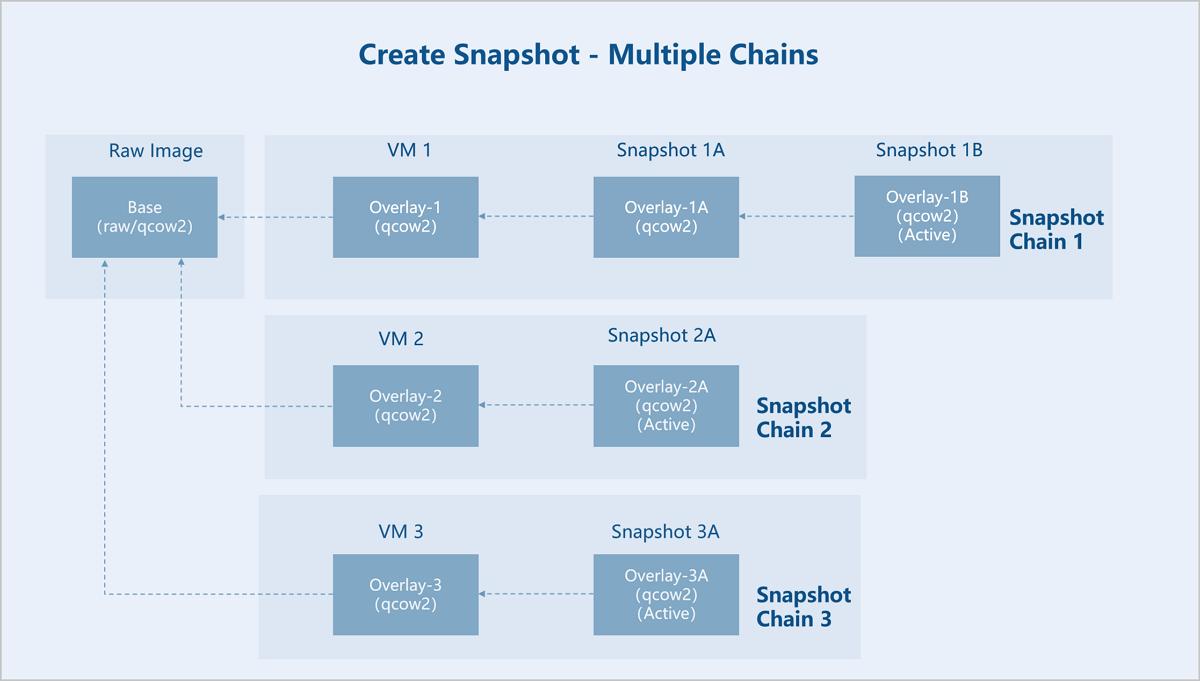
Assume there is an original base image (Base). VM instance 1, VM instance 2, and VM instance 3 are created using this base image as a template. Then, snapshot 1A and snapshot 1B are created sequentially for VM 1, snapshot 2A is created for VM 2, and snapshot 3A is created for VM 3.- Base Image: A pre-made disk image file containing a complete operating system and bootloader, serving as the Base (read-only).
- Snapshot Chain 1:
- VM Instance 1: A new empty file, Overlay-1, is created. Its backing file points to Base. Base remains read-only, thus becoming a snapshot. Subsequent data is written only to Overlay-1.
- Snapshot 1A: A new empty file, Overlay-1A, is created. Its backing file points to Overlay-1. Overlay-1 is set to read-only, thus becoming a snapshot. Subsequent data is written only to Overlay-1A.
- Snapshot 1B: A new empty file, Overlay-1B, is created. Its backing file points to Overlay-1A. Overlay-1A is set to read-only, thus becoming a snapshot. Subsequent data is written only to Overlay-1B. VM 1 uses the disk file corresponding to the last snapshot 1B in snapshot chain 1, and snapshot 1B is Active.
- Snapshot Chain 2:
- VM Instance 2: A new empty file, Overlay-2, is created. Its backing file points to Base. Base remains read-only. Subsequent data is written only to Overlay-2.
- Snapshot 2A: A new empty file, Overlay-2A, is created. Its backing file points to Overlay-2. Overlay-2 is set to read-only, thus becoming a snapshot. Subsequent data is written only to Overlay-2A. VM 2 uses the disk file corresponding to the last snapshot 2A in snapshot chain 2, and snapshot 2A is Active.
- Snapshot Chain 3:
- VM Instance 3: A new empty file, Overlay-3, is created. Its backing file points to Base. Base remains read-only. Subsequent data is written only to Overlay-3.
- Snapshot 3A: A new empty file, Overlay-3A, is created. Its backing file points to Overlay-3. Overlay-3 is set to read-only, thus becoming a snapshot. Subsequent data is written only to Overlay-3A. VM 3 uses the disk file corresponding to the last snapshot 3A in snapshot chain 3, and snapshot 3A is Active.
- Create a single snapshot chain based on a backing file.
- Merge Snapshots
External snapshots are interdependent, where each overlay file depends on its backing file. Each snapshot preserves its corresponding data, preventing the direct deletion of an individual snapshot to shorten the chain length. The chain length of external snapshots can be reduced through two methods: downward merging (Blockcommit) or upward merging (Blockpull).
- Blockcommit
Within the same snapshot chain, you can merge overlays to backing files.
图 4. Blockcommit 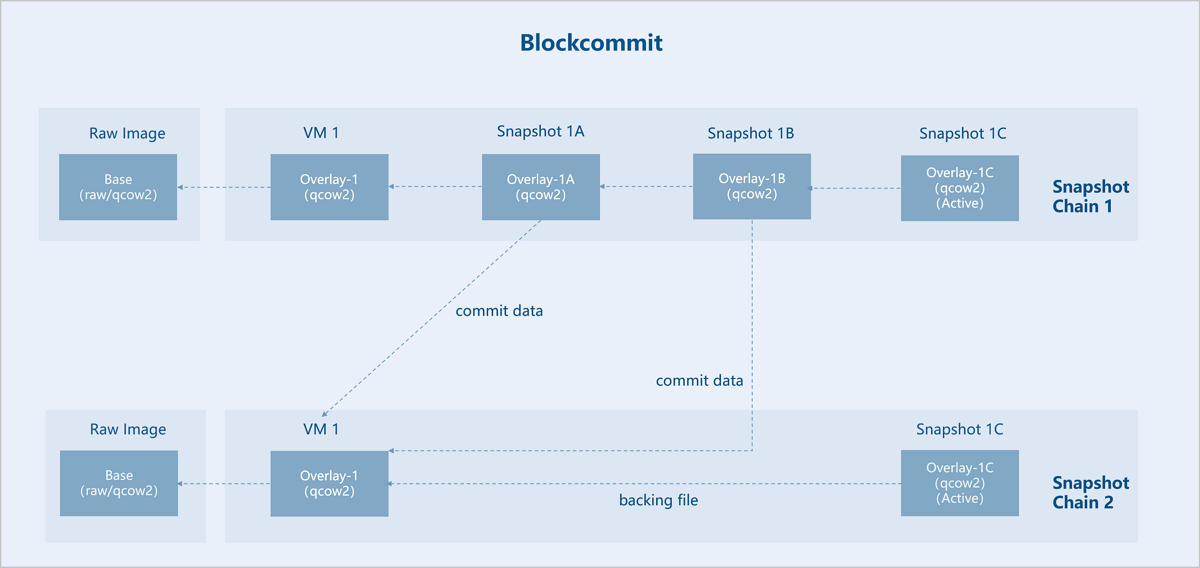
Assume there is an original base image (Base). VM instance 1 is created based on Base, and three interdependent external snapshots are created for VM instance 1: Snapshot 1A, Snapshot 1B, and Snapshot 1C. Now, Snapshot 1A and Snapshot 1B are merged downward into VM instance 1. As a result, the backing file of Snapshot 1C (Active) points directly to VM instance 1, so the snapshot chain is shortened. Snapshots 1A and 1B are no longer useful and can be deleted.
- Blockpull
Within the same snapshot chain, you can merge backing files to overlays.
图 5. Blockpull 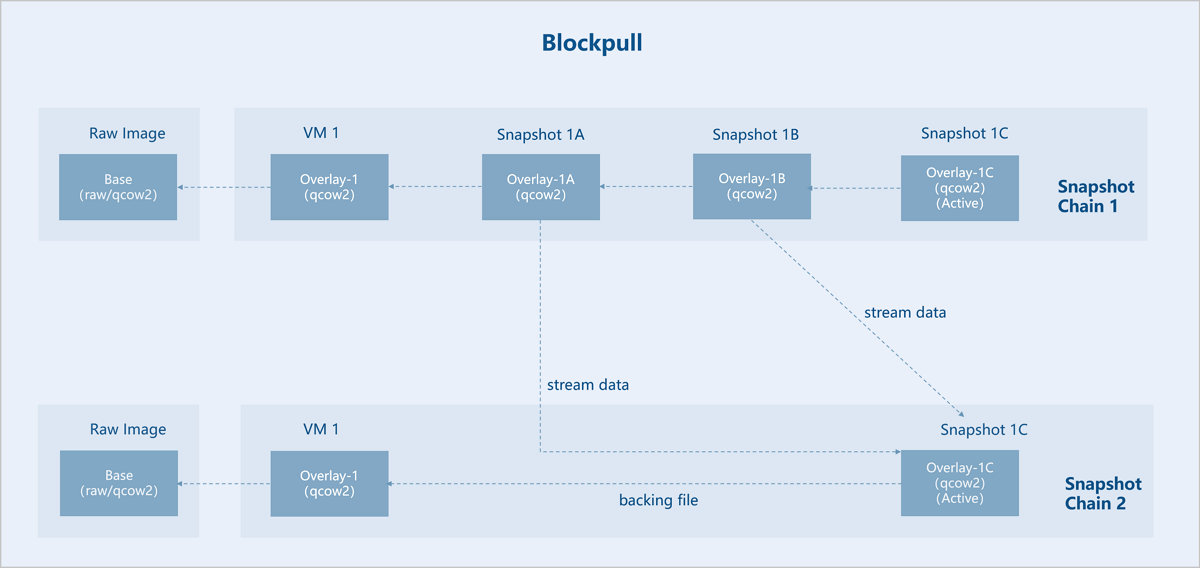
Assume there is an original base image (Base). VM instance 1 is created based on Base, and three interdependent external snapshots are created for VM instance 1: Snapshot 1A, Snapshot 1B, and Snapshot 1C. Now, Snapshot 1A and Snapshot 1B are merged upward into Snapshot 1C (Active). As a result, the backing file of Snapshot 1C (Active) points directly to VM instance 1, so the snapshot chain is shortened. Snapshots 1A and 1B are no longer useful and can be deleted.
- Blockcommit
Distributed Storage Snapshot Mechanism
Ceph enterprise edition uses ROW snapshot technology. Self-Developed Distributed Storage uses COW snapshots. For more information, see Volume Snapshot Protection.
Backup Service
Data Backup
The backup service supports data backup based on the QEMU block device layer. VM instances on all types of primary storage support backup operations. Backup types include full backup and incremental backup. A full backup contains a complete data set, while an incremental backup contains only the data updated since the last backup. Both full and incremental backups only backup actual used data.
By default, the backup policy is configured to automatically perform a full backup after every 63 incremental backups, starting after the initial full backup. Due to the dependencies between incremental backups, a new full backup must be created before previous incremental backups can be deleted. In practice, the system employs more intelligent and flexible strategies to determine the appropriate backup method, ensuring the safety and reliability of the backup data.
The data backup process consists of three parts: data replication, data transfer, and data storage.
Data Replication
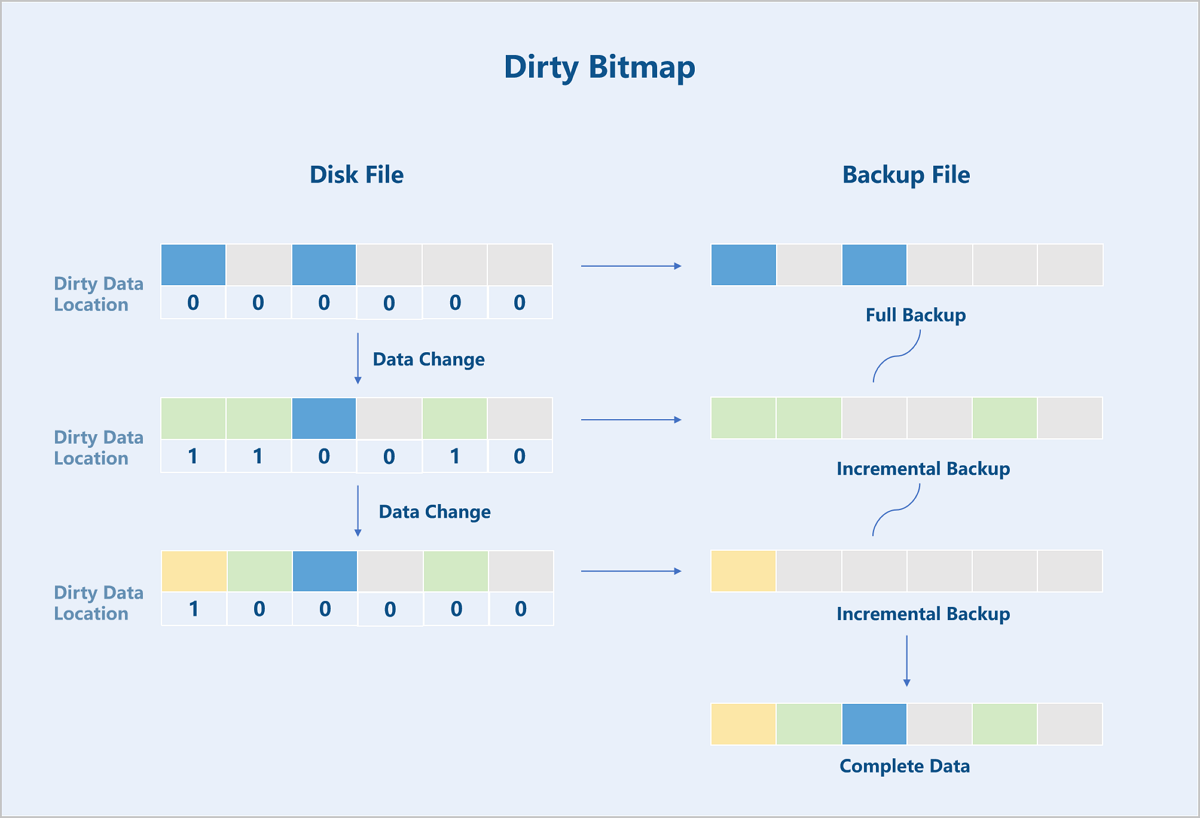
The Backup Service module utilizes the dirty data tracking functionality (Dirty Bitmap) at the QEMU block device layer to track and export backup data.
Locations in the VM instance's disk where data changes occur are called dirty data locations. The Dirty Bitmap records all such locations in the virtual disk file that have been modified since the last backup. Based on these records, all data modified since the last backup (incremental backup data) can be exported. Ultimately, the full backup file and subsequent incremental backup files form a complete backup chain to preserve the entire data set.
ZStack Cloud provides an adaptive backup export policy. Depending on the scenario, the backend decides whether to export incremental or full backup data. Since the Dirty Bitmap resides in the memory of the QEMU process, the tracking information is lost after a VM reboot. Therefore, ZStack Cloud automatically exports a full backup data after a VM reboot.
Data Transfer
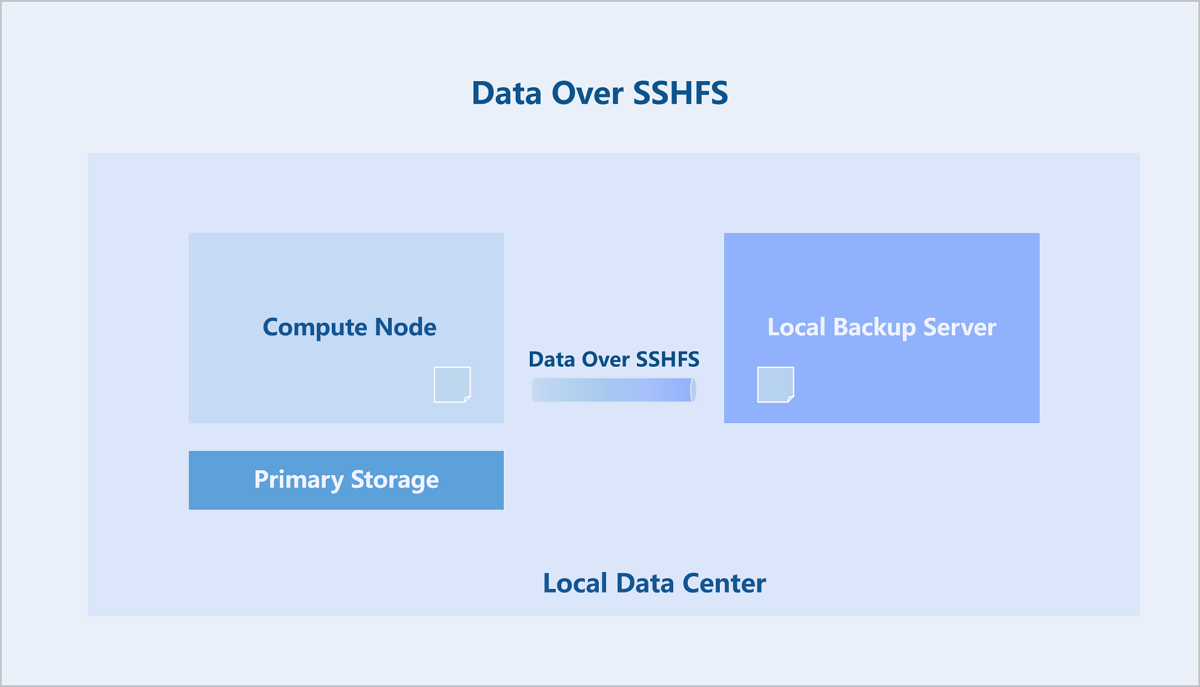
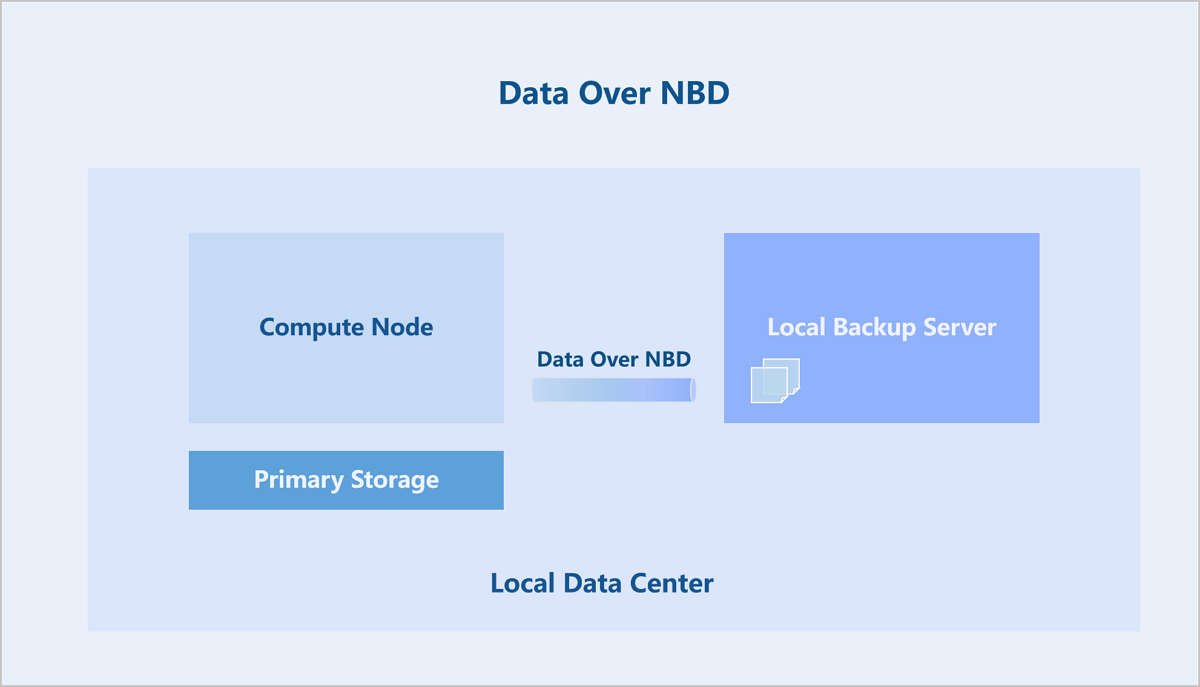
Two different implementation schemes are supported for different virtualization component versions, differing primarily in how backup data is transferred.
Scheme 1: Data Over SSHFS. This scheme uses SSHFS to mount the backup directory of the remote backup server on the compute node and imports the backup data into the backup server. SSHFS is a simple FUSE Over SSH solution. The data channel is encrypted by the SSH session, and each backup job uses a dedicated SSHFS link.
Scheme 2: Data Over NBD. This scheme uses the NBD module on the backup server to export a backup disk. Then, the compute node utilizes a QEMU block device job (Block-job) to write backup data directly to this disk.
Data Storage
The backup server supports various storage media types, including SAN, NAS, disk arrays, and tape libraries.
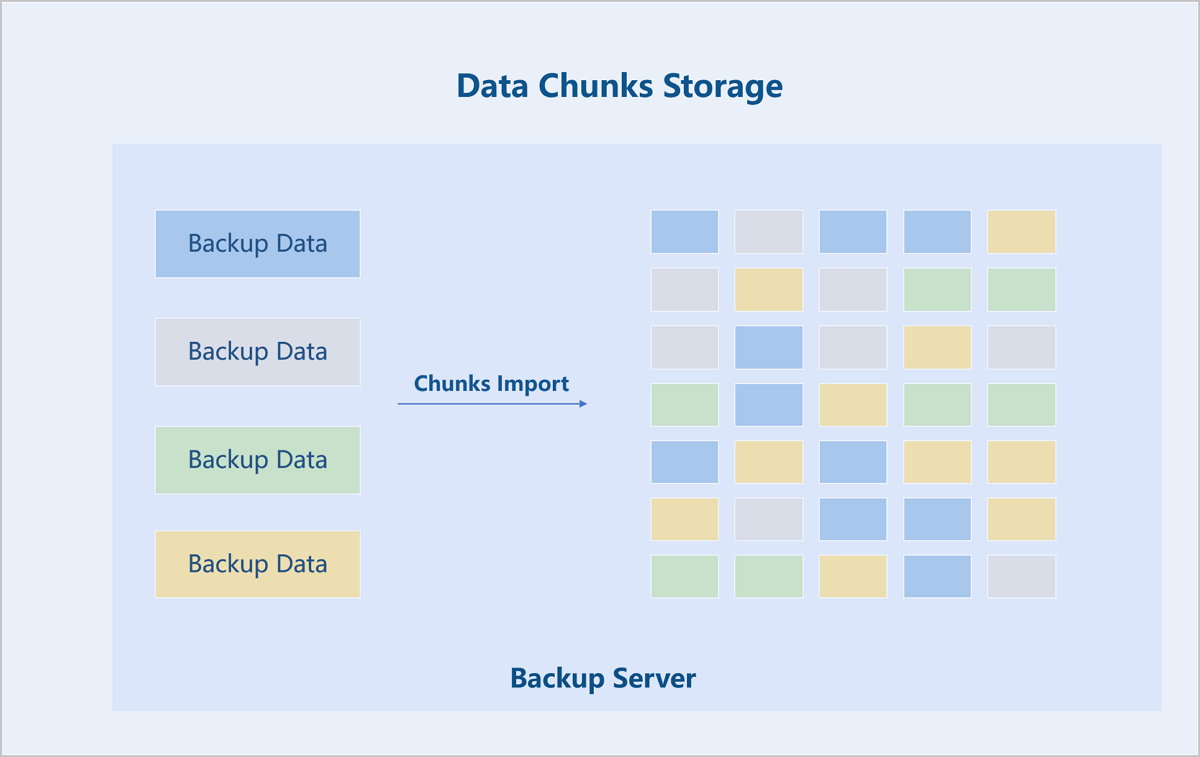
The backup server stores data in a chunked and deduplicated format. The backup data is split into 64MB chunks. A hash is calculated for each chunk, and an index is created. Data chunks with identical has values are stored only once.
Data Recovery
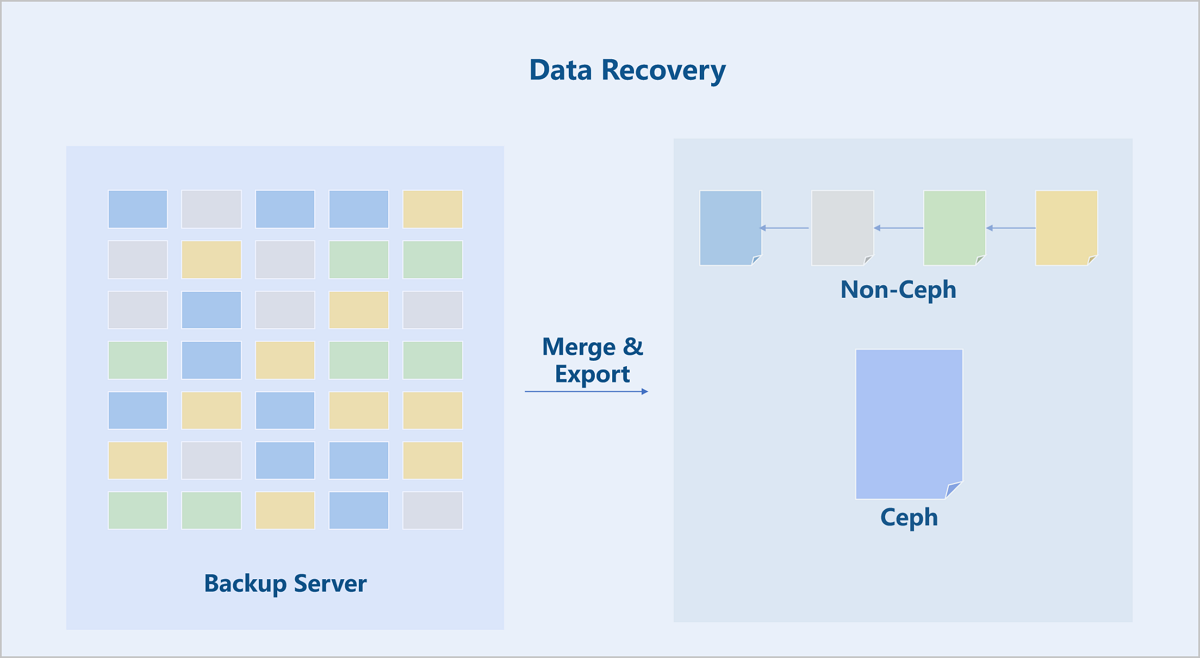
When restoring a VM instance or volume from a local backup, the chunked data on the backup server is merged and imported into the primary storage.
For non-Ceph primary storage, the restored backup data is stored as a disk chain. For Ceph primary storage, the disk chain is merged into a single disk file for storage.
For a new recovery, the disk data restored to the primary storage serves as an image cache to create a new VM instance or volume. For an overwrite recovery, the system updates the database record of the current VM instance or volume with the new disk path on the primary storage and then deletes the old VM instance or volume files.
Continuous Data Protection (CDP) Service
Data Backup
Data Replication
The CDP module utilizes the dirty data tracking functionality (Dirty Bitmap) and Drive-mirror at the QEMU block device layer to track and export backup data.
Locations in the VM instance's disk where data changes occur are called dirty data locations. The Dirty Bitmap records all such locations in the virtual disk file that have been modified since the last backup. Based on these records, all data modified since the last backup (incremental backup data) can be exported.
ZStack Cloud provides an adaptive backup export policy. Depending on the scenario, the backend decides whether to export incremental or full backup data. Since the Dirty Bitmap resides in the memory of the QEMU process, the tracking information is lost after a VM reboot. Therefore, ZStack Cloud automatically exports a full backup data after a VM reboot.
The exported backup data is imported and saved via Drive-mirror into an empty QCOW2 disk file on the CDP backup server. This empty disk file is pre-created when the COP task is created. This empty file is then exposed over the network as an accessible block device using the NBD protocol. This allows the CDP backup task to continuously import the volume data of the VM instance to the CDP backup server.
Recovery Points
The CDP backup server stores the transferred data of VM instances in QCOW2 disk files. A QEMU storage service associated with this QCOW2 disk file provides data recovery points under various protection policies.
The data recovery points for a CDP task consist of Base Points (BP) and Recovery Points (RP). BPs are generated regularly (every 20 minutes by default) at a coarse granularity as external snapshots. RPs can be generated by recording I/O changes as fast as once per second, based on the actual CDP protection policy.
The CDP backup server first performs a full replication of the VM instance data to generate an initial BP. Subsequently, QEMU continuously captures I/O data changes, timestamps each set of changed I/O data to generate RPs, and saves them. The generation of all RPs is performed entirely on the CDP backup server and does not affect the original VM instance.
Data Recovery
File-Level Recovery
When files are lost due to accidental deletion of a VM instance, the CDP backup data supports quickly browsing backup files for file-level data recovery. You can select any recovery point to browse its files and data. You can also preview file contents to confirm the file containing the required data, and then choose to either download the file immediately or lock the recovery point for subsequent data restoration.
Rapid Recovery
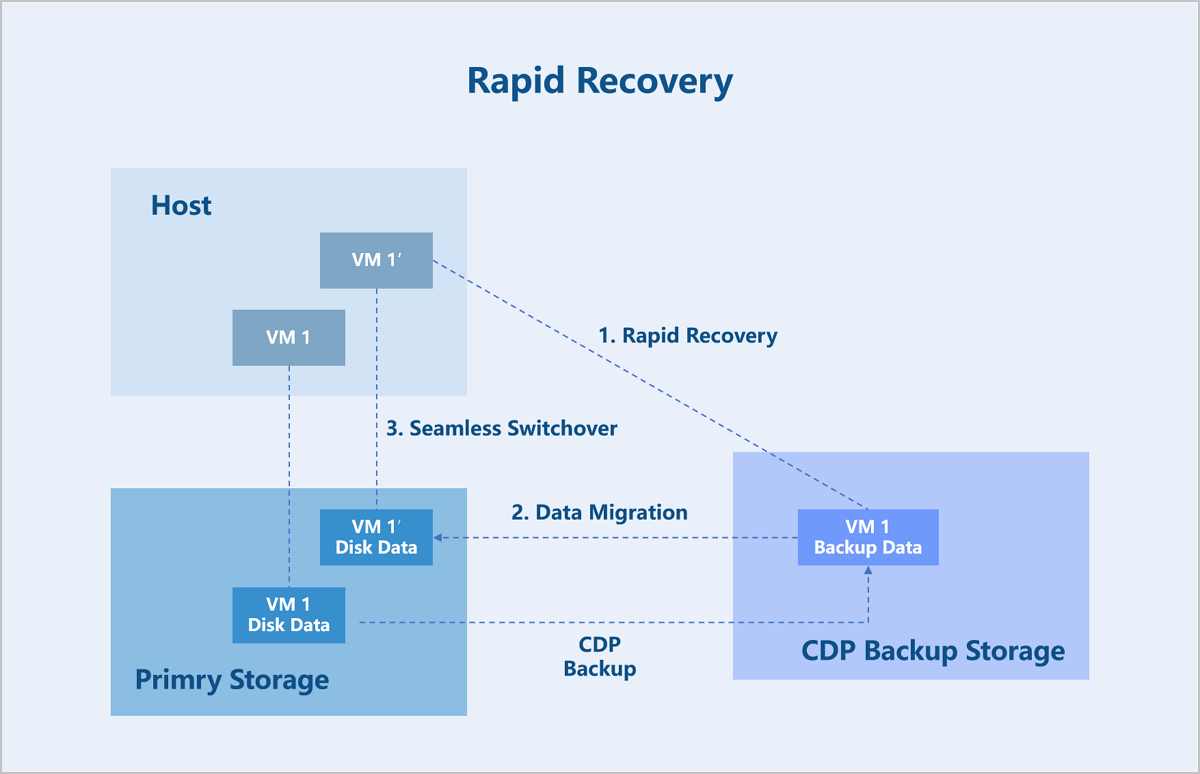
When a service failure or virus infection on a VM instance requires a full data restoration, CDP backup data supports rapid, second-level recovery to meet the need for quick service restoration.
The rapid recovery process involves two main steps: rapid VM startup and VM data migration.
The backup data of VM instances is stored in QCOW2 disk format on the CDP backup server. To enable rapid startup, the backed-up QCOW2 disk is first exported as a network block device via NBD. The VM instance on the compute node then accesses this backup disk on the backup server over NBD. At this point, the VM instance can provide services normally, allowing users to read from and write to it.
Because the VM instance disk is not yet stored in the primary storage, the backend initiates a storage migration task to synchronize the disk data from the backup server to the primary storage. During this process, the system records all write operations to the VM instance as dirty pages and synchronizes these dirty pages to the target disk in the primary storage.
Once the synchronization task detects that all data has been copied, the VM instance automatically switches its disk access path to the path on the primary storage. The background migration process synchronizes all VM instance data to the primary storage. This entire process is transparent to users and does not impact the VM instance's services.
Backup Reliability Metrics
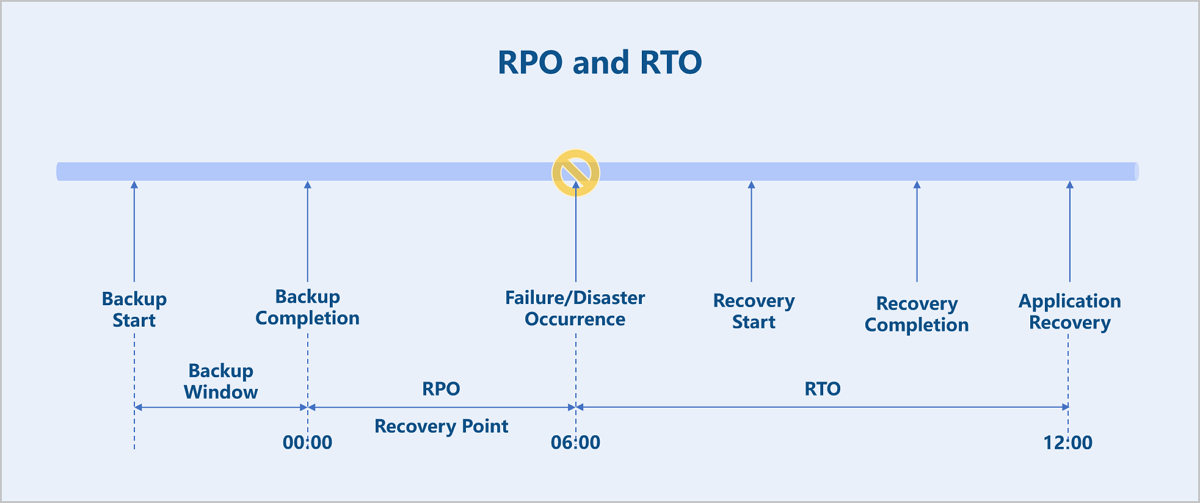
Two key metrics for evaluating the reliability of a backup system are RPO and RTO. RPO (Recovery Point Objective) indicates the maximum amount of data loss that a company can tolerate after a disaster. RTO (Recovery Time Objective) indicates the maximum time required to recover data that a company can tolerate after a disaster.
For the CDP module, both RPO and RTO can be as low as 1 second when the VM instance is under low load.