
VM Scheduling Policy
Overview
Virtual Machine Scheduling Policy (VM Scheduling Policy): A VM scheduling policy is a resource orchestration policy based on which virtual machines are assigned to hosts to achieve the high performance and high availability of businesses.
Related Definitions
- Scheduling Policy: ZStack ZSphere provides four types of
scheduling policies, each supporting two execution mechanisms:
- Policy Type: Supports four types of scheduling policies: VM
Exclusive from Each Other, VM Affinitive to Each Other, VMs
Exclusive from Hosts, and VMs Affinitive to Hosts. By combining
different execution mechanisms, virtual machine scheduling is
achieved:
- VM Exclusive from Each Other: Virtual machines in the same VM scheduling group should not/must not run on the same host.
- VM Affinitive to Each Other: Virtual machines in the same VM scheduling group should/must run on the same host.
- VMs Exclusive from Hosts: Given any one of the virtual machines in a VM scheduling group and any one of the hosts in a host scheduling group, the virtual machine should not/must not run the host.
- VMs Affinitive to Hosts: Given any one of the virtual machines in a VM scheduling group and any one of the hosts in a host scheduling group, the virtual machine should/must run the host.
- Execution Mechanism: Supports two mechanisms: Hard and Soft:
- Hard: Virtual machines are forcibly assigned hosts based on the associated VM scheduling policies. For example, if you associate the VM Exclusive from Each Other policy with a VM scheduling group and select the Hard mechanism for the policy, any two of the virtual machines in the scheduling group are not allowed to run on the same host. If no host is available to be scheduled based on the policy for a virtual machine, the virtual machine will end up failure upon startup.
- Soft: Virtual machines are primarily assigned hosts based on the associated VM scheduling policies. For example, if you associate the VM Exclusive from Each Other policy with a VM scheduling group and select the Soft mechanism for the policy, any two of the virtual machines in the scheduling group will primarily not run on the same host. If no host is available to be scheduled based on the policy for a virtual machine, the virtual machine will attempt to run on a host that does not satisfy the policy.
- Policy Type: Supports four types of scheduling policies: VM
Exclusive from Each Other, VM Affinitive to Each Other, VMs
Exclusive from Hosts, and VMs Affinitive to Hosts. By combining
different execution mechanisms, virtual machine scheduling is
achieved:
- VM Scheduling Group: The basic unit for binding virtual machines to scheduling
policies.
- A virtual machine can only join one virtual machine scheduling group. Once joined, the virtual machine will be assigned to a host according to the scheduling policy associated with the scheduling group.
- A virtual machine scheduling group can be bound to one or more scheduling policies.
- A scheduling policy can be bound to one virtual machine scheduling group.
- Deleting a virtual machine scheduling group will also delete the associated virtual machine scheduling policies.
- Host Scheduling Group: The basic unit for binding hosts to scheduling policies,
used only when selecting the virtual machine mutually exclusive hosts or
virtual machine host affinity scheduling policies.
- A host can only join one host scheduling group. Once joined, the host will be scheduled according to the scheduling policy associated with the scheduling group.
- A host scheduling group can be bound to one or more scheduling policies.
- A scheduling policy can be bound to one host scheduling group.
- Deleting a host scheduling group will also delete the associated virtual machine scheduling policies.
Function Principles
- If a mutually exclusive virtual machine or aggregated virtual machine policy is bound, no host scheduling group needs to be specified, and the virtual machine is assigned to a host according to the policy and its execution mechanism.
- If a virtual machine host affinity or virtual machine mutually exclusive host scheduling policy is bound, the corresponding host scheduling group must be specified, and the virtual machine is assigned to a host according to the policy and its execution mechanism.
The following explains the working principles of the four types of scheduling policies through four scenarios:
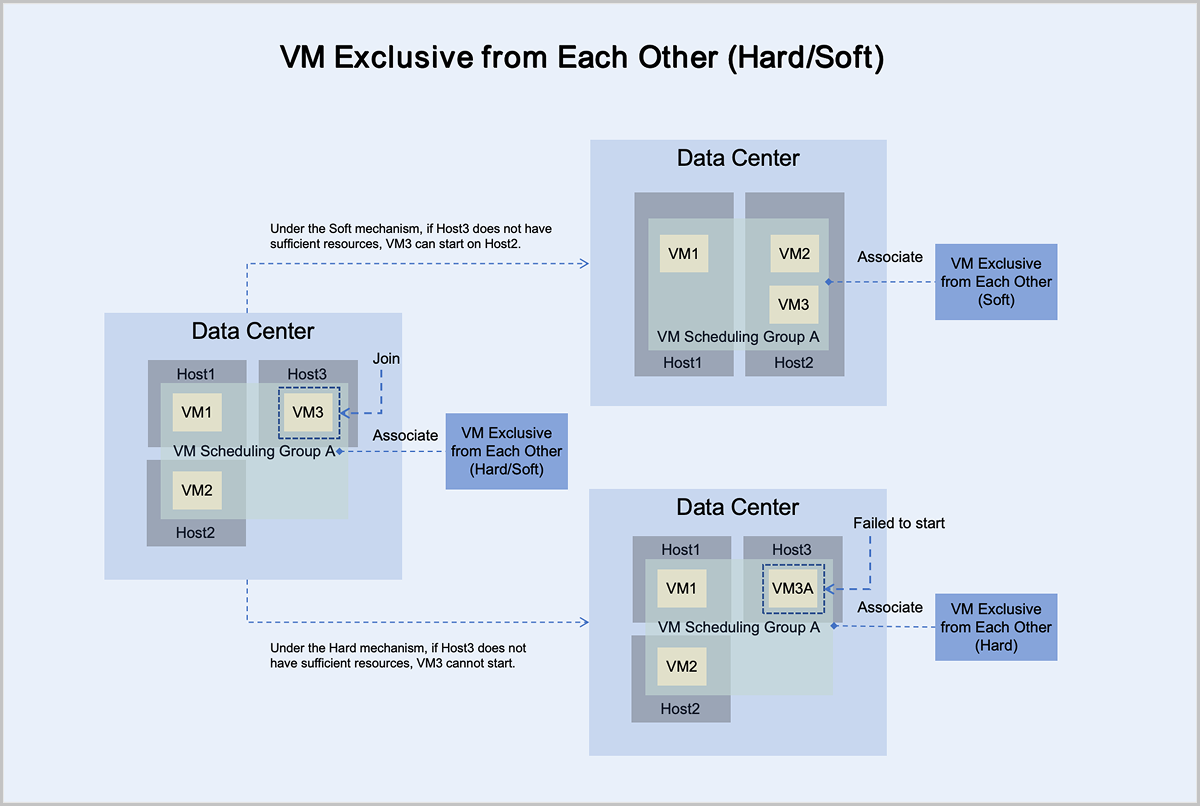
- Under the mandatory mechanism, virtual machine VM3 adheres to the principle
of mandatory mutual exclusion with other virtual machines in the group:
- If Host3 has sufficient resources, it can normally start and run on Host3.
- If Host3 does not have sufficient resources, it cannot start on Host3.
- Under the preferred mechanism, virtual machine VM3 adheres to the principle
of trying to mutually exclude other virtual machines in the group,
prioritizing starting on Host3:
- If Host3 has sufficient resources, it can normally start and run on Host3.
- If Host3 does not have sufficient resources, VM3 can attempt to start on another host with sufficient resources. In this scenario, VM3 starts and runs on Host2.
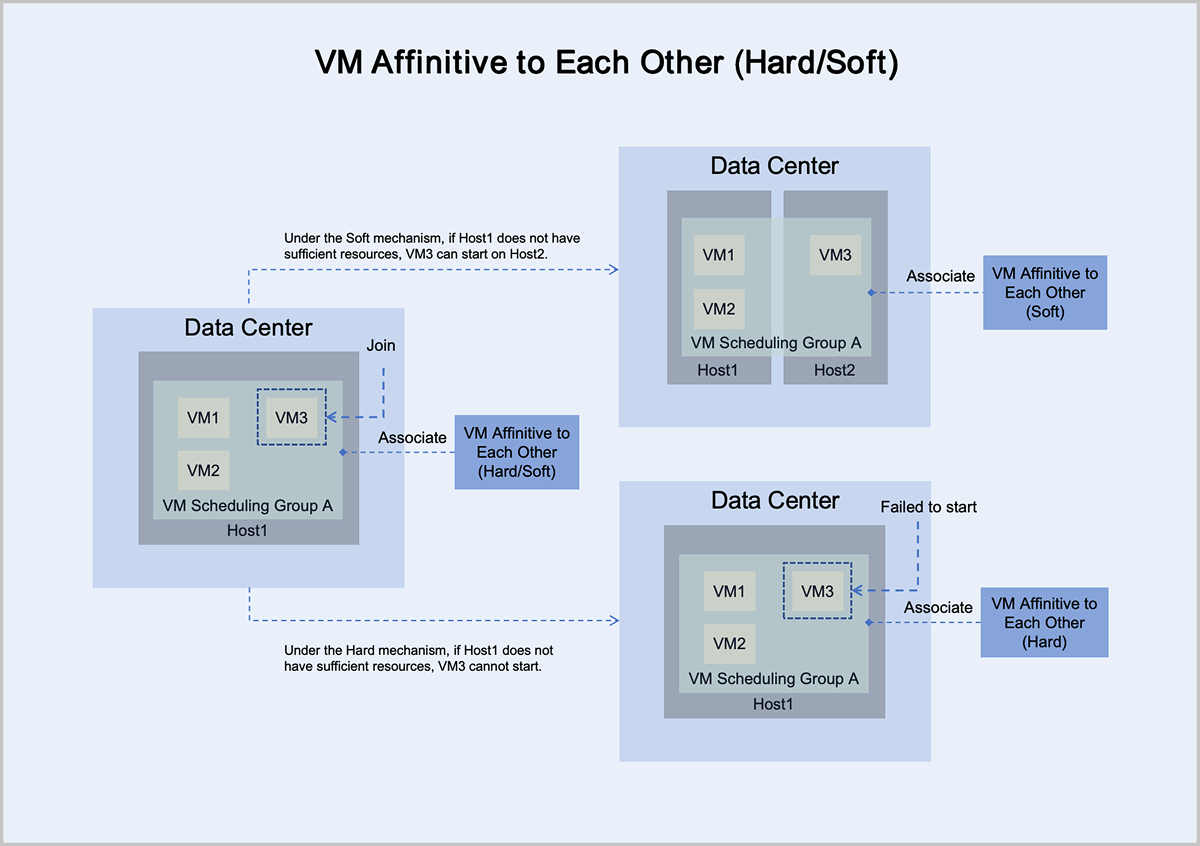
- Under the mandatory mechanism, virtual machine VM3 adheres to the principle
of mandatory aggregation with other virtual machines in the group:
- If Host1 has sufficient resources, it can normally start and run on Host1.
- If Host1 does not have sufficient resources, it cannot start on Host1.
- Under the preferred mechanism, virtual machine VM3 adheres to the principle
of trying to aggregate with other virtual machines in the group,
prioritizing starting on Host1:
- If Host1 has sufficient resources, it can normally start and run on Host1.
- If Host1 does not have sufficient resources, VM3 can attempt to start on another host with sufficient resources. In this scenario, VM3 starts and runs on Host2.
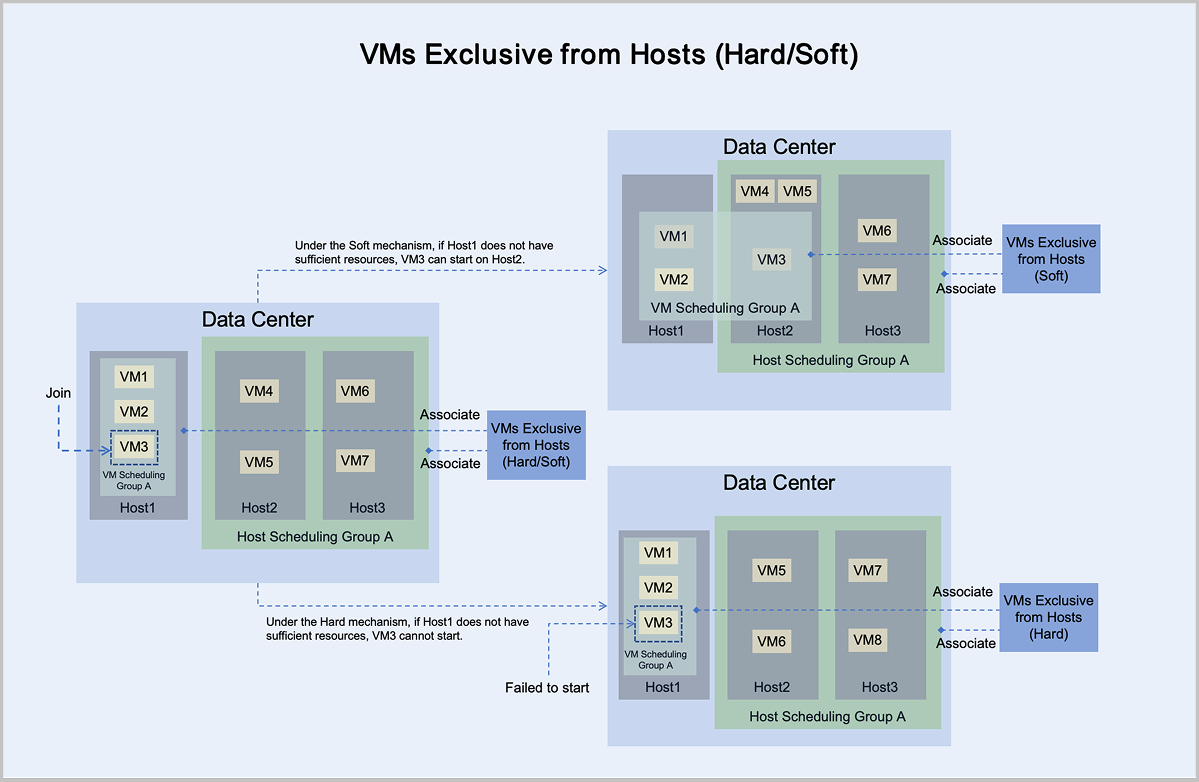
- Under the mandatory mechanism, virtual machine VM3 adheres to the principle of mandatory mutual exclusion with hosts in host scheduling group A:
- If Host1 has sufficient resources, it can normally start and run on Host1.
- If Host1 does not have sufficient resources, it cannot start on Host1.
- Under the preferred mechanism, virtual machine VM3 adheres to the principle of trying to mutually exclude hosts in host scheduling group A, prioritizing starting on Host1:
- If Host1 has sufficient resources, it can normally start and run on Host1.
- If Host1 does not have sufficient resources, VM3 can attempt to start on another host with sufficient resources. In this scenario, VM3 starts and runs on Host2.
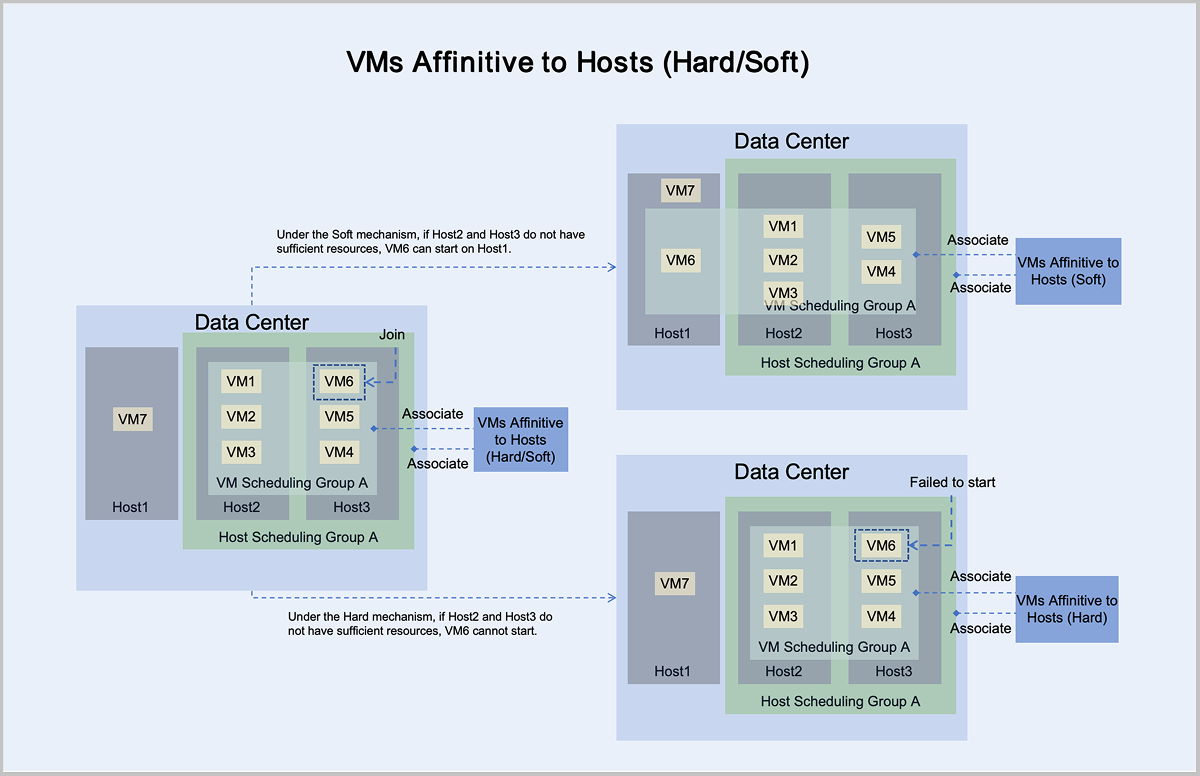
- Under the mandatory mechanism, virtual machine VM6 adheres to the principle of mandatory aggregation with hosts in host scheduling group A:
- If Host2 or Host3 has sufficient resources, it can normally start and run on Host2 or Host3.
- If Host2 and Host3 do not have sufficient resources, it cannot start on Host2 or Host3.
- Under the preferred mechanism, virtual machine VM6 adheres to the principle of trying to aggregate with hosts in host scheduling group A, prioritizing starting on Host2 or Host3:
- If Host2 or Host3 has sufficient resources, it can normally start and run on Host2 or Host3.
- If Host2 and Host3 do not have sufficient resources, VM6 can attempt to start on another host with sufficient resources. In this scenario, VM6 starts and runs on Host1.
Use Cases
- Example use case for the VM Exclusive from Each Other (Hard) policy: Two virtual machines hosting primary and backup databases are required to be deployed on different hosts to ensure high availability of the service.
- For example: Users deploy two virtual machines to host primary and backup MySQL databases, requiring that both virtual machines must be deployed on different hosts to reduce the risk of service downtime. Since deployment is automated, users cannot predict in advance which hosts have available resources. Using the mutually exclusive virtual machine (mandatory) policy, two different hosts can be selected to run these two virtual machines, ensuring high availability of the service.
- Example use case for the VM Exclusive from Each Other (Soft) policy:
Hadoop nodes with different roles are preferably deployed on different hosts to improve overall system performance.
- For example: Users deploy a Hadoop system, for which nodes with different roles such as namenode, datanode, jobtracker, and tasktracker, cannot be predicted in advance regarding the total number of nodes. However, deploying them on different hosts improves efficiency. Using the mutually exclusive virtual machine (preferred) policy, the Hadoop cluster can be deployed across different hosts as much as possible, distributing IO pressure and improving overall system performance.
- Example use case for the VMs Affinitive to Hosts (Hard) policy: Business virtual machines need to be deployed on hosts with a specific CPU frequency to ensure service stability.
- For example: Users deploy four virtual machines to run critical services, requiring hosts with very high CPU frequencies. Since there are few hosts that meet the CPU frequency requirement, the virtual machines must run on these specific hosts. In this case, the virtual machine host affinity (mandatory) policy can be used to make the virtual machines run on the target hosts, ensuring service stability.
- Example use case for the VMs Affinitive to Hosts (Soft) policy: Different business virtual machines preferably run on hosts located in the same rack to ensure efficient inter-service communication.
- For example: Four virtual machines run different services, which require frequent communication between them, and the hosts need to be as close as possible, such as in the same rack, to minimize communication latency. In this case, the virtual machine host affinity (preferred) policy can be used to make the virtual machines run on the target hosts as much as possible, ensuring efficient inter-service communication.
Advantages
- Comprehensive & Flexible:
- Provides 4 types of scheduling policies and 2 execution mechanisms, defining mutual exclusion/affinity relationships between virtual machines and between virtual machines and hosts. These scheduling policies can be flexibly combined to meet all mainstream business scenario requirements.
- Supports binding/unbinding multiple virtual machines to/from one or more scheduling policies through a virtual machine scheduling group, making the process simple and efficient.
- Displays virtual machine scheduling status intuitively and provides quick conflict resolution operations, allowing users to keep track of business scheduling dynamics in real-time and make adjustments promptly.
- Powerful & Reliable:
- Supports mutual exclusion/affinity between the same/different services, achieving service isolation/efficient intercommunication, ensuring high performance and reliability of services.
- Allows flexible configuration of virtual machine business fault domains through host scheduling groups, supporting single host deployments, batch host deployments within a single cluster, and cross-cluster host deployments. This avoids single points of failure, ensures business stability, and improves physical resource utilization.
Create Mutually Exclusive/Affinitive VM Scheduling Policies
Create a VM Scheduling Group
In the ZStack ZSphere platform, click to enter the VM Scheduling Group page. Click the New VM Scheduling Group operation to create a new group.
- Name: Set the virtual machine scheduling group name, for example, Virtual Machine Scheduling Group A1
- Description: Optional, can be left blank
- Virtual Machine: Select one or more target virtual machines to join this scheduling group
After clicking OK, the new virtual machine scheduling group will be created successfully.
Create a Mutually Exclusive/Affinitive VM Scheduling Policy
- Name: Set the virtual machine scheduling policy name, for example, Virtual Machine Scheduling Policy A1
- Description: Optional, can be left blank
- Type: Select VM Exclusive from Each Other or VM Affinitive to Each Other
- Execution Mechanism: Supports Hard and Soft execution
mechanisms
- Hard: Virtual machines are forcibly assigned hosts based on the associated VM scheduling policies. For example, if you associate the VM Exclusive from Each Other policy with a VM scheduling group and select the Hard mechanism for the policy, any two of the virtual machines in the scheduling group are not allowed to run on the same host. If no host is available to be scheduled based on the policy for a virtual machine, the virtual machine will end up failure upon startup.
- Soft: Virtual machines are primarily assigned hosts based on the associated VM scheduling policies. For example, if you associate the VM Exclusive from Each Other policy with a VM scheduling group and select the Soft mechanism for the policy, any two of the virtual machines in the scheduling group will primarily not run on the same host. If no host is available to be scheduled based on the policy for a virtual machine, the virtual machine will attempt to run on a host that does not satisfy the policy.
- Associate VM Scheduling Group: After binding, the scheduling policy will take effect on all virtual machines within the virtual machine scheduling group. You can bind existing or newly created scheduling groups. Here, select the scheduling group created above.
After clicking OK, the new virtual machine scheduling policy will be created successfully. The virtual machines will run according to the scheduling policy.
Create VM Mutually Exclusive/Affinitive Host Scheduling Policies
Create a VM Scheduling Group
In the ZStack ZSphere platform, click to enter the VM Scheduling Group page. Click the New VM Scheduling Group operation to create a new group.
- Name: Set the virtual machine scheduling group name, for example, Virtual Machine Scheduling Group A2
- Description: Optional, can be left blank
- Virtual Machine: Select one or more target virtual machines to join this scheduling group
After clicking OK, the new virtual machine scheduling group will be created successfully.
Create a Host Scheduling Group
- Name: Set the host scheduling group name, for example, Host Scheduling Group A2
- Description: Optional, can be left blank
- Host: Select one or more hosts to join this scheduling group
After clicking OK, the new host scheduling group will be created successfully.
Create a VM Mutually Exclusive/Affinitive Host Scheduling Policy
- Name: Set the virtual machine scheduling policy name, for example, Virtual Machine Scheduling Policy A2
- Description: Optional, can be left blank
- Type: Select Virtual Machine Mutually Exclusive or affinitive Host
- Execution Mechanism: Supports Hard and Soft execution
mechanisms
- Hard: Virtual machines are forcibly assigned hosts based on the associated VM scheduling policies. For example, if you associate the VM Exclusive from Each Other policy with a VM scheduling group and select the Hard mechanism for the policy, any two of the virtual machines in the scheduling group are not allowed to run on the same host. If no host is available to be scheduled based on the policy for a virtual machine, the virtual machine will end up failure upon startup.
- Soft: Virtual machines are primarily assigned hosts based on the associated VM scheduling policies. For example, if you associate the VM Exclusive from Each Other policy with a VM scheduling group and select the Soft mechanism for the policy, any two of the virtual machines in the scheduling group will primarily not run on the same host. If no host is available to be scheduled based on the policy for a virtual machine, the virtual machine will attempt to run on a host that does not satisfy the policy.
- Associate VM Scheduling Group: After binding, the scheduling policy will take effect on all virtual machines within the virtual machine scheduling group. You can bind existing or newly created scheduling groups. Here, select the scheduling group created above.
- Associate Host Scheduling Group: After binding, the scheduling policy will take effect on all hosts within the host scheduling group. You can bind existing or newly created scheduling groups. Here, select the scheduling group created above.
After clicking OK, the new virtual machine mutually exclusive/affinitive host scheduling policy will be created successfully. The virtual machines and hosts will run according to the scheduling policy.
Manage VM Scheduling Policies and Related Resources
This section uses the Virtual Machine Scheduling Policy A2, Virtual Machine Scheduling Group A2, and Host Scheduling Group A2 as examples to illustrate how to operate virtual machine scheduling policies and related resources.
VM Scheduling Policy
- If the scheduling policy is disabled, then the scheduling state is Inactive. In this state, the scheduling policy does not take effect on the associated virtual machines.
- If the scheduling policy is enabled, then the scheduling policy may exist in
one of the following two execution states:
- Normal: All virtual machines associated with the virtual machine scheduling policy are running on hosts allocated according to the scheduling policy.
- Conflict: Some of the virtual machines associated with the virtual machine scheduling policy are not running on hosts allocated according to the scheduling policy.
If you need to modify basic information about the virtual machine scheduling policy A2, such as the name, description, or execution mechanism, you can click the Modify Configuration operation for the scheduling policy, and modify the corresponding information as needed. The changes will be successful upon saving.
 Note: After deleting a virtual
machine scheduling policy, the associated virtual machines will no longer be
scheduled according to that policy.
Note: After deleting a virtual
machine scheduling policy, the associated virtual machines will no longer be
scheduled according to that policy.VM Scheduling Group
If you want to add more virtual machines to the virtual machine scheduling group A2 for scheduling or remove some virtual machines from the virtual machine scheduling group A2, you can do so in the virtual machine scheduling group main list by clicking the Add Virtual Machine or Remove Virtual Machine operation for the scheduling group.
If you need to modify basic information about the virtual machine scheduling group A2, such as the name or description, you can click the Edit Name and Description operation for the scheduling group, and modify the corresponding information as needed. The changes will be successful upon saving.
Note: After deleting a virtual
machine scheduling group, the associated virtual machine scheduling policies
will also be deleted. Please proceed with caution.Host Scheduling Group
If you want to add more hosts to the host scheduling group A2 for scheduling or remove some hosts from the host scheduling group A2, you can do so in the host scheduling group main list by clicking the Add Host or Remove Host operation for the scheduling group.
If you need to modify basic information about the host scheduling group A2, such as the name or description, you can click the Edit Name and Description operation for the scheduling group, and modify the corresponding information as needed. The changes will be successful upon saving.
Note: After deleting a host
scheduling group, the associated virtual machine scheduling policies will also
be deleted. Please proceed with caution.