
L2 Network
What is L2 Network?
- VLAN, VXLAN, and SDN can be used as an L2 network.
- An L2 network is used to provide layer 2 isolation for an L3 network.
L2 Network Types
- L2NoVlanNetwork
- You must specify the NIC name of the host.
- The hosts in the cluster to which the L2 network is attached must have NICs that share the same name.
- When the data packets of VM instances flow out of the host NIC and reach the physical switch, the data packets are not flagged with VLAN tags. Note that the physical switch must be in VLAN Access mode.
- If you create an L2 network of the L2NoVlanNetwork type, a network bridge is created based on the specified host NIC.
- L2VlanNetwork
- You must specify the host NIC name and VLAN ID. ZStack Cube Ultimate allows you to create virtual NICs and virtual switches, and supports IEEE 802.1Q VLAN trunking.
- The hosts in the cluster to which the L2 network is attached must have NICs that share the same name.
- When the data packets of VM instances flow out of the host NIC and reach the physical switch, the data packets are tagged with the specified VLAN ID.
- If you create an L2 network of the L2VlanNetwork type, a VLAN device is created based on the specified VLAN ID and then a network bridge is created based on the VLAN device.
- If you attach an L2 network of the L2NoVlanNetwork type and an L2 network of the L2VlanNetwork type or attach multiple L2 networks of the L2VlanNetwork type to a cluster, the physical switch NIC must be in Trunk mode. Besides, the VLAN ID in use must be contained in the Trunk VLAN configurations.
- VxlanNetwork
- Virtual Extensible LAN (VXLAN) is an overlay technology that allows for the creation of overlaying L2 networks. This technology can support a maximum of 16 million logical networks.
- VxlanNetwork is an implementation of the software-based VXLAN technology.
- If you create an L2 network of the VxlanNetwork type, you must specify a software SDN-based VXLAN pool. The L2 network must correspond to a VNI in the pool.
- The VTEP IPs of the hosts in the cluster to which the L2 network of the VxlanNetwork type is attached must belong to the specified VXLAN pool.
- When the data packets of VM instances flow out of the host, the host encapsulates VXLAN messages to the data packets and then sends the encapsulated data to the physical switch.
- HardwareVxlanNetwork
- Virtual Extensible LAN (VXLAN) is an overlay technology that allows for the creation of overlaying L2 networks. This technology can support a maximum of 16 million logical networks.
- HardwareVxlanNetwork is a solution to the integration with third-party hardware SDN.
- If you create an L2 network of the HardwareVxlanNetwork type, you must specify a hardware SDN-based VXLAN pool. The L2 network must correspond to a VNI in the pool.
- When the data packets of VM instances flow out of the host NICs and reach the distributed virtual switches, the data packets are flagged with the specified VLAN ID. The VLAN ID is mapped with VXLAN ID based on the SDN controlled that you add to the Cloud.
 Note: For some OSes, the NIC name in the
 ethX format will be changed after the system reboots. In addition, the NIC sequence will also be randomly changed. We recommend that you change the NIC name of each compute node (especially for VM instances with multiple NICs) to a non-ethX format, such as em01.L2 Network | Cluster | L3 Network | VM Instance
- If you attached an L2 network to a cluster whereas the L2 network was not attached to a host, you could not add the host to the cluster.
- If you did not attach an L2 network to a cluster and the L2 network was not attached to a host, you could not attach the L2 network to the cluster.
- If you attached an L2 network to a host whereas the corresponding L2 network devices were inconsistently connected to other hosts in a cluster, note that the VM IP that you created would not work properly.
- If you delete an L2 network, the corresponding L3 networks and VM NICs that are using these networks will also be deleted.
- If you delete an L2 network, the VPC vRouter and vRouter offering that use the L2 network will also be deleted.
- If you delete an L2 public network, all network services that are using the network, such as VPC vRouter, vRouter offering, VIP, EIP, port forwarding, load balancing, IPsec tunnel, and Netflow will also be deleted.
- You can create multiple VxlanNetworks using a VXLAN Pool. These VxlanNetworks can be applied to flat networks and VPC networks, respectively.
- VM instances in an L2 network of the VxlanNetwork type cannot be accessed through the Internet. To access these VM instances through the Internet, use an EIP or port forwarding.
- You can use an L2 network to create multiple L3 networks. However, we recommend that unless necessary you do not create multiple L3 networks from an L2 network. This may cause the DHCP services of these L3 networks unable to work as expected.
Create an L2 Network
On the main menu of ZStack Cube Ultimate, choose . On the L2 Network page, click Create L2 Network. Then, the Create L2 Network page is displayed.
- Create an L2NoVlanNetwork.
- Create a VxlanNetwork.
- Create an L2VlanNetwork.
- Create a HardwareVxlanNetwork.
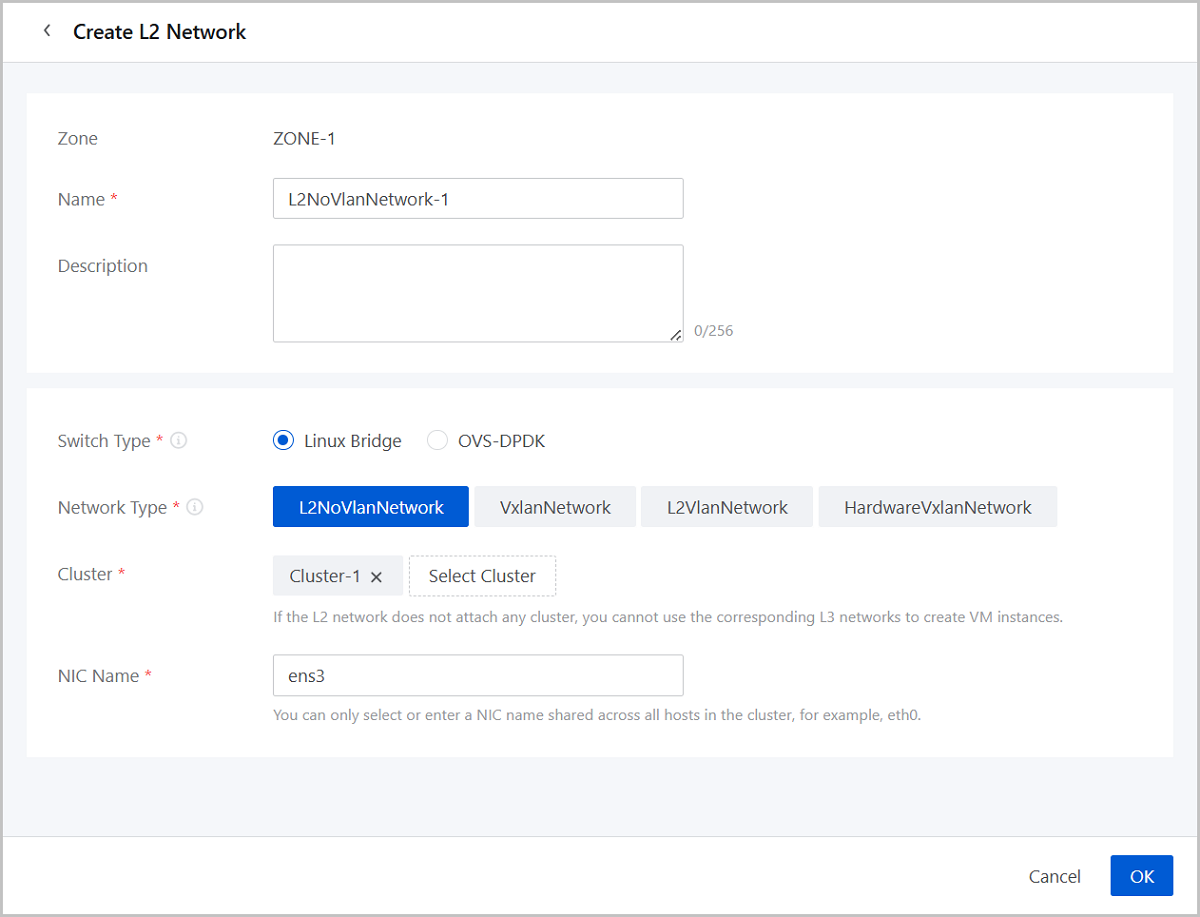
Create an L2NoVlanNetwork
- Zone: By default, the current zone is displayed.
- Name: Enter a name for the L2
network.
The name must be 1 to 128 characters in length and can contain Chinese characters, letters, digits, spaces, hyphens (-), underscores (_), periods (.), parenthesis (), colons (:), and plus signs (+) and cannot begin or end with spaces.
- Description: Optional. Enter a description for the L2 network.
- Switch Type: Supported switch types include Linux
Bridge and OVS-DPDK. Choose a type of switch based on your business need
when creating an L2NoVlanNetwork.
- Linux Bridge: The Linux Bridge switch type is suitable for small-scale, low-load network environments.
- OVS-DPDK: The OVS-DPDK switch type is
designed for high-performance and low-latency network
environments.Note: OVS-DPDK is supported only when the host OS
is the H84R system.
- Network Type: Select L2NoVlanNetwork.
- Cluster: Select the cluster to which the L2 network will be attached.
- NIC Name: Select or enter an NIC
name for the L2 network, for example, em01.Note: You can only select or
enter an NIC name shared across all hosts in the cluster.
Create an L2VlanNetwork
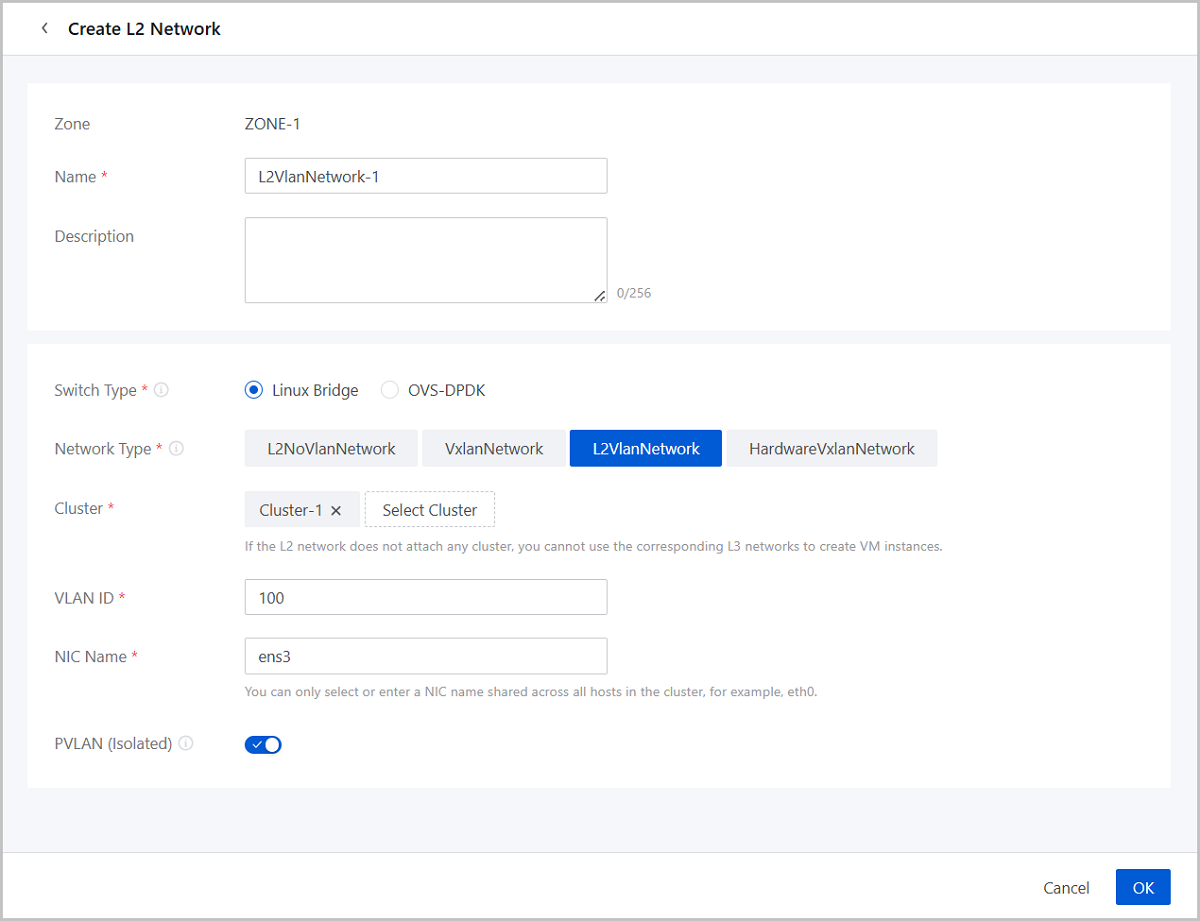
- Zone: By default, the current zone is displayed.
- Name: Enter a name for the L2
network.
The name must be 1 to 128 characters in length and can contain Chinese characters, letters, digits, spaces, hyphens (-), underscores (_), periods (.), parenthesis (), colons (:), and plus signs (+) and cannot begin or end with spaces.
- Description: Optional. Enter a description for the L2 network.
- Switch Type: Supported switch types include Linux
Bridge and OVS-DPDK. Choose a type of switch based on your business need
when creating an L2VlanNetwork.
- Linux Bridge: The Linux Bridge switch type is suitable for small-scale, low-load network environments.
- OVS-DPDK: The OVS-DPDK switch type is
designed for high-performance and low-latency network
environments.Note: OVS-DPDK is supported only when the host OS
is the H84R system.
- Network Type: Select L2VlanNetwork.
- Cluster: Select the cluster to which the L2 network will be attached.
- VLAN ID: Specify a VLAN ID that matches the actual network configurations. Valid values: 1 to 4094.
- NIC Name: Select or enter an NIC
name for the L2 network, for example, em01.Note: You can only select or
enter an NIC name shared across all hosts in the cluster.
- PVLAN (Isolated): By default, the switch is disabled.
You can specify whether to enable the isolated VLAN function on the Cloud.
It is usually used to work with the PVLAN function of the physical switch.
When enabled, the VM instances in the L3 network created from this L2
network cannot communicate with each other.Note:
- Currently, you cannot change the switch status after the creation. Please plan your network in advance.
- The L3 network services are not affected if the L2 network has isolated VLAN enabled.
Create a VxlanNetwork
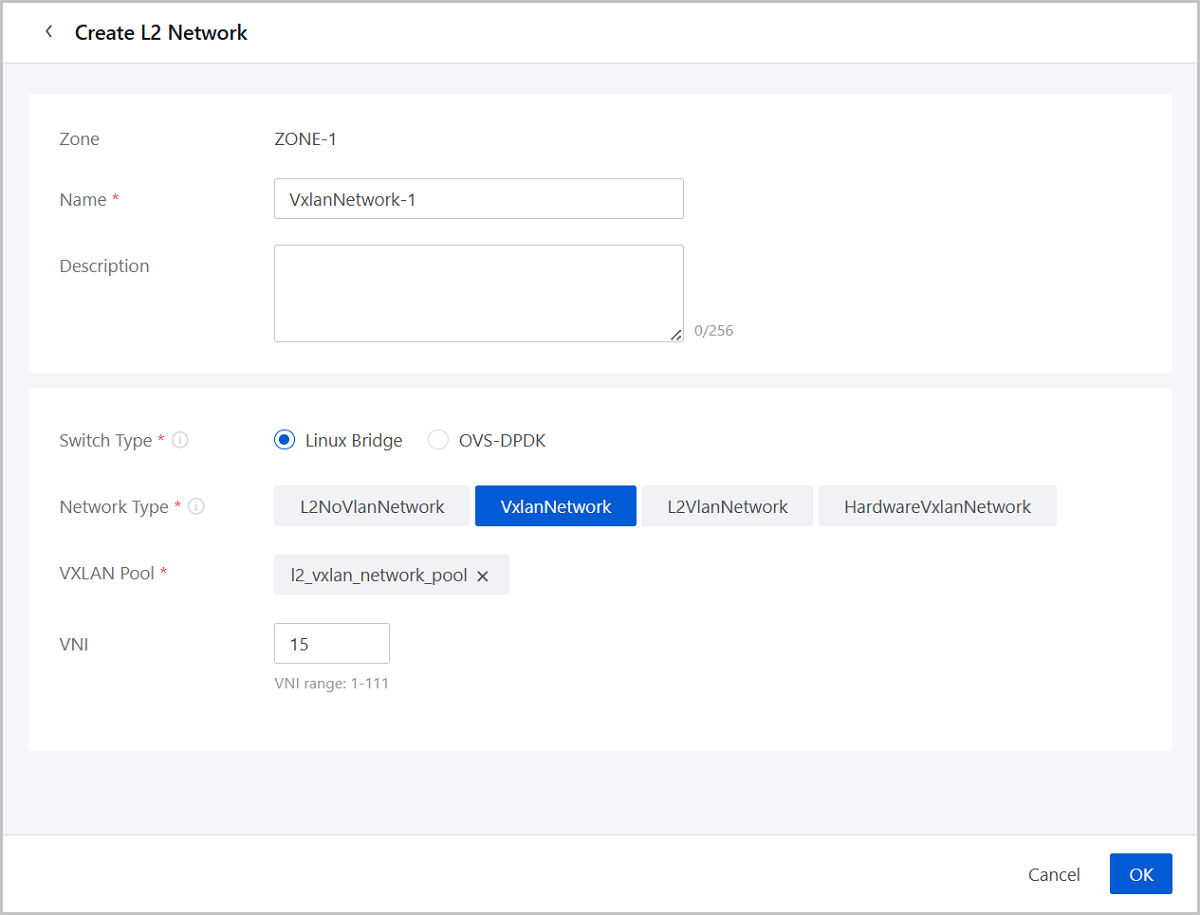
- Zone: By default, the current zone is displayed.
- Name: Enter a name for the L2
network.
The name must be 1 to 128 characters in length and can contain Chinese characters, letters, digits, spaces, hyphens (-), underscores (_), periods (.), parenthesis (), colons (:), and plus signs (+) and cannot begin or end with spaces.
- Description: Optional. Enter a description for the L2 network.
- Switch Type: You can create VxlanNetwork on the Linux Bridge switch.
- Network Type: Select VxlanNetwork.
- VXLAN Pool: Select a VXLAN pool of the software SDN type.Note:
- Before you can create a VxlanNetwork, create a VXLAN pool of the software SDN type.
- For more information, see Create Software-SDN VXLAN Pool.
- VNI: Optional. Specify a VNI in the VXLAN pool. If not specified, the platform allocates a VNI randomly.
Create a HardwareVxlanNetwork
To create a HardwareVxlanNetwork, make sure a valid SDN network license is added to the platform.
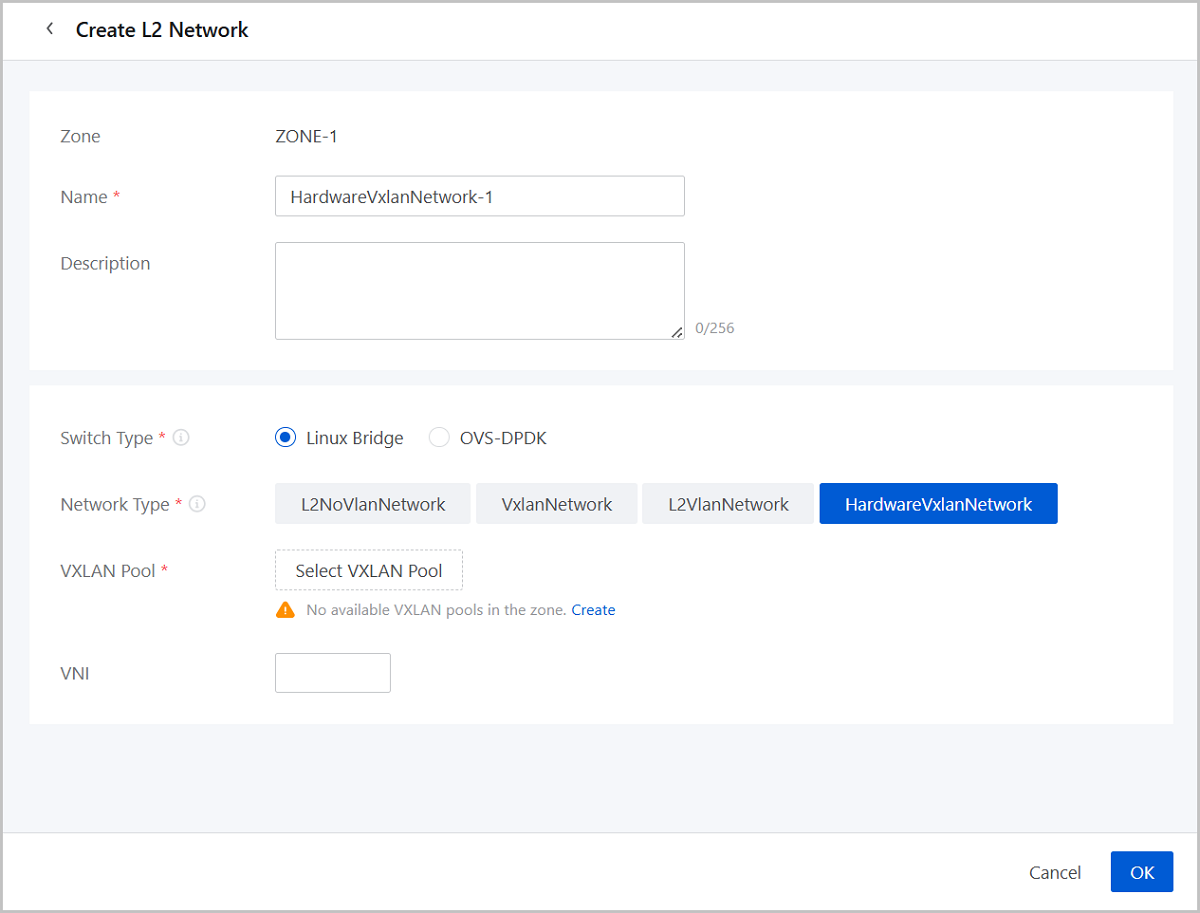
- Zone: By default, the current zone is displayed.
- Name: Enter a name for the L2
network.
The name must be 1 to 128 characters in length and can contain Chinese characters, letters, digits, spaces, hyphens (-), underscores (_), periods (.), parenthesis (), colons (:), and plus signs (+) and cannot begin or end with spaces.
- Description: Optional. Enter a description for the L2 network.
- Switch Type: You can create HardwareVxlanNetwork on the Linux Bridge switch.
- Network Type: Select HardwareVxlanNetwork.
- VXLAN Pool: Select a VXLAN pool of the hardware SDN type.Note:
- Before you can create a HardwareVxlanNetwork, create a VXLAN pool of the hardware SDN type.
- For more information, see Create Hardware-SDN VXLAN Pool.
- You need to configure the SDN Tenant parameter, if the selected VXLAN Pool is created based on H3C VCFC R6506.
- If the selected VXLAN Pool is created on HUAWEI SDN controller, the VNI parameter will not be displayed. In addition, you need to configure the Remote VPC and VLAN ID parameters.
- VNI: Optional. Select a specified VNI in the VXLAN
pool.
If not specified, the Cloud allocates a VNI randomly.
Manage an L2 Network
On the main menu of ZStack Cube Ultimate, choose . Then, the L2 Network page is displayed. The following tables list the actions that you can perform on an L2 network.
| Action | Description |
|---|---|
| Create L2 Network | Create an L2NoVlanNetwork or L2VlanNetwork network. |
| Edit L2 Network | Edit the name and description of the L2 network. |
| Attach Cluster | Attach the L2 network to a cluster. |
| Detach Cluster | Detach the L2 network from a cluster.Note:
|
| Set Sharing Mode |
Set the sharing mode of a resource. The
platform provides the following sharing modes:
Note:
|
| Delete L2 Network | Delete the L2 network.Note: Deleting an L2 network also deletes
its L3 networks and associated VPC vRouters, and detaches the
corresponding VM NICs. Please exercise caution. |
| Modify L2 Network type | Modify a L2 Network type to L2VlanNetwork or
L2NoVlanNetwork.Note: You can perform this modification on the
L2 Network details page by editing the Type parameter.
|
| Modify VLAN ID | Modify the VLAN ID of the L2 Network.Note: You
can perform this modification on the L2 Network details page by
editing the VLAN ID parameter.
|
| Action | Description |
|---|---|
| Create L2 Network | Create a VxlanNetwork network. |
| Edit L2 Network | Edit the name and description of the L2 network. |
| Set Sharing Mode |
Set the sharing mode of a resource. The
platform provides the following sharing modes:
Note:
|
| Delete L2 Network | Delete the L2 network.Note: Deleting an L2 network also deletes
its L3 networks and associated VPC vRouters, and detaches the
corresponding VM NICs. Please exercise caution. |
| Modify VNI | Modify the VNI or the L2 network.Note: You can
perform this modification on the L2 Network details page by
editing the VNI parameter.
|
| Action | Description |
|---|---|
| Create L2 Network | Create HardwareVxlanNetwork network. |
| Edit L2 Network | Edit the name and description of the L2 network. |
| Delete L2 Network | Delete the L2 network.Note: Deleting an L2 network also deletes
its L3 networks and associated VPC vRouters, and detaches the
corresponding VM NICs. Please exercise caution. |