VPC HA Group
What is VPC HA Group?
A VPC vRouter HA group consists of two VPC vRouters. Either VPC vRouter can be a primary or secondary VPC vRouter for the group. If the primary VPC vRouter does not work as expected, the VPC vRouter becomes the secondary VPC vRouter in the group to ensure high availability of business.
Considerations
- Modifying the following configurations of a VPC vRouter also modifies the
configurations of its peer VPC vRouter:
- Attach or detach a network to or from a VPC vRouter.
- Configure EIP, port forwarding, load balancing, IPsec, virtual IP QoS, DNS, SNAT, dynamic routing, multicast routing, and distributed routing for a VPC vRouter.
- The restart, reconnect, delete, and launch console actions only take effect on the target VPC vRouter.
- When you can add a VPC vRouter to a VPC vRouter HA group, note that:
- The management network and the public network attached to this VPC vRouter must be deployed independently.
- Before you add the VPC vRouter to a VPC vRouter HA group, stop the VPC vRouter first.
- VPC vRouters in a VPC vRouter HA group are displayed in the HA group details page. They are not displayed in the list of VPC vRouter page.
Create a VPC vRouter HA Group
On the main menu of ZStack Cube Ultimate, choose . On the VPC vRouter HA Group page, click Create VPC vRouter HA Group. Then, the Create VPC vRouter HA Group page is displayed.
On the displayed page, set the following parameters:
- Name: Enter a name for the VPC vRouter HA group.
- Description: Optional. Enter a description for the VPC vRouter HA group.
- Monitor IP: Set an IP address as the monitor IP address.
The monitor IP address determines the primary-secondary relationship between two
VPC vRouters in the HA group.
 Note:
Note:
- The monitor IP address must be a public IP address that can be accessed by the primary and the secondary VPC vRouters in the HA group.
- The monitor IP address must be a steady, secure IP address.
- VPC vRouter: Add a VPC vRouter by creating a new one or
importing an existing one. After you add a VPC vRouter to the HA group, the
Cloud automatically configures the peer vRouters with the same
configurations.If you choose Create, set the following parameters:
- Name: Enter a name for the VPC vRouter.
- Description: Optional. Enter a description for the VPC vRouter.
- Host: Optional. Select a host where the VPC vRouter is located. You can select up to two hosts.
- vRouter Offering: Select a vRouter offering
you created before.Note:
- Make sure that a vRouter offering is available before you can create a VPC vRouter.
- After you create a VPC vRouter successfully and the primary-secondary relationship is determined, set the DNS on the VPC vRouter HA group details page to ensure that the VPC vRouters work properly.
- Enable SR-IOV: Optional. Choose
whether to use SR-IOV to pass through a VF NIC to the VPC vRouter.Note:
- By default, the SR-IOV is disabled and a vNIC is attached to the VPC vRouter as a default public network NIC.
- If the hardware requirements are satisfied, you can enable SR-IOV to attach a VF NIC to the VPC vRouter as a default public network NIC.
- To enable SR-IOV, ensure the following
points:
- The public network and the management network of the VPC vRouter are deployed separately.
- The vRouter offering uses an openEuler image.
- The L2 network of the public network in the vRouter offering uses the SR-IOV network acceleration mode.
- There are available VF NICs based on the physical NICs corresponding to the public network.
- Assign VIP: Optional. Specify a public IP address as the virtual IP address (VIP) for the HA group. If not specified, the Cloud allocates one automatically.
- Assign Management Network IP: Optional.
Assign management network IPs to the VPC vRouters. Note: To assign
management network IPs, make sure that the management network
used by the VPC vRouters are separated from the public network
the VPC vRouters use. If the VPC vRouters use a same network
both as their management network and public network, you cannot
assign management network IPs.
图 1. Create VPC vRouter HA Group by Creating New VPC vRouter 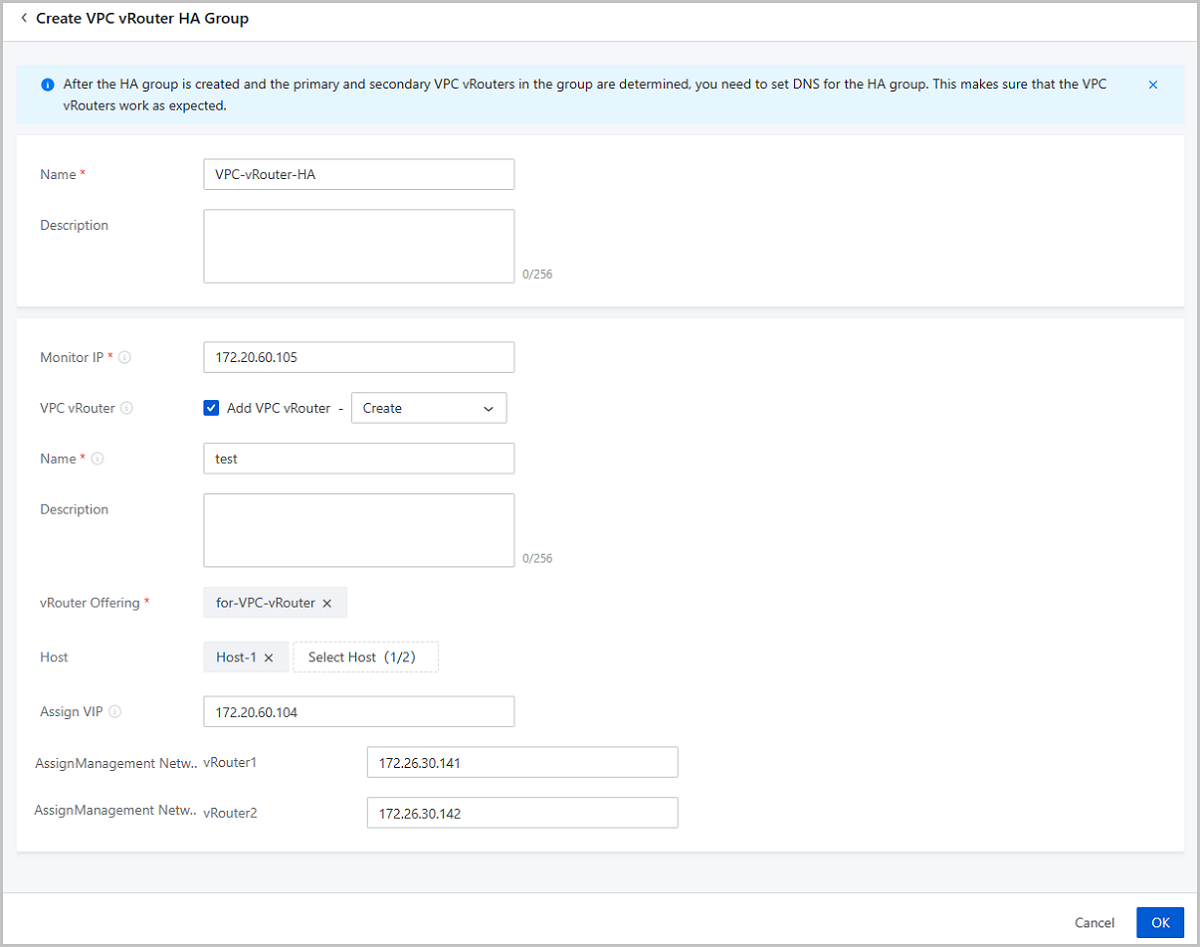
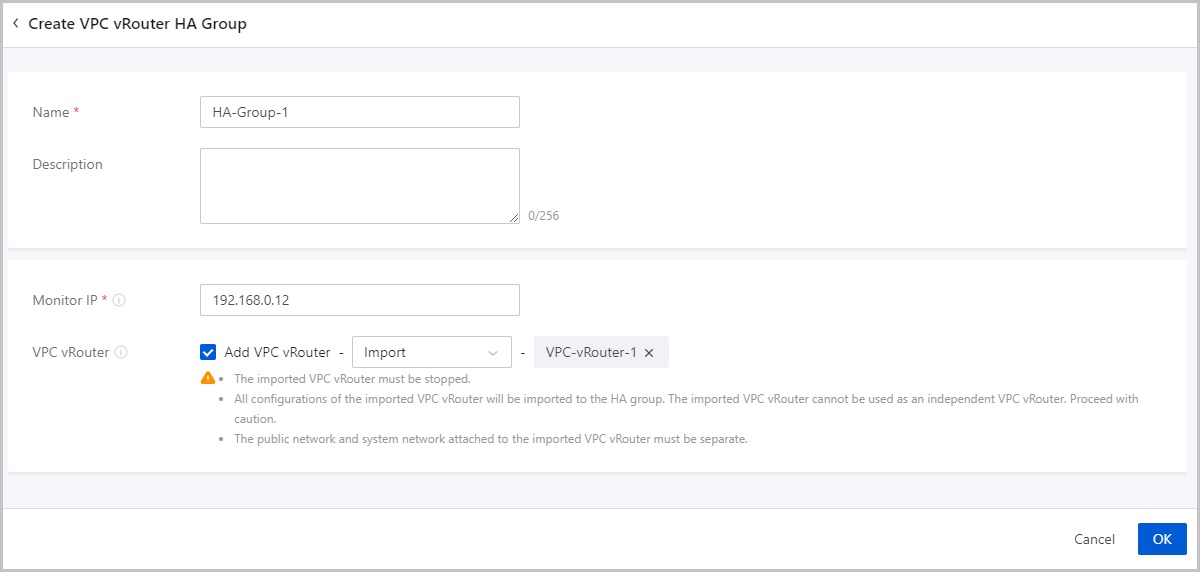
If you choose Import, set the following parameters:- Select VPC vRouter: Select an existing VPC vRouter.Note:
- The VPC vRouter to be imported must be stopped.
- Importing an existing VPC vRouter also imports all configurations of the VPC vRouter. In this case, the VPC vRouter cannot be used independently. Please exercise caution.
- Only VPC vRouters with isolated public network and system network can be added to an HA group.
图 2. Create VPC vRouter HA Group by Adding Existing VPC vRouter