
VXLAN Pool
What is VXLAN Pool?
VXLAN Pool: A VXLAN pool is a collection of VXLAN networks established
based on VXLAN Tunnel Endpoints (VTEPs). The VNI of each VXLAN network in a VXLAN
pool must be unique.
- Before you can use a VXLAN network, create a VXLAN pool in advance.
- A VXLAN pool is only a collection of VXLAN networks and cannot be used to create L3 networks.
- VXLAN pool supports two types of SDN: software SDN and hardware SDN.
- Software SDN:
- The VNI range of a software-SDN VXLAN pool can be 1-16777214.
- Hosts in the cluster to which the software-SDN VXLAN pool is
attached must have an IP address as a VXLAN tunnel endpoint
(VTEP) in the specified CIDR.
- Generally, a VTEP corresponds to a NIC IP of a compute
node within a cluster. On the Cloud, you can configure a
VTEP according to its CIDR. For example,
- Assume that the NIC IP of a compute node is 10.12.0.8, the netmask is 255.0.0.0, and the gateway is 10.0.0.1. Then, the CIDR of the VTEP is 10.0.0.1/8.
- Assume that the NIC IP of the compute node is 172.20.12.13, the netmask is 255.255.0.0, and the gateway is 172.20.0.1. Then, the CIDR of the VTEP is 172.20.0.1/16.
- When a VXLAN pool is attached to a cluster, the IP address that is associated to the VTEP will be checked without checking physical L2 devices.
- Generally, a VTEP corresponds to a NIC IP of a compute
node within a cluster. On the Cloud, you can configure a
VTEP according to its CIDR. For example,
- Hardware SDN:
- Make sure a valid SDN network license is added to the platform.
- Before you can create a hardware-SDN VXLAN pool, add an SDN controller to the Cloud in advance.
- The VNI range of a hardware-SDN VXLAN pool depends on the distributed vSwitch to which an SDN controller corresponds.
- The host NIC in the cluster to which the hardware-SDN VXLAN pool is attached must connect to a switch managed by the SDN controller.
- If you use VCFC to configure hardware SDN, configure the mapping between VLAN and VXLAN on VCFC in advance.
- Software SDN:
Create a VXLAN Pool
On the main menu of ZStack Cloud, choose . On the VXLAN Pool page, click Create VXLAN Pool. Then, the Create VXLAN Pool page is displayed.
The following lists two types of VXLAN pools that you can create:
- Create a software-SDN VXLAN pool
- Create a hardware-SDN VXLAN pool
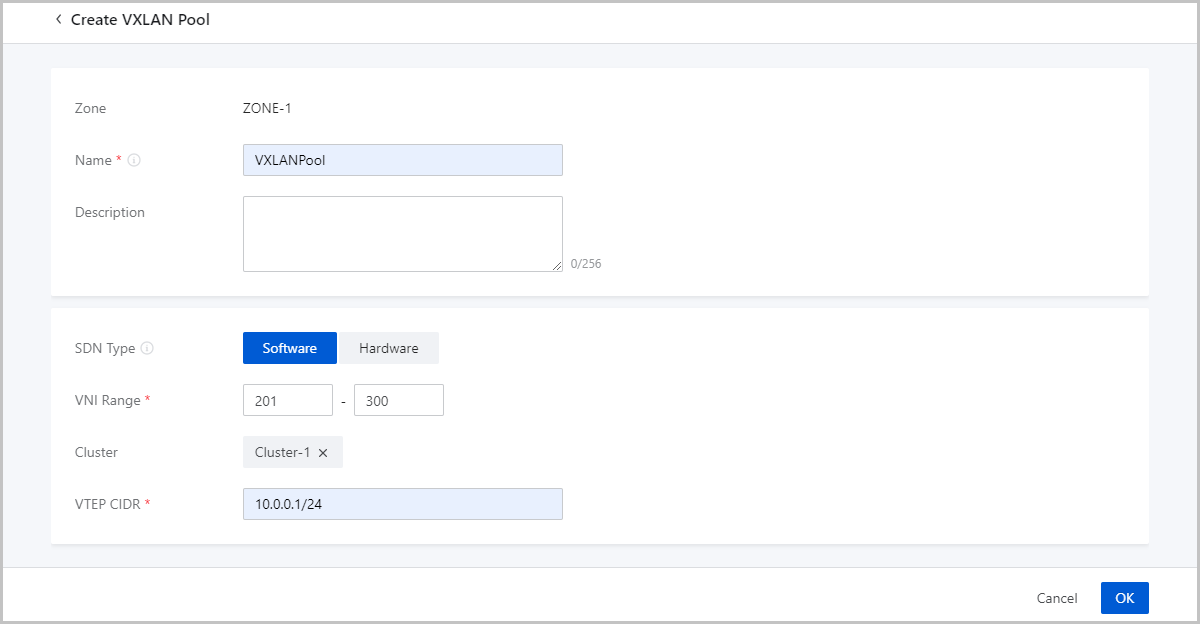
Create Software-SDN VXLAN Pool
On the displayed page, set the following parameters:
- Zone: By default, the current zone is displayed.
- Name: Enter a name for the VXLAN pool.The name must be 1 to 128 characters in length and can contain Chinese characters, letters, digits, spaces, hyphens (-), underscores (_), periods (.), parenthesis (), colons (:), and plus signs (+) and cannot begin or end with spaces.
- Description: Optional. Enter a description for the VXLAN pool.
- SDN Type: Select Software.
- VNI Range: Enter the start ID and end ID of VXLAN networks.
 Note:
Note:
- You can enter an ID that ranges from 1 to 16777214.
- The end ID must be equal to or greater than the start ID.
- The two VNI IDs 16777215 and 16777216 are reserved by the system of this cloud platform.
- Cluster: Optional. Attach the VXLAN pool to a cluster.Note:
- You can attach a VXLAN pool to a cluster when you create the VXLAN pool or after the VXLAN pool is created.
- When you attach the VXLAN pool to a cluster, IP addresses of the compute nodes must be available in the cluster that correspond to the VTEP CIDR block.
- VTEP CIDR: Enter the corresponding VTEP CIDR block.
Create Hardware-SDN VXLAN Pool
To create a hardware-SDN VXLAN Pool, make sure a valid SDN network license is added to the platform.
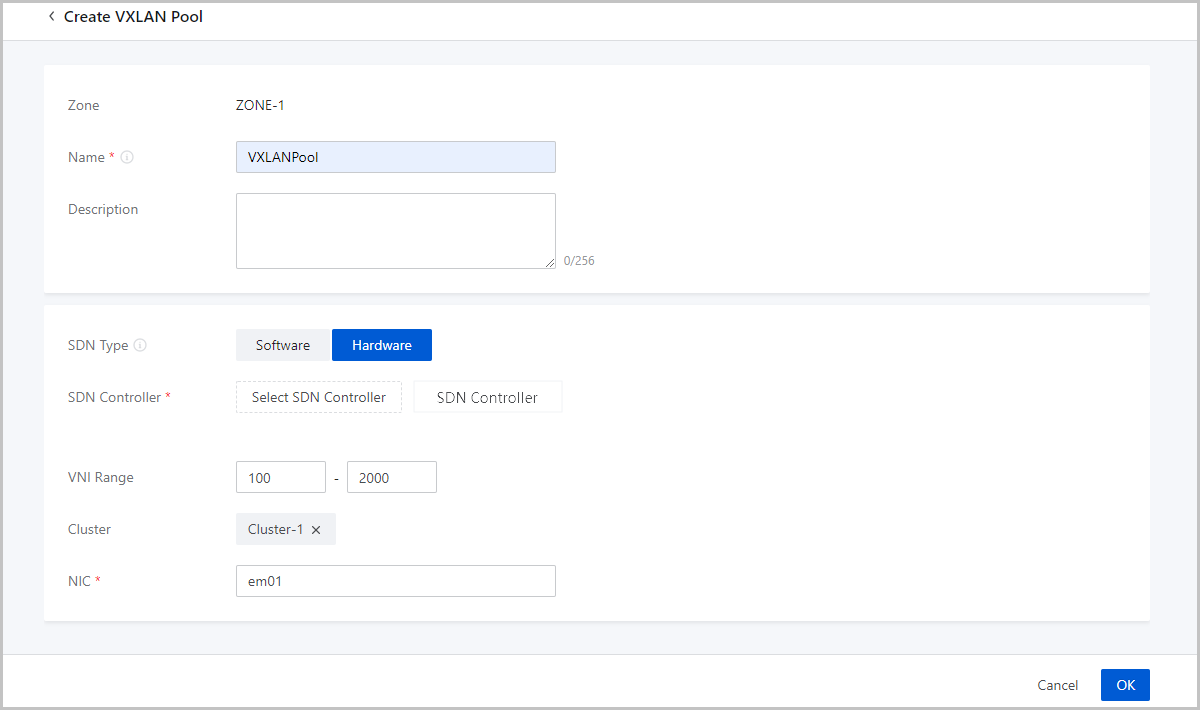
On the displayed page, set the following parameters:
- Zone: By default, the current zone is displayed.
- Name: Enter a name for the VXLAN pool. The name must be 1 to 128 characters in length and can contain Chinese characters, letters, digits, spaces, hyphens (-), underscores (_), periods (.), parenthesis (), colons (:), and plus signs (+) and cannot begin or end with spaces.
- Description: Optional. Enter a description for the VXLAN pool.
- SDN Type: Select Hardware.
- SDN Controller: Select an SDN controller.Note: You need add an SDN controller to the cloud platform in advance.
- VNI Range: Enter the start ID and end ID of hardware-based VXLAN networks.Note:
- The end ID must be equal to or greater than the start ID.
- The VNI range of a hardware-SDN VXLAN pool varies depending on the virtual distributed switches associated with the SDN controller.
- This parameter will not be displayed if the vendor of the selected SDN controller is HUAWEI.
- Cluster: Optional. Attach the VXLAN pool to a cluster.Note: You can attach a cluster to a VXLAN pool when you create the VXLAN pool or after the VXLAN pool is created.
- NIC: Enter a host NIC.Note: The host NICs in the cluster attached to the VXLAN pool must be connected with the switches managed by the SDN controller.
Manage a VXLAN Pool
On the main menu of ZStack Cloud, choose . Then, the VXLAN Pool page is displayed.
The following table lists the actions that you can perform on a VXLAN pool.
| Action | Description |
|---|---|
| Create VXLAN Pool | Create a VXLAN pool. |
| Edit VXLAN Pool | Edit the name and description of the VXLAN pool. |
| Attach Cluster | Attach the VXLAN pool to a cluster.
|
| Detach Cluster | Detach the VXLAN pool from a cluster. |
| Set Sharing Mode |
Set the sharing mode of a resource. The
platform provides the following sharing modes:
Note:
VXLAN pools created by using hardware SDNs cannot be shared. |
| Delete VXLAN Pool | Deleting a VXLAN pool also deletes the VXLAN networks in the pool and the associated L3 networks and VM NICs. Proceed with caution. |