
Elastic IP
What is Elastic IP?
An elastic IP address (EIP) functions based on the NAT technology. IP addresses in a private network are translated into an EIP that is in another network. This way, private networks can be accessed from other networks by using EIPs.
Concepts
- Public EIP: The EIP service provided by a virtual IP address (VIP) created
from a public network.
- The private network is an isolated network that cannot be directly accessed from other networks or the Internet. A public EIP can directly associate the access to a public network with the VM IP of the private network.
- A public EIP can be associated with or disassociated from a VM instance dynamically.
- A public EIP can be associated with VM instances created from
private networks, such as flat networks and VPC networks.
- The public EIP realized by a distributed EIP can access flat networks through public networks.
- A VPC vRouter can be used to access VPC networks through public networks.
- Flat EIP: The EIP service provided by a VIP created from a flat network.
- L3 isolations exist between flat networks of different network ranges. Therefore, these flat networks cannot be accessed directly. A flat EIP can be used to associate the access to one flat network with the VM IP created from another flat network.
- A flat EIP can be associated with or disassociated from a VM instance dynamically.
- A flat EIP can be associated with VM instances created from other flat networks.
Scenarios
- EIP usage in a flat network scenario:
The following diagram shows how an EIP is used in a flat network scenario.
图 1. EIP Usage in Flat Network Scenario 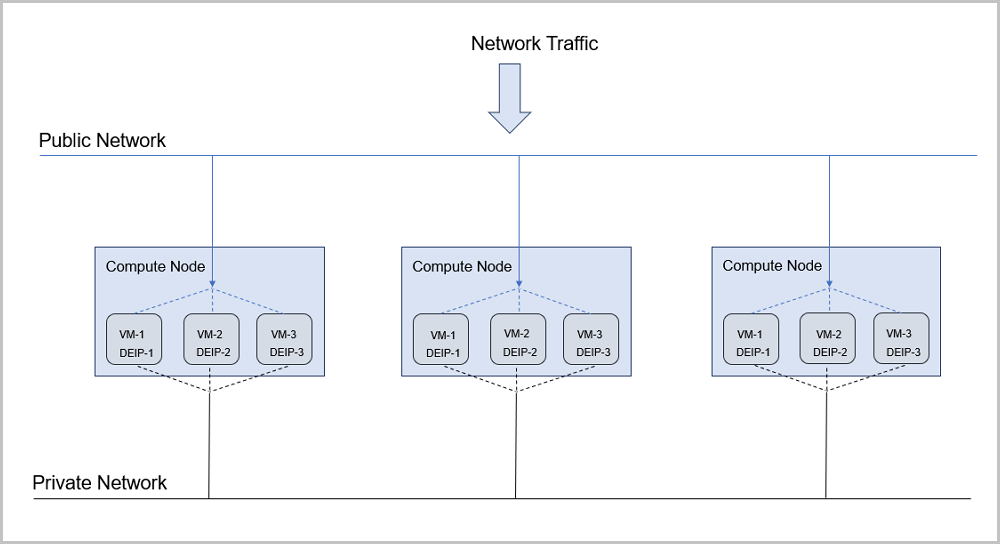
- Public networks can connect to the Internet through firewalls.
- Flat networks provide IP addresses for VM instances in each compute node. Notice that these IP addresses cannot connect to the Internet by default.
- A distributed EIP is deployed on each compute node, and can be associated with public networks or private networks separately.
- EIP usage in a VPC network scenario:
The following diagram shows how an EIP is used in a VPC network scenario.
图 2. EIP Usage in VPC Network Scenario 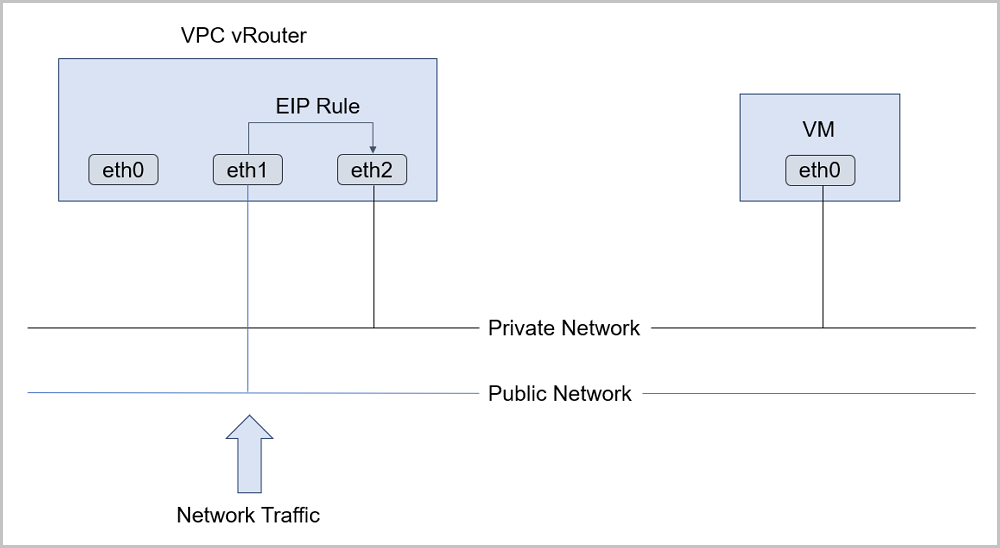
Considerations
When you use an EIP, note that:
- An instance can have only one EIP associated at a time.
- The EIP association and disassociation operations take effect in real time.
- Associating or disassociating an EIP does not affect the running of an instance.
Create an Elastic IP
On the main menu of ZStack Cloud, choose . On the EIP page, click Create EIP. Then, the Create EIP page is displayed.
On the displayed page, set the following parameters:
- Name: Enter a name for the EIP.
- Description: Optional. Enter a description for the EIP.
- You can use a virtual IP address by using either of the following methods:
- VIP: Select Create VIP.
- Network: Select an L3 network to create a
VIP. The network can be a public network or a flat
network.
 Note: Currently, you cannot create a VIP with a flat
network disabled with IP address management.
Note: Currently, you cannot create a VIP with a flat
network disabled with IP address management. - Network Range: Optional. Select a network
range.Note:
- If you selected an IPv4 public network, you can select a normal network range or an address pool. If you selected an IPv6 public network, you can only select a normal network range.
- If you selected an IPv4 or IPv6 public network, you can only select a normal network range.
- If you selected an IPv4 VPC network, you can only select a normal network range.
- Assign IP: Optional. You can assign a
virtual IP address.Note:
- If left blank, the system automatically assigns a VIP.
- If you do not select a network range, you can specify an IP address only from a normal network range.
- Network: Select an L3 network to create a
VIP. The network can be a public network or a flat
network.
- VIP: Select Use Existing VIP.Set the following parameter:
- VIP: Select an existing VIP.
图 1. Create EIP 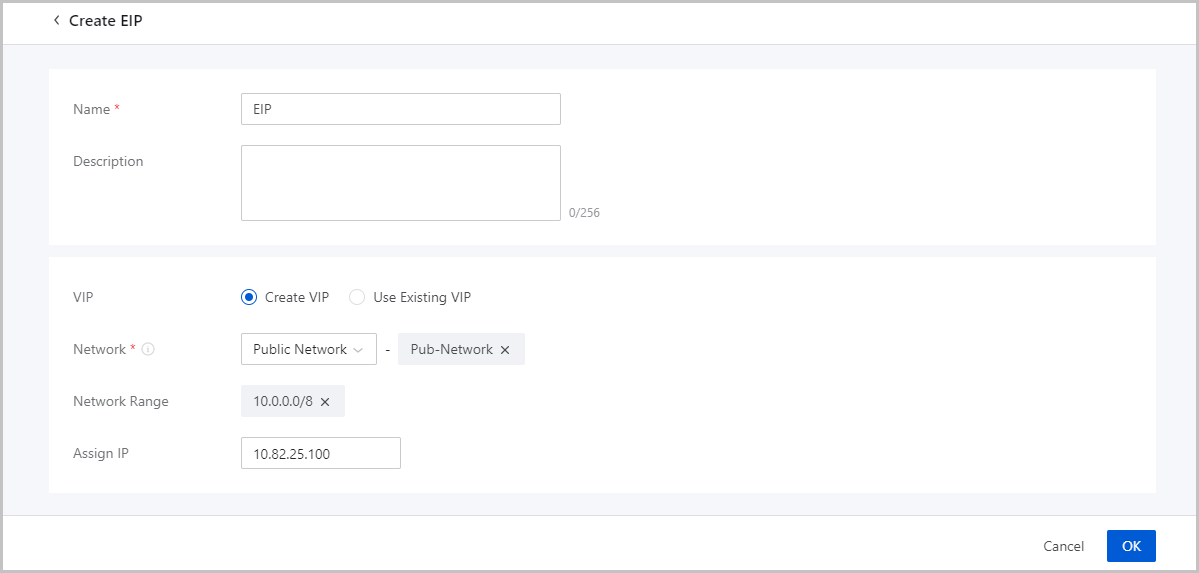
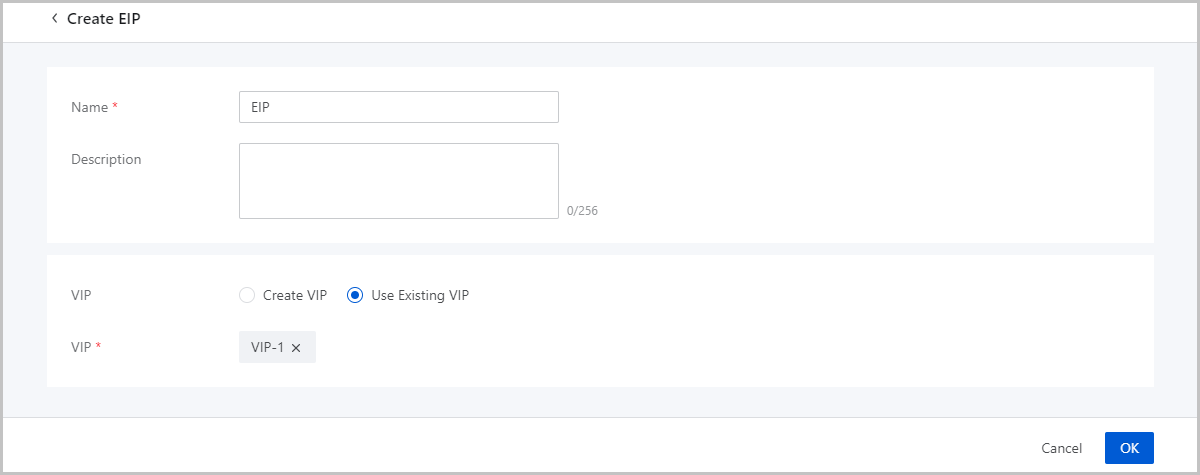
- VIP: Select Create VIP.