
SDN Cluster
What is SDN Cluster?
SDN cluster: A cluster of dedicated VM instances designed to provide highly available SDN capabilities.
Considerations
- Before you create an SDN cluster, you need to prepare the management network and SDN image required for an SDN instance.
- An SDN instance is created from an SDN instance offering with a management network. The management network defined in the instance offering cannot be detached.
Create an SDN Cluster
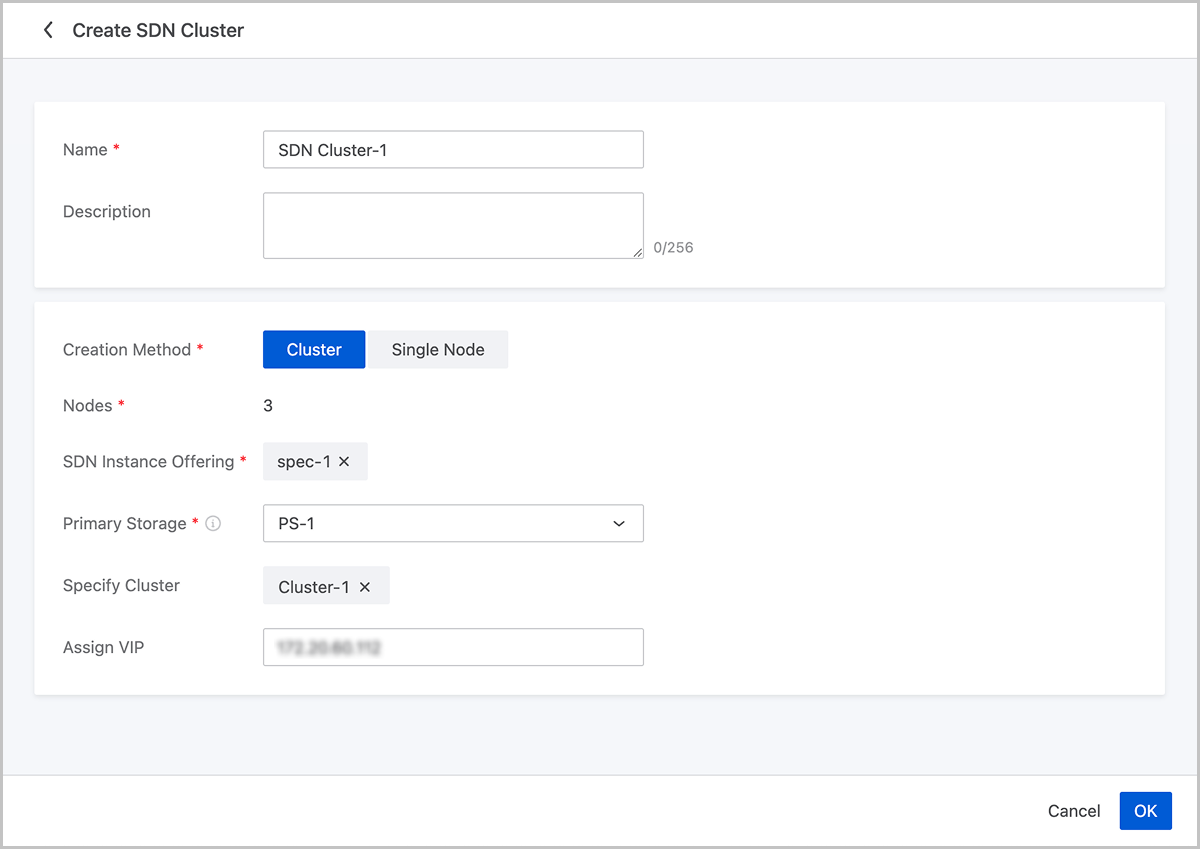
On the main menu of ZStack Cloud, choose . On the SDN Cluster page, click Create SDN Cluster. Then, the Create SDN Cluster page is displayed.
On the displayed page, set the following parameters:
- Name: Enter a name for the SDN cluster.
- Description: Optional. Enter a description for the SDN cluster.
- Creation Method: Support two creation methods: Cluster and Single Node.
- Cluster: Recommended for production environments. When this mode is selected, the system will automatically create an SDN cluster containing 3 nodes. All nodes in the cluster have the same instance offering and are deployed on the same primary storage. The system uses an anti-affinity policy to ensure the 3 nodes are scheduled to run on different hosts.
- Single Node: Suitable for development, testing, and lightweight environments. When this mode is selected, the system will create an SDN cluster containing 1 node.
- Nodes: Displays the number of nodes when the Cluster creation method is selected.
- SDN Instance Offering: Select the SDN instance offering. Instances in the cluster will be created according to this offering.
- Primary Storage: Select the primary storage used by the instances in the cluster. After selecting the SDN instance offering, the system identifies the corresponding cluster based on the network specified in that offering and filters the available primary storage accordingly.
- Specify Cluster: Optional. Specify the cluster. The hosts that run the SDN instances will be located within the cluster.
- Assign VIP: Optional. Specify the VIP for the SDN cluster. If left blank, the system will assign one automatically.
Manage an SDN Cluster
On the main menu of ZStack Cloud, choose . Then, the SDN Cluster page appears.
The following table lists the actions that you can perform on an SDN cluster.
| Action | Description |
|---|---|
| Create SDN Cluster | Create an SDN cluster. |
| Edit Name and Description | Edit the name and description of an SDN cluster. |
| Enter Maintenance Mode | The SDN cluster enters a maintenance mode. While in maintenance mode, you can perform operations such as adding, starting, stopping, rebooting, or deleting SDN instances within the cluster in this state. |
| Exit Maintenance Mode | The SDN cluster exits the maintenance mode. |
| Delete SDN Cluster | Delete an SDN cluster. Note: Deleting an SDN cluster also deletes all SDN instances within it. The deletion will interrupt associated SDN networks. Proceed with caution. Note: Deleting an SDN cluster also deletes all SDN instances within it. The deletion will interrupt associated SDN networks. Proceed with caution. |
The following table lists the actions that you can perform on an SDN instance.
| Action | Description |
|---|---|
| Edit Name and Description | Edit the name and description of an SDN instance. |
| Launch Console | Access an SDN instance via the console terminal. |
| Start SDN Instance | Start a stopped SDN instance.Note: To perform this action, make sure the SDN cluster has entered a maintenance mode. |
| Stop SDN Instance | Stop a running SDN instance.Note:
|
| Reboot SDN Instance | Reboot an SDN instance.Note:
|
| Migrate-Change Host | Migrate an SDN instance to another host.
|
| Migrate-Change Host and Primary Storage | Migrate an SDN instance to another host and primary storage.
|
| Delete SDN Instance | Delete an SDN instance.Note:
|