On the main menu of ZStack Cloud Hybrid Cloud
Management, choose Products > EIP. On the EIPpage, click Create
EIP. Then, the Create EIP page is displayed.
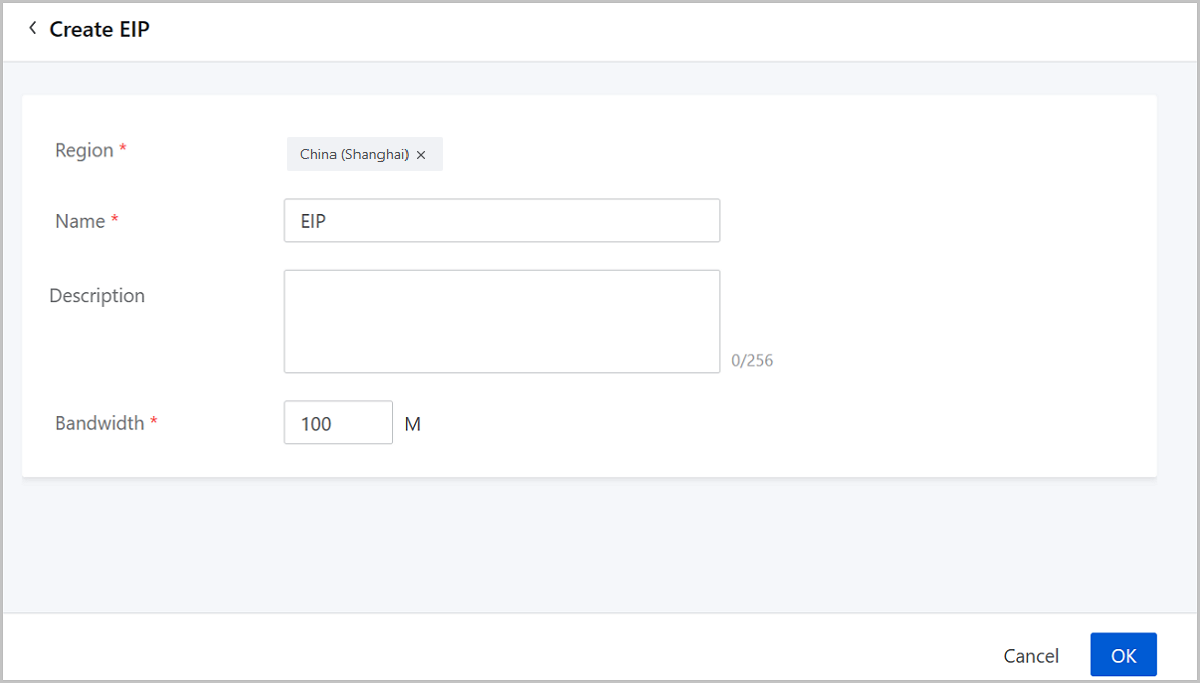
On the displayed page, set the following parameters:
Region: Choose a region for the EIP.
Name: Enter a name for the EIP.
Description: Optional. Enter a description for the
EIP.
Bandwidth: Set a bandwidth for the EIP. Unit: M.
图 1. Create an EIP
Manage an EIP
On the main menu of ZStack Cloud Hybrid Cloud
Management, choose Products > EIP. Then, the EIP page is displayed.
The following lists the actions you can perform on an EIP.
Action
Description
Edit EIP
Edit the name and description of an EIP.
Create EIP
Create an EIP.
Attach ECS Instance
Attach an EIP to an ECS instance.
Detach ECS
Detach an EIP from an ECS instance.
Delete EIP
Delete an EIP.
Note: By default, only the local
record of the EIP is deleted. If you want to delete the EIP on
Alibaba Cloud, select the checkbox of Delete Resources on
Alibaba Cloud.

 Note: By default, only the local
record of the EIP is deleted. If you want to delete the EIP on
Alibaba Cloud, select the checkbox of Delete Resources on
Alibaba Cloud.
Note: By default, only the local
record of the EIP is deleted. If you want to delete the EIP on
Alibaba Cloud, select the checkbox of Delete Resources on
Alibaba Cloud.