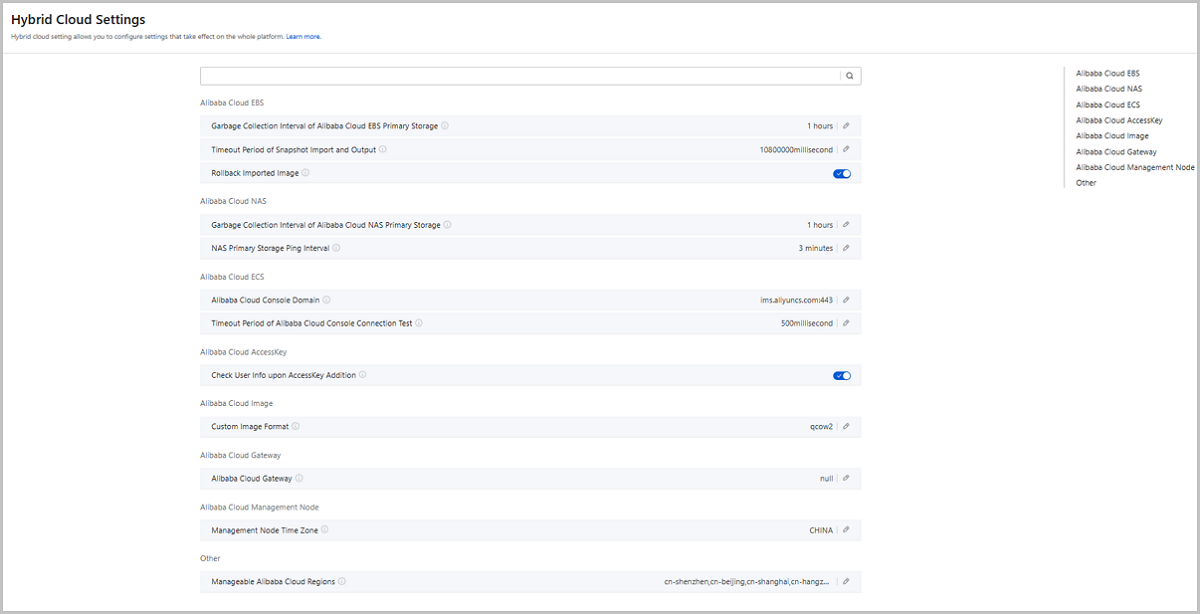
Global Setting allows you to configure settings that take
effect on the whole platform.
On the main menu of ZStack Cloud Hybrid Cloud
Management, choose Set > Hybrid Cloud Setting. Then, the Hybrid Cloud Setting is displayed.图 1. Hybrid Cloud Setting
The following lists setting entries in Hybrid Cloud Setting.
Category
Name
Description
Alibaba Cloud EBS
Garbage Collection Interval of Alibaba Cloud EBS
Primary Storage
Specifies the interval to clean up garbage data
of Alibaba Cloud EBS primary storage. Default: 3600. Unit:
second.
Timeout Period of Snapshot Import and
Output
The timeout period of importing and exporting
snapshots in EBS primary storage. Default: 10800000. Unit:
millisecond.
Rollback Imported Image
Specifies whether to rollback related objects in
OSS buckets if an error occurs when you upload custom images to
Alibaba Cloud EBS Image Storage. Default: true. If set to false, the
uploaded images are not rolled back if upload errors occur.
Alibaba Cloud NAS
Garbage Collection Interval of Alibaba Cloud NAS
Primary Storage
The interval of collecting garbage data in NAS
primary storage. Default: 3600. Unit: second.
NAS Primary Storage Ping Interval
The interval that the management node pings NAS
primary storages. Default: 180. Unit: second.
Alibaba Cloud ECS
Alibaba Cloud Console Domain
The access address of the Alibaba Cloud console.
Default: ims.aliyuncs.com:443. When you add an AccesKey pair on the
Hybrid Cloud, you need to check the connection of the management
node to the Alibaba Cloud console.
Timeout Period of Alibaba Cloud Console
Connection Test
The timeout period of checking the connection of
the management node to the Alibaba Cloud console. Default: 500.
Unit: milliseconds. When you add an AccesKey pair on the Hybrid
Cloud, you need to check the connection of the management node to
the Alibaba Cloud console. If the management node does not connect
to the Alibaba Cloud console, the addition fails.
Alibaba Cloud AccessKey
Check User Info upon AccessKey Addition
Specifies whether to check user information while
adding an Alibaba Cloud AccessKey pair on the platform. Default:
true.
Alibaba Cloud Image
Custom Image Format
The format of custom images uploaded to the
Hybrid Cloud. Default: qcow2. Valid values: qcow2 and raw.
Alibaba Cloud Gateway
Alibaba Cloud Gateway
The custom gateway. Default: null. The gateway
format
is
The time zone of the terminal address to which
API requests are sent. Default: China.
Other
Manageable Alibaba Cloud Regions
The Alibaba Cloud regions that the cloud platform
allows you to manage. Default:
cn-shenzhen,cn-beijing,cn-shanghai,cn-hangzhou,cn-zhangjiakou,cn-qingdao,cn-huhehaote.
Separate each region with a comma (,).