
Email Server
What is Email Server?
If you select Email as the endpoint of an alarm, you need to set an email server. Then alarm messages are sent to the email server.
Add an Email Server
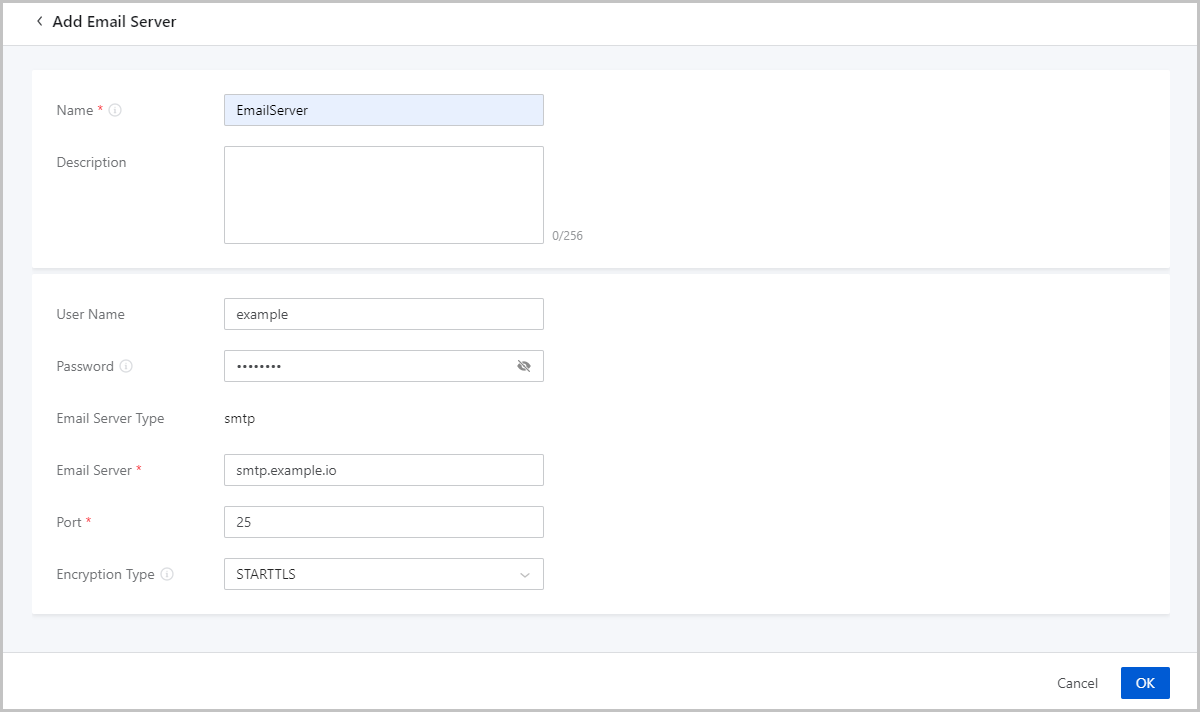
On the main menu of ZStack Cube Ultimate, choose . On the Email Server page, click Add Email Server. Then, the Add Email Server page is displayed.
On the displayed page, set the following parameters:
- Name: Enter a name for the email server.
- Description: Optional. Enter a description for the email server.
- User Name: Enter a user name.
- Password: Enter the password for the user.
 Note: If you
add a third-party email server to the Cloud, you need to enable the SMTP
service in advance. In addition, enter the authentication code in the
Password field.
Note: If you
add a third-party email server to the Cloud, you need to enable the SMTP
service in advance. In addition, enter the authentication code in the
Password field. - Email Server Type: Valid value: smtp.
- Email Server: Enter the IP address of the email server.
- Port: Enter the port of the email server. Default value: 25.
- Encryption Type: Optional. Select an
encryption type to encrypt data communications of the email server port. Valid
values: STARTTLS, SSL/TLS, and NONE.
- STARTTLS is selected by default. The corresponding port is 25 by default.
- If you select SSL/TLS, the corresponding port is 465 by default.
- If you do not need encrypted communications, select NONE.
 Note:
Note:
Configure the settings as needed. Contact the email server provider for support in case of any email server related problems.
Manage an Email Server
On the main menu of ZStack Cube Ultimate, choose . Then, the Email Server page is displayed.
The following table lists the actions that you can perform on an email server.
| Action | Description |
|---|---|
| Add Email Server | Add an email server. |
| Enable Email Server | Enable a disabled email server. |
| Disable Email Server | Disable an enabled email server. |
| Edit Email Server | Edit the name and description of an email server. |
| Set Sharing Mode | Share an email server to all projects/accounts (if you have installed the Tenant Management license). |
| Change Owner | Change the owner of an email server. |
| Test | Check whether an email server is connected. |
| Delete Email Server | Delete an email server. |