
SDN Controller
What is SDN Controller?
The SDN controller is the core of the SDN architecture, responsible for centralized management and control of network devices.
Feature Highlights
- Unified Management: Supports multiple software and hardware SDN controller types and delivers a consistent management experience.
- Automated Configuration Deployment: Automatically pushes network configurations to the SDN controller when creating L3 networks, significantly improving deployment efficiency.
- SDN Tenant-Level Resource Isolation: Automatically allocates subnets to target SDN tenants, ensuring resource isolation and preventing resource contention across tenants.
Supported Controller Types
The following table lists the supported controller types.
| Vendor | Version | Description |
|---|---|---|
| Cloud SDN Controller | - | A software SDN controller provided by ZStack Cloud. You can create OVS-DPDK L2 networks with high performance and low latency. |
| H3C VCFC | R6506 | With H3C SDN controllers, you can manage SDN networks of hardware switches, thereby reducing network latency and improving VXLAN network performance. |
| E2507 | ||
| HUAWEI | iMaster NCE-Fabric V100R023 | With Huawei SDN controllers, you can achieve centralized management and automated configuration deployment, enabling efficient VXLAN network construction and intelligent operation. |
Core Concepts
- Tenant
- An SDN tenant is a logically isolated entity on H3C or Huawei SDN controllers that enjoys independent network resources and security policies.
- Logical Router
- A virtualized network device on Huawei SDN controllers that connects VMs across different networks, enabling cross-layer-3 communication between virtual machines.
- Remote VPC
- A security domain on Huawei SDN controllers that provides inter-tenant network isolation. Each VPC typically corresponds to a specific business unit or department.
Add an SDN Controller
On the main menu of ZStack Cloud, choose . On the SDN Controller page, click Add SDN Controller. Then, the Add SDN Controller page is displayed.
Add a Cloud SDN Controller
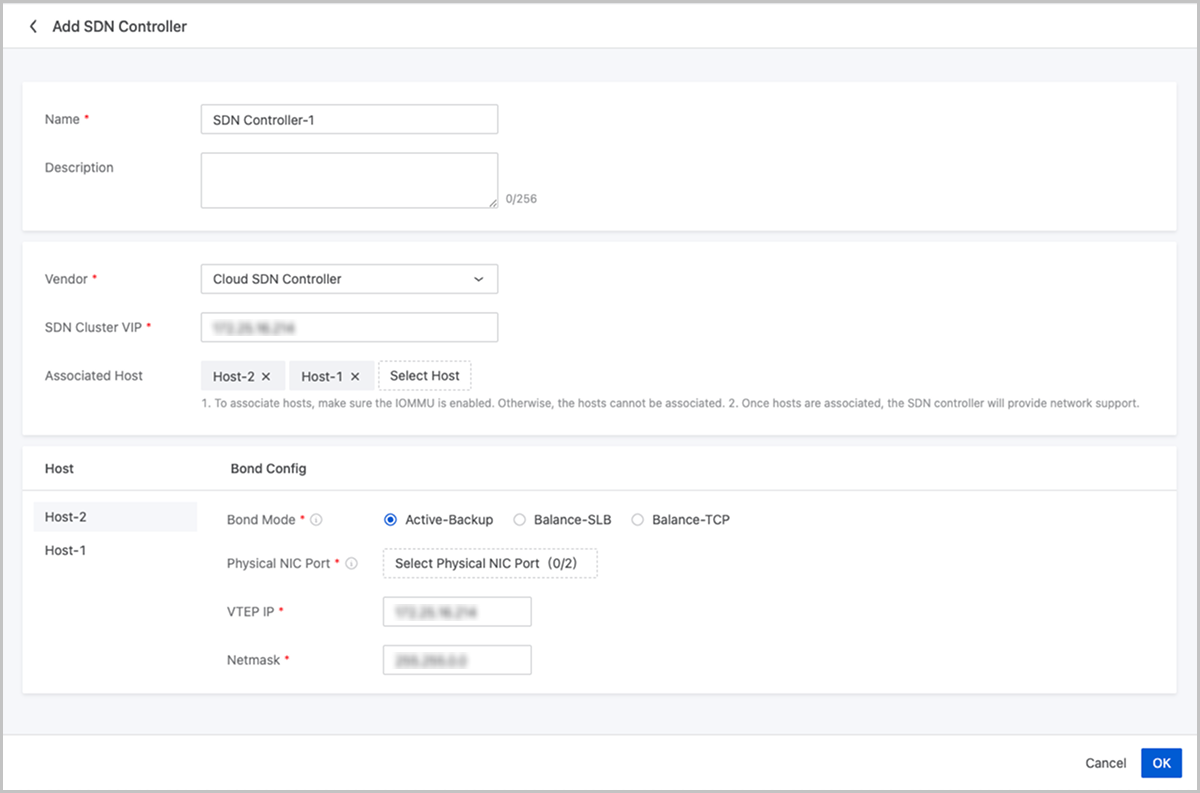
On the displayed page, set the following parameters:
- Name: Enter a name for the SDN controller.
- Description: Optional. Enter a description for the SDN controller.
- Manufacturer: Select Cloud SDN Controller.
- SDN Cluster VIP: Enter the VIP address of the SDN cluster.
- Associated Host: After associated, the configuration will be deployed to the host.
 Note:
Note:
- To associate hosts, make sure the IOMMU is enabled. Otherwise, the hosts cannot be associated.
- An SDN controller without an associated host will not be able to provide an available network.
- Bond Mode: Select the physical port aggregation mode. The following three modes are supported:
- Active-Backup: All network traffic is handled by the primary port. If the primary port fails, traffic automatically switches to the backup port to avoid service interruption.
- Balance-SLB: Distributes network traffic across ports based on source MAC address and VLAN ID to achieve load balancing.
- Balance-TCP: Distributes network traffic across ports based on TCP flow's source/destination IP addresses and port numbers for more granular load balancing.
- Physical NIC Port: Select the physical ports to be bonded. Active-Backup mode supports bonding one to two ports. Balance-SLB and Balance-TCP modes support bonding one to eight ports.
- VTEP IP: Specify the VTEP IP.
- Netmask: Specify the netmask.
Add an H3C VCFC
Prerequisites:
- Make sure a valid SDN network license is added to the platform.
- To add an SDN controller to ZStack Cloud, you must plan the management network in advance and complete the basic configuration of the SDN controller.
- To configure hardware SDN using VCFC, you must configure the VLAN-to-VXLAN mapping table on the VCFC in advance to ensure successful configuration.
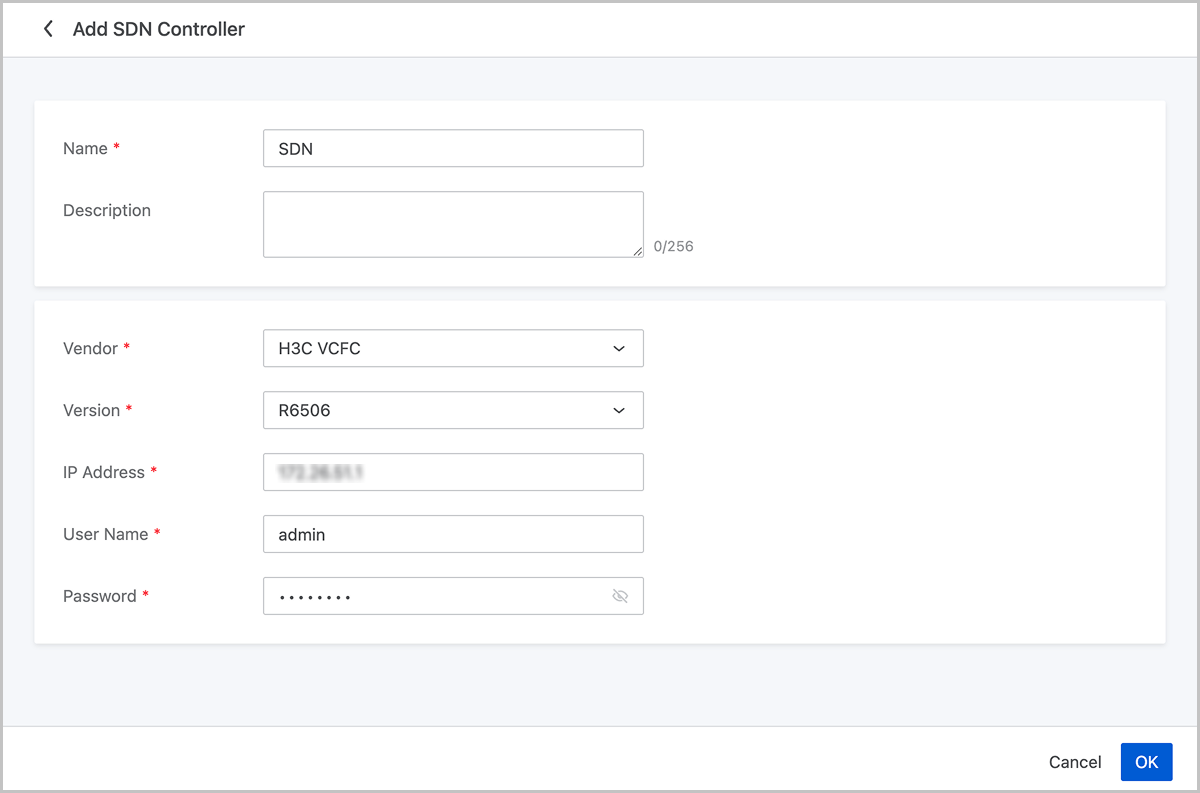
On the displayed page, set the following parameters:
- Name: Enter a name for the SDN controller.
- Description: Optional. Enter a description for the SDN controller.
- Vendor: Select H3C VCFC.
- Version: Select a version of H3C VCFC. Options include R6506 and E2507.
- For R6506, enter the IP address, username, and password of the SDN controller.
- For E2507, enter the IP address, username, password, and virtual distributed switch UUID of the SDN controller.Note:
- You need to configure a virtual distributed switch on the SDN controller in advance.
- With this virtual distributed switch, an available VNI range of the hardware SDN VXLAN Pool can be determined.
Add a HUAWEI iMaster NCE-Fabric
Prerequisites:
- Make sure a valid SDN network license is added to the platform.
- Make sure the LLDP is enabled on the hosts and switches.
- Make sure you have completed the Fabric, VPC, tenant, and VLAN range configurations on the HUAWEI SDN controller.
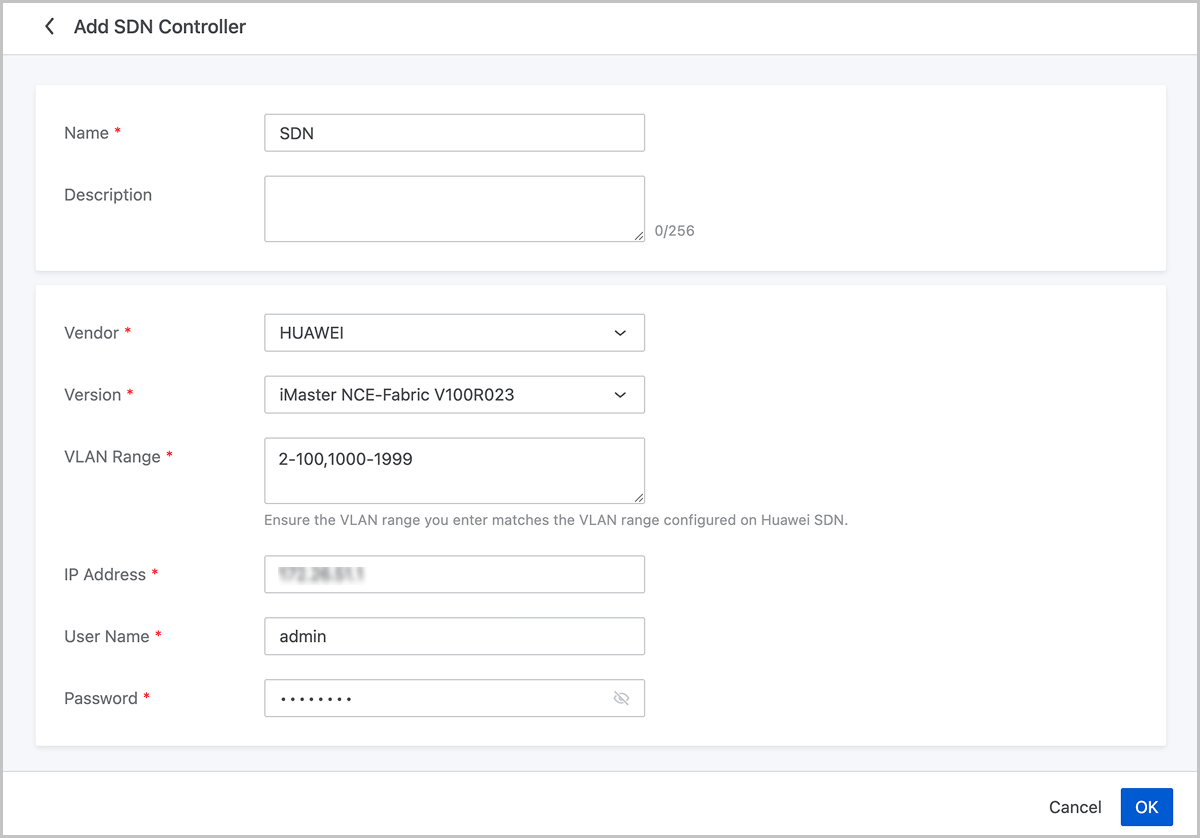
On the displayed page, set the following parameters:
- Name: Enter a name for the SDN controller.
- Description: Optional. Enter a description for the SDN controller.
- Vendor: Select HUAWEI.
- Version: Select iMaster NCE-Fabric V100R023
- VLAN Range: Enter a VLAN range that matches the one configured on the Huawei SDN controller.Note:
- VLAN range: 1-4094.
- You can enter multiple VLAN ranges, with each range separated by a comma. Example: 2-100,1000-1999
- IP Address: Enter the IP address of the SDN controller.
- User Name: Enter the username of the SDN controller.
- Password: Enter the password.
Manage an SDN Controller
On the main menu of ZStack Cloud, choose . Then, the SDN Controller page appears.
Manage a Cloud SDN Controller
The following table lists the actions that you can perform on an SDN controller.
| Action | Description |
|---|---|
| Add SDN Controller | Add an SDN controller to the Cloud. |
| Reconnect SDN Controller | Reconnect the SDN controller.Note: Reconnecting SDN controller will update configurations to the SDN instances, which may cause network interruptions. Proceed with caution. |
| Edit Name and Description | Edit the name and description of an SDN controller. |
| Delete SDN Controller | Deleting the SDN controller will clear OVS configurations on the associated hosts and delete associated L2 networks and VM instance NICs. Proceed with caution. |
Manage an H3C VCFC
The following table lists the actions that you can perform on an SDN controller.
| Action | Description |
|---|---|
| Add SDN Controller | Add an SDN controller to the Cloud. Note: Before you can add an SDN controller to the Cloud, you need to plan for management networks in advance, and complete the basic configurations of the SDN controller. |
| Edit SDN Controller | Edit the name and description of an SDN controller. |
| Delete SDN Controller | Delete an SDN controller. Note: Deleting an SDN controller also deletes the SDN-based VXLAN Pool that is associated with the SDN controller, and deletes all VXLAN networks and corresponding L3 networks in the VXLAN Pool. Proceed with caution. |
Manage a HUAWEI iMaster NCE-Fabric
The following table lists the actions that you can perform on an SDN controller.
| Action | Description |
|---|---|
| Add SDN Controller | Add an SDN controller to the Cloud platform. |
| Reconnect SDN Controller | Reconnect an SDN controller. |
| Edit Name and Description | Edit the name and description of an SDN controller. |
| Synchronize Remote Password | After changing the HUAWEI SDN password due to expiration, you need to submit the updated password here to ensure synchronization. |
| Delete SDN Controller | Delete an SDN controller.Note: Deleting the SDN controller will clear virtual switch configurations on the associated hosts and delete associated L2 networks and VM NICs. Proceed with caution. |