
Port Mirroring
What is Port Mirroring?
Port mirroring mirrors the traffic data of VM NICs and sends the traffic data to the target ports. This allows for the analysis of data packets of ports and simplifies the monitoring and management of data traffic and makes it easier to locate network errors and exceptions.
Create a Port Mirroring
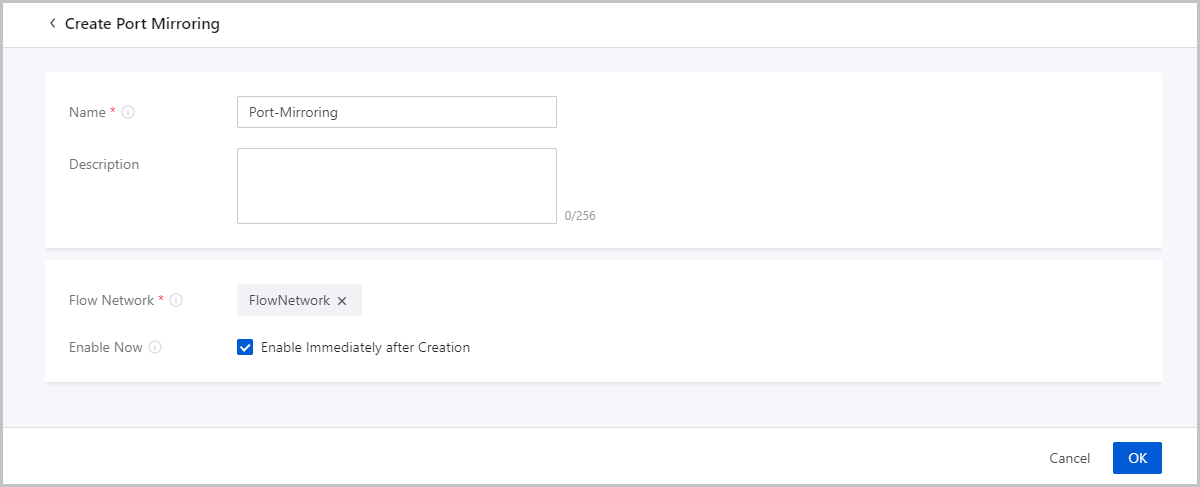
On the main menu of ZStack Cloud, choose . On the Port Mirroring page, click Create Port Mirroring. Then, the Create Port Mirroring page is displayed.
On the displayed page, set the following parameters:
- Name: Enter a name for the port mirroring.
- Description: Optional. Enter a description for the port mirroring.
- Flow Network: Select a flow network for port
mirroring.
 Note:
Note:
- A flow network is a dedicated network for port mirroring. You can use a flow network to transmit the mirrors of data packets of NIC ports to the target ports.
- You cannot use a flow network for other purposes except for port mirroring.
- A port mirroring occupies a flow network.
- The VM instances for which port mirroring is configured must reside in the cluster where the associated flow networks are located.
- Enable Now: Optional. Choose whether to enable port mirroring immediately after the port mirroring is created. Enabling port mirroring immediately after the creation may occupy physical network bandwidth. Make sure that your business is not affected and then select the checkbox.
Manage a Port Mirroring
On the main menu of ZStack Cloud, choose . Then, the Port Mirroring page is displayed.
The following table lists the actions that you can perform on a port mirroring.
| Action | Description |
|---|---|
| Create Port Mirroring | Create a port mirroring. |
| Edit Port Mirroring | Edit the name and description of a port mirroring. |
| Enable Port Mirroring | Enable a disabled port mirroring. |
| Disable Port Mirroring | Disable an enabled port mirroring. |
| Delete Port Mirroring | Delete a port mirroring. |